Showing posts with label adaptive. Show all posts

Thursday, April 30, 2015

New and Notables: CSUN 2015 Exhibit Hall


APPS, SOFTWARE & ACCESSORIES

CSUN is a treasure-trove of information and each year there are lots of goodies to be discovered.

Here are some products and resources sighted at this year's CSUN Exhibit Hall:

The hands down favorite find this year was:

Microsoft Sprout by HP
This software was on display for everyone to play with and I was floored at all the possibilities it could open up in an educational or special needs setting, not to mention it being coveted for home use i.e. for scrap booking, for organizing your tax receipts... oh my, I have a really hard time thinking of someone who would NOT think this would be a helpful tool.
The demonstration included an amazing 3D prototype not to mention existing capability to literally place any object down on the mat and have it pretty much instantaneously imported into the software program as an image, using dual (above/below)
document cameras.

Ah, the price tag... At $1,899 it's not cheap, but it is certainly comparable to other programs and devices many school districts are using, with many advantageous features. {Crossing fingers my school district will feel the same}

Microsoft is actively seeking educational and special needs-focused developers for this platform, so if that is you, seek them out.

More info on Microsoft Sprout HP here: http://www.cnet.com/products/hp-sprout/

iYoMube is an app for visually impaired users that reads aloud signs and written print in the environment using Apple's existing VoiceOver technology and camera feature.

I was sold after a demo- the app read aloud several signs more than 10 feet away, but have had trouble with the app on my iPhone 4 sadly.
(FYI this was demonstrated on a newer iPhone, with the latest iOS, and I think that is key- my old iPhone 4 did not perform well)

**I recommend waiting for a lite version of this app to be available in the App Store so potential users can try it out with their device and operating system first.** 
Developer Response: The App works best on iPhone 6 or 6+ for now because of its better camera focusing function.
                   
Here is the premise for how it should work- to use the app you must have VoiceOver feature enabled. You can use the app to "read" photos in your photo album, but even more impressive was live reading of whatever is in your viewfinder. To activate this feature open the app and swipe to the left until you get to the settings page, then choose ''navigation mode" to turn on the "Real Time Speech" (it is off by default).  There are also two modes you can switch in and out of by swiping left or right on the screen- Text mode, where all recognizable words are read at once, or Blocks mode, where each individual part of an image can be read by touching it. You can also choose to save images captured via the app to your photo album, or change the language to be recognized from one of five choices: English, Japanese, Korean, Chinese (simplified) or Chinese (traditional).

I can't vouch whether this app will work for your device or not.  But we have come a long way, technology-wise, a long way indeed!


Also spied, were the tactile Parcheesi and checker sets from Altix Vision
seen at last year's CSUN event...the current sets available are upgraded models with high quality wood and even cooler! They were just being launched last year and basically were in prototype stage, but now they are definitely ready for purchase.

The sets have easy to grasp pieces that are easier to differentiate from one another, so those with visual impairments, as well as any other players, can enjoy!
The games are about $30 each, but do not include shipping.  They are currently seeking distributors in the U.S. so if that is you, you can contact them.

The sets can be ordered by sending a request to: adam.kalbarczyk@altix.pl


While doing further research on the above products, I also came across this web resource on how to offer assistance to people who have low vision or are blind:

http://valenciacollege.edu/osd/documents/BlindnessDraft.pdf

\
Chat Wrap

This iPad case is clearly the object of my desire but at $499 out of reach for some of us. (There may be some confusion on the pricing I was quoted as SilverKite has the ChatWrap case listed at $395 here: https://store.silver-kite.com/product_info.php/products_id/552 ). The sound is very clear and loud, and the case is very sturdy while not adding an extreme amount of weight- it is lighter weight than a popular leading industry competitor that comes to mind. I would like to see a screen protector of some sort included as standard. There is a feature to easily add a lanyard too.  If you are successful with insurance reimbursement, or if more mainstream cases have failed to meet your needs, this would be a worthwhile investment indeed!

There were  also some companies from last year spied again:

 GoTalk Now and a suite of special needs apps and products from Attainment Company, speech and language therapy apps from Virtual Speech Center, Sono Flex and Tobii's eye tracking software (A previous favorite last year was eye tracking software from Sensory Software); Proloquo2Go (and newer 'sister' products Keedogo and Proloquo4Text) from Assistive Ware; L.A.M.P. Words for Life from PRC and Boardmaker from Mayer Johnson. 


Sunday, March 2, 2014

10 Tried and True Special Needs App Developers to Watch

There are many good special education apps out there, but finding them in the App Store can be like searching for a needle in a haystack. Wouldn't it be nice to search for one app and instead find a whole suite of suitable apps?

Here are some favorite developers to watch that specialize in making quality apps for special education:


Inclusive Technology Ltd.  

Inclusive Technology's bevy of mostly switch accessible apps are a welcome surprise not only for users who use switch devices, but also for users who are just beginning to explore a cause and effect relationship. A simple tap of a switch, or the iPad screen itself is all that is needed to activate the game elements. App offerings range from a musical painting app, which brings changing color and sound with every touch, to curriculum based literacy and science apps, to mazes, memory, car race games and delightful song apps with simple, quick repetitive verses that engage my students.


Favorite Pick: Five Little Aliens. One of my preverbal students is so excited and motivated by this app that he has started to communicate more with sign language to gain access to it. We are also working on counting from 1-5, and other vocabulary from this fun little song/counting app.

Another favorite is Big Bang Pictures, an app that has adjustable settings to meet the needs of children with visual impairment.


View all apps from Inclusive Technology Ltd on (iOS) here and (Google Play) here 


Alessandro La Rocca
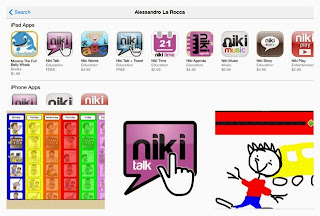
As the saying goes, necessity is the mother of all invention.  The motivation and inspiration behind each of Alessandro La Rocca's apps is his daughter, Niki, who has special needs.  The first app to be released was Niki Talk, an AAC app for emerging communicators that SASK believes was one of the first to include a unique drawing feature.  Read more about the story behind Niki Talk here.  Alessandro understands what features are important to special needs caregivers and educators and at time of review has developed 9 apps to benefit the special needs community, stay tuned for more!
Favorite Pick: Niki Story
Create your own stories from scratch, with or without picture symbol support (symbols not included), using Niki Story. This app has a unique feature that allows you to shrink your own images to make symbol sentence strips. You can then add your own media- including videos, or even draw your own images in the app. This app has a dyslexia font option! You can use the app to create stories, and to read stories. FULL REVIEW HERE

Check out a SASK review of another Niki favorite, Niki Agenda, here.

View all apps from Alessandro La Rocca here (iOS); Niki Talk is also on (Google Play)

I Get It, LLC

I Get It is a developer making affordable, themed visual story apps that can serve as social stories or visual planners; apps are highly customizable, allowing the user to insert personal images and recordings to make the stories relevant to the needs of each individual. A variety of themes to pick from allow your student to access themed curriculum and better understand their community and environment.

At time of review, I Get It has apps available for the following themes/subjects: Grocery Store, Family Photos, Playground, Fireworks/Fourth of July, Community Vocabulary, Easter, Classmates, Cooking, Going to a Restaurant, School, Going to Birthday Parties, All About Me, St. Patrick's Day, Valentine's Day, Going to the Beach, Christmas, and several Scheduling apps for home and school.

If one of the themes above doesn't meet your needs, I Get It also has an app where you can make your own visual story from scratch, i Create... Social Skills Stories.

Favorite Pick: i Get...My Classmates Photo Books  Not only is this helpful for the child using this app, it is very useful for teachers, IEP team members, and parents- It is much harder for a child to learn how to get a peer's attention by calling his/her name if the adults around that child are not modeling this behavior.  Also handy for class events where you need a list of classmates available i.e. to make Valentine's Day cards, or for when your child comes home able to tell you something about a happening at school, minus the who. This can help with that.

View all apps from I Get It LLC here


Special iApps

I love that Special iApps apps are developed out of a mission to support children of all abilities. From their website: "We are a non-profit social enterprise, dedicated to helping children learn, and to supporting charities and voluntary organizations that work with children.
Founded by parents with many years of experience in both education and software, we work closely with other professionals, and children of all abilities, especially those with special needs.
We specialize in developing apps that children find easy to use and appealing. We design and trial our apps to ensure they are accessible to all children, including those with learning difficulties.
We write all our apps ourselves - we don't contract out the development work. We are very fortunate to have an experienced team of volunteers (adults and children) who help us with everything from graphic design to translation."


Favorite Pick: Special Words is based on the See and Learn picture/picture, word/word, picture/word matching program from Down Syndrome Education International . The app has a simple interface without visual clutter, which means no unnecessary distractions. There are four activities: Match Pictures, Match Words, Word to Picture, and Picture to Word.  The user can either drag correct answers to their correct match, or simply touch the answer to bring a card to its match.  It also is switch accessible and has a simple lock feature to help prevent accidental editing of pages. The app is inexpensive, comes with quite a few word/picture sets that can be rearranged, recorded over or removed completely- it is very easy to add your own images with recordings too.  Best yet, this app supports multiple profiles AND allows you to copy existing profiles or even export/import word lists- which means you don't have to build a set all over from scratch again if you would like to use similar material with a new user!

If you are looking for an early math app with similar features, take a look at Special Numbers -A friend raves about this app for her daughter, and I am glad to have it available on my loan library device.

View all apps from Special iApps on (iOS) and (Google Play) here


Hamaguchi Apps for Speech, Language & Auditory Development

Hamaguchi is known for its consistent production of quality apps for young language delayed children; I like Hamaguchi apps because my students are engaged by them, they offer flexible settings, and have data tracking capabilities. Hamaguchi has recently introduced a series of apps for older children and adults centering on social skills, Between the Lines.
Favorite Pick: Fun with Verbs and Sentences HD. A tight race between its predecessor, First Phrases, but I am finding myself reaching for Fun with Verbs more often. Children tap and say the sentence parts and are then rewarded with a fun animation of each sentence afterward. My students love hearing their voice played back! There is also a fun bubble popping game you can set to play at certain intervals for students who need a consistent reward system to stay engaged. This app offers just the right amount of scaffolding for my language delayed preschool students, and as always, great data tracking capabilities.  I can also go into settings to pick exactly which vocabulary I would like to focus on. FULL REVIEW here.

View all apps from Hamaguchi Apps for Speech, Language & Auditory Development here


Good Karma Applications, Inc.

A pioneer for special needs apps, Good Karma Apps was one of the very first developers to offer specialized apps for autism, with the introduction of First Then and My Choice Board into the App Store. Good Karma Apps have now evolved, with many features and two more apps to help users with autism and other special needs make sense of their day and learn from their environment.


Favorite Pick: FTVS HD - First Then Visual Schedule HD  FTVS HD -First Then Visual Schedule HD is the original premise of First Then, with more modern options like optimization for iPad, video embedding, and an integrated timer feature.  The video embedding means you can actually embed your own video as a step in a visual schedule- this is so relevant for a variety of life skills, from brushing teeth, tying shoes...anything you can capture on film. You can take videos of each step in the sequence i.e. getting your toothbrush out, picking up toothpaste and taking off cap, putting toothpaste on toothbrush etc.  The app comes with a library of symbols too.

View all apps from Good Karma Applications, Inc. here . 

If you are looking specifically for premade video modeling modules for a variety of sensitive hygiene topics such as changing of sanitary pads, shaving, putting on a bra etc. take a look at My Video Schedule, for iPhone/iPod touch/2x iPad

Attainment Company, Inc.

Attainment Company offers a number of apps created specifically for special needs users- apps that are switch friendly, AAC apps with a number of flexible features, and adapted curriculum apps.  Attainment Company also has developed cases for iPad and iPad mini, two of which were reviewed here FULL REVIEW


Favorite Pick: GoTalk Now  The scope of this app goes beyond a typical AAC app. It is also a wonderful tool for creating interactive learning content, such as switch accessible story readers, and visual scenes. Incredibly flexible and easy to set up, users can customize pages quickly with a large number of font, color and size options.  The included library of picture symbols is large, and it also easy to add multiple picture symbols to one single button- a feature that has been so handy and yet is hard to find in other similar apps.  You can of course add your own pictures, as well as embed internet links, or even music into buttons. 

There is also a GoTalk Now Plus version available, with additional features.
View all apps from Attainment Company, Inc. here


Mobile Education Store LLC

Mobile Education Store LLC has three new curriculum based apps (science), and many language Arts apps that address specific areas your child or student may be struggling with, such as storytelling/narrative skills, verb tenses, prepositions, forming questions, understanding parts of speech, and a favorite topic- conversation.


Favorite Pick: ConversationBuilder Deluxe  This app helps children who are verbal but struggle with what to say in social situations. One of their first apps and still my favorite, this app has grown with each update to become even more flexible, such as the group conversation mode where you can use your own images.  Mobile Education Store also has another version of this app for older users, ConversationBuilder Teen FULL REVIEW

View all apps from Mobile Education Store LLC here



Tactus Therapy Solutions Ltd.

 Tactus TherAppy Solutions first came out with Comprehension TherAppy in 2011 and currently at time of review has a suite of over a dozen therapy apps, as well as lite versions for the majority of their apps.  Tactus apps are easy to use, have flexible settings to meet the needs of different users, and have quality content and images.  They are appropriate for both adult and school aged children and have been used in school and hospital settings.

 
https://itunes.apple.com/us/app/conversation-therappy/id620456076?mt=8
Favorite Pick: Conversation TherAppy

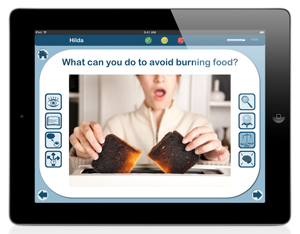
Conversation TherAppy  is a very  useful tool for speech and language therapy sessions with children or adults- it can help you figure out communication strengths and weaknesses and work on communication skills in a structured way.  You can really see where the breakdown in communication and understanding is occurring when evaluating across many facets such as describing, inference, word choice and so on.  For example, perhaps a student can give the right answer when asked "What do you when you are lost?" but that student is still unable to explain how a person might feel when lost, or explain why it would be useful to ask for directions. Or perhaps the student simply doesn't know the correct vocabulary to use- this app is a good fit for ESL students as well.   As I have come to expect from Tactus Therapy Solutions, there is data tracking and flexible settings to make this app easy to personalize content for each student.  You can even use the app with multiple students during a group therapy session!
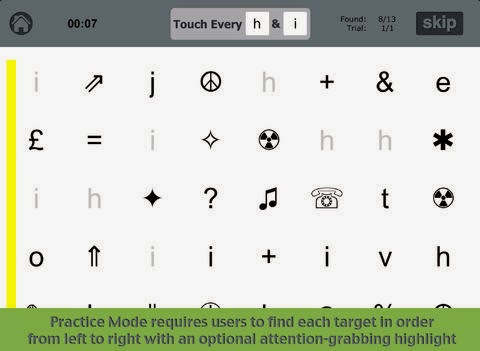


We also use Visual Attention TherAppy frequently with my elementary school aged son to reinforce what he has worked on in Vision Therapy.  Therapists are using this in Skilled Nursing Facilities with success as well.

View all apps from Tactus Therapy Solutions Ltd. here


AND HONORARY AWARD GOES TO...                                                     


GrasshopperApps.com
The following developer didn't set out to make "Special Education apps" necessarily, but many in the special needs community are happy to have this developer as a formidable resource.  Grasshopper Apps offer dozens of highly customizable vocabulary and story apps-many are FREE. Add your own photos, and sounds, determine the number of images your child will have to choose from when answering a question, and more.

Favorite Pick: Bitsboard Pro

View all apps from GrasshopperApps.com here


Tuesday, October 1, 2013

REVIEW: iReadWrite by Texthelp, Ltd.


iReadWrite by Texthelp, Ltd. ($19.99 at time of review, for iPad )


iReadWrite is an adaptive app geared toward struggling readers and writers.   Users have access to a variety of tools within the app, including text to speech (TTS), predictive text, spell checking and homophone checker, a dictionary with picture icons and auditory support, customizable color schemes and fonts, and choice of voices.  The app also supports sharing and importation of other documents.


What I Like:

Text to Speech (3 voices to choose from)
Dual Text Highlighting
Word Prediction
Extensive offline dictionary feature with auditory support
Picture symbol support for many dictionary words
OpenDyslexia Font
Use of Voiced Navigational Cues to guide user
Easy document sharing
Flexible Settings

Features:

TTS / Text to Speech-   The text entered into the app can be read back to you, either automatically, or by selecting the play button.  There are three text to speech voices to choose from- Jill, Samantha (who sounds a lot like Siri, in my opinion), or Tom.  All are easy to understand.  I do wish there were settings to adjust rate of speech and pitch, if desired.


Dictionary Feature-The Dictionary feature is accessible in Writing mode or within Spell Check mode by long pressing on a word.   I was impressed with the scope of the dictionary.  There is an extensive collection of words in the dictionary, and definitions as well as sample sentences for the different parts of speech for a word are included.  You can also adjust the settings to have the definitions voiced automatically, or you can use the play/stop buttons on the screen.  Picture symbols are included for many of the words for further support.

Word Prediction-A list of words will pop up on the left of the screen as you type. You can also access suggested words for previously entered text by placing the cursor to the right of a word. You can touch a word from the list once to hear it voiced, and touch a second time to replace the current word in front of the cursor. You can also use a swiping action across a desired word to insert it into a text (Choose "Swipe to Insert" in Settings).  Long press to access a voiced definition of the word with picture symbol support. (See Dictionary Feature above). You can also use the native iOS "auto-correct"- if this is turned on in your iPad's settings suggested words will pop up and automatically be inserted when the keyboard's space bar is tapped.

Spell Check- The Spell Check feature is easily accessible through the main tool bar, and will also light up red during Writing mode, if a spelling error has been made.  When the Spell Check feature is enabled, a list of words will be offered for words that need to be reviewed.  The Spell Check includes homophones like knew/gnu/new or bate/bait.   The student can tap a word once to hear it, or do a long press to bring up the dictionary feature, if hearing the voiced word alone did not help the user choose the correct spelling.  

 Incorrect spellings or incomplete words are displayed in red (default color, or set your own).  Homonyms are displayed in blue (default color, or set your own). Tap a word from the list twice to replace an incorrect word.  As with word prediction lists, you can also use a swiping action across a correct word from the Spell Check list to select and replace an incorrect word. (Choose "Swipe to Insert" in Settings)

You can still also access the native iOS dictionary feature within the app by long pressing a word when while in Writing mode, then choosing Define.


Custom Spellings- The "Add Spelling to Dictionary" feature accessible via the keyboard will allow you to add a word that is not recognized by the Spell Check.   If a word has been added, it will not be shown as incorrect when a Spell Check is done.

After selecting a word, you can choose "Add Spelling to Dictionary". We tried this with some unusual spellings my son enjoys using on a regular basis, such as Obi Wan Kenobi. Kenobi now pops up when "Kenob" is typed in. Alternatives such as "ken obi" and "canopy" are still offered if the cursor is placed after the word, but the word will not be singled out as incorrect during a Spell Check.   I would love to somehow add these new custom words to the app's dictionary too- so that our own unique definitions for a word can be brought up with a long press.

Customizable Color Schemes. Highlighting and Font Choices
The color schemes in iReadWrite can be tailored to each individual's needs. Not only can you can set the background color and font color for words, there is also a feature called dual text highlighting- each sentence is highlighted in the color of your choice as it is read aloud, while each voiced word is read in a second color as the cursor moves through the sentence. This is really helpful for readers who tend to lose their place while reading.You can change the background color, font color, and set the highlighting colors for word and sentences separately. The color picker makes it really easy to pick the exact color you want.

There are a variety of fonts to choose from, including my favorite, the OpenDyslexia font, a font designed to be easier to read by people with dyslexia.  Fonts can be adjusted from 8 pt. to 36 pt.- I would love to see the font size increased significantly to better assist users with low vision.
 
 
Voiced Navigational Cues

iReadWrite will alert the user to a change in mode via voiced cues such as when a user taps Spell Check, Writing, or Adding of a New Document. The voiced cues can be turned on/off in the settings by tapping the "Screen Reading" option.

 
Sharing of Documents

Share the documents you create via email, messaging or Facebook; You can also copy data into other program. This is really handy for making sure your child's assignments get to his/her teacher!


Wish List:

A larger font size ( fonts adjust from 8 pt. to 36 pt.- the font size seen in screenshots is 36 pt.)
Ability to adjust spacing between words.
Ability to add our own custom words and accompanying images to the app's dictionary- perhaps the user's own special words could be added, with a custom definition and ability to add an image for each new word.
Ability to save Default Settings or "Profiles" for several different users.  Currently you can restore settings to the Default Setting only.
Ability to add additional definitions to existing words in the dictionary.
Settings to adjust rate of speech, pitch


Thursday, July 4, 2013

Bookshare & Compatible apps for Print Disabilities


Bookshare
   Share Via Twitter

Bookshare is an excellent resource for individuals with print disabilities or physical disabilities where a reader cannot hold a book.  Bookshare provides recorded books, including DAISY format, web readers and more. There are a variety of books, textbooks, newspapers and periodicals- including the latest and most popular selections for all ages- currently 197,988 titles in the collection. The great news is qualifying students and schools in the United States can access Bookshare for FREE! There are subscriptions available to qualifying individuals in many parts of the world as well. More information on Bookshare is available here.


Bookshare has its own app available, Read2Go (by Benetech, $19.99, iPhone/ iPad compatible); see video here. 

Some app developers have caught on to the importance of Bookshare and are Bookshare compatible.

Voice Dream Reader allows access to Bookshare for those that have an account. It also has many useful features for dyslexics as well as for those with vision impairment.  FULL REVIEW HERE

Read&Write Gold from Texthelp has an entire series of web apps to help struggling readers. Their web app, Ebook Reader, works with their Read&Write Gold program to read aloud Bookshare books with highlighting tools, a built-in dictionary and more. If you own their software, access is free.  More information on the software here. You will be happy to know they have an iPad app too, iReadWrite ( FULL REVIEW HERE; see video of app here).

Kurzweil 3000 supports Bookshare and has many other features such as brainstorming and outline tools, auditory spell check, text to speech etc.  More information here.  For subscribers, there is a free iPad app also, firefly K3000

For More Supports & Apps for Struggling or Reluctant Readers/Writers, see here.


Apps for Reluctant or Struggling Readers/Writers


Tips & Suggested Apps for Reluctant Readers 

Use voice technology to assess reading ability 
.Read Along by Ottercall INC. There is a Read Along Spanish option too. The reader will need clear articulation for the technology to be effective, and the stories right now could improve, but this app did encourage my son to read aloud.  For a similar app practicing words only, try Sight Words - The Future of Flashcards by Sprite Labs.


Let the child "decide"
Remember the "Choose Your Own Adventure" books? Brush of Truth by Story Bayou might be just the techie answer for encouraging a love of reading. From iTunes description: "You choose how the action folds in this interactive book app for kids 8-12. Geared to third through sixth graders, Brush of Truth, told in "your" voice, has 65 decision points and 20 possible endings." 

Julie Landry Laviolette, founder of Story Bayou, Inc., is a parenting journalist, mom, and educational book app developer who created the book app, Brush of Truth, to appeal to reluctant readers. She has written several guest blog posts about the app industry, and about using non-traditional ways to engage kids in reading. Here are her suggestions for reaching reluctant readers: “Tips to Get Kids Reading”

Make it personalized
Some story apps have a record your own voice feature and/or the ability to change text.I Don't Lie - Starring you - An Interactive reading app by Sparky Kids, Inc. allows you to create personalized avatars of your child. You can also personalize the story with your child's name, and record his/her own voice. The story is free to download, with a small in-app purchase (currently $2.99) to get the above features. The free version is ad-supported.

Love You to the Moon & Back, an interactive bedtime book for kids by Sue Shanahan (presented by Auryn) allows you to record your own voice and change the text of the story. It also has another neat feature highlighted below, "tap to label" - touch an object in the scene to hear and see its written label.

Use Musical Story Apps
Cassandra the Cow by Animalations is a huge hit with students, as are some of the apps from Perplext - my favorite from this developer is The Little Red Hen.  The Perplext apps have a great pause feature so we can stop and practice each part of the story at our own pace.


Make reading irresistibly fun
Here's a version of Little Red Riding Hood that kids have a hard time saying no to: Grimm's Red Riding Hood ~ 3D Interactive Pop-up Book  by StoryToys Entertainment Limited (there are more titles to choose from in this series, you can see them all  here.)  Each story has interactive elements and related games embedded in its pages.


More ideas for Struggling Readers

Try a story app with a Dyslexia-friendly font
Three Billy Goats Gruff- An Interactive Children's Book by Backseat Driver, LLC This is one of five story apps from this developer (Princess and the Pea, The Three Little Pigs, Jack and the Beanstalk, and 'Twas the night before Christmas); all of the apps offer a dyslexia font as an option.


Look for apps that highlight each word in the story as it is spoken.
A number of story apps do this.  Read this blog post and this blog post for some places to start. 

Try apps with a "tap to label" feature
Stories like The Poky Little Puppy from Random House allow the reader to teach each word of the story to hear it spoken. Oceanhouse Media has familiar story apps that allow you to tap an image in the story to hear and see the label of that image.  Auryn Inc. also has many apps with this feature as well. 


Use Modeled Writing with "Write to Read"
The app Write to Read by WriteReader Aps is perfectly named as it serves as a good reminder that you can become a better reader through writing. This app is a story maker that uses the child's invented spelling and a correct spelling model from an adult. You can insert a picture and accompanying audio on each page, with a place for the child to write and a spot for the adult to write the "translation" below. The finished stories can be printed out with the child's captions, the adult's or both.

Create your own stories
There are also a number of story maker apps or apps with story making components, which really warrant a separate blog post. Here are a few favorites: Kid in Story Book Maker (by Locomotive Labs),  Storybook Maker (by Merge Mobile), Little Story Maker (by GrasshopperApps.com), SEE  BELOW  "Make your own adapted stories and lessons"" for more customizable story apps.


Use audiobooks and ereaders.
Bookshare has a vast library of books, textbooks, newspapers and periodicals for all ages and access in the United States is FREE for qualifying schools, and students with a print disability or physical disability that impedes access to typical books. Bookshare has its own app available, Read2Go, and there are several other Bookshare-compatible apps in the App Store, including Voice Dream Reader, iReadWrite, and firefly k3000.  For more information on Bookshare, and compatible apps, see here.


Consider Adapted Apps & Other Apps with Visual Supports

Premade Adapted Stories
A great online resource for adapted Boardmaker books (you will need the Boardmaker software) is http://www.baltimorecityschools.org/site/Default.aspx?PageID=1446


Marblesoft has premade readers with picture symbol support, including A Leader Is and My Country. These apps are switch accessible too. (for more switch accessible stories and games from Marblesoft see here; also take a look at  Inclusive Technology Ltd.)


Attainment's Read to Learn by Attainment Company uses real photos for visual support and has features such as highlighting of words, auto page turn and more. The app has stories with graded comprehension exercises; the stories are divided into three categories: Safety Skills, Life Skills, Focus on Feelings.  This app is capable of scanning and is switch accessible.


iGet It Apps has premade apps with a diverse set of life skills topics such as "Going to the Beach", "People in My Community", "Going to the Playground", "Going to Birthday Parties" - view them all here, You can choose to customize each story with your own pictures, audio recordings and written labels.


GrasshopperApps.com  has several dozen premade (but customizable) story apps, such as 2nd Grade Reading - I Like Horses and I Like Animals - Learning to Read Books - all 37 books are available in one app title I Like Books - 37 Picture Books for Kids in 1 App You can edit the audio recordings and words on each page- as well as embed "pop up" labels that show when a part of the image is touched. You can touch any word to hear it spoken. The apps also offer word highlighting.

Two more "general education" apps you may also find helpful for creating custom lessons: Bitsboard Pro and Sentence Maker.

Make your own Adapted Stories & Lessons
Create your own stories from scratch, with or without picture symbol support, using Niki Story. This app has a unique feature that allows you to shrink your own images to make symbol sentence strips. You can then add your own media- including videos, or even draw your own images in the app. This app has a dyslexia font option (shown). You can use the app to create stories, and to read stories. FULL REVIEW HERE


For a switch accessible story maker, try Alexicom Elements Story Maker .


AutisMate - If you are looking for an app that allows you to create visual scenes and stories with picture, video, image and audio support and can also can serve as an AAC/ communication tool, this is worth a serious look. FULL REVIEW HERE


GoTalk Now by Attainment Company is another versatile AAC app that allows you to create books and has a visual scene mode. You can even embed Internet links and music into app buttons. There is also a library of user created materials available. 


Scene Speak by Good Karma apps is a fully customizable visual scene app that allows custom written/audio labels (with recorded or text to speech) to pop up when a designated area is touched.  This is a flexible app with easy to use features.  You can add images to the app via your iPad, or even use Google and Bing search.


Abilipad is a custom keyboard app and much, much more.  Create your own adapted keyboards for literacy support- you can use the customized keyboards to write within the app, with text to speech and word prediction.  You can assign pictures to each keyboard's buttons and make them color coded, pick from a variety of fonts and record your own custom sounds for buttons. 


More Writing & Spelling Supports

Crick Software is the maker of Clicker 6 and several other writing tools, including the app Clicker Sentences, featured above. For more information see here. Crick Software also has three writing support apps in the App Store:

Clicker Sentences from Crick Software supports beginning writers in assembling sentences;  Sentences can be hidden completely with a spoken model provided, temporarily displayed for copying before a child begins writing, or shown permanently for students who need a visual model shown to copy. Picture Support is also an option.  Once punctuation is added, the sentence is read aloud.  This app has access to many Sentence Sets via an integrated "LearningGrids" site- sets are downloaded and run from within the app.  FULL REVIEW HERE

Clicker Docs is a writing support app with several key features, including editable word banks with selectable keys, text to speech, and access to 50+ classroom writing resources (with free registration). These "LearningGrids" include "Story Setting Adjectives", "Adverb Bank", "Alternatives to Said". "Beach Words", "Communities A-Z", and many more. The resources are targeted to 7-11 yr. olds, the majority being for upper elementary. FULL REVIEW PLANNED

WriteOnline is a writing support app for ages 11 and up.  This third app from Crick Software builds on its sister apps with more sophisticated vocabulary for older students, as well as word prediction capabilities, a talking spellchecker, and useful features like Dropbox support.  The app also contains downloadable LearningGrid resources.


Ghotit Real Writer&Reader 3 is a software program for Mac, Windows or Linux (Update: it is available for Android now too)


Ghotit Real Writer&Reader 3 is an integrated writing and reading solution comprising several advanced assistive technologies tailor-made for people with dyslexia, dysgraphia, and other specific learning disabilities. The solution helps children and adults with dyslexia and dysgraphia to write, read, and correct texts in any application and includes:
• Word-prediction with grammar and phonetics awareness • Context-sensitive and phonetic spell checker • Advanced grammar and punctuation corrector • An effective proofreader • Speak as you write (speech feedback) • Integrated dictionary • Reading assistance with dual highlighting
Ghotit Real Writer&Reader 3 can be used with any text editor or as a simple to use “Dyslexia Text Editor” at Windows (including tablets), Mac, Linux, and Android (tablets and smartphones).
For additional information visit Ghotit web site at http://www.ghotit.com


iReadWrite by Texthelp, Ltd. is an adaptive app geared toward struggling readers and writers. Users have access to a variety of tools within the app, including text to speech (TTS), predictive text, spell checking and homophone checker, a dictionary with picture icons and auditory support, customizable color schemes and fonts, and choice of voices. The app also supports sharing and importation of other documents. FULL REVIEW HERE

For more iOS apps with spellchecking support take a look at Typ-O HD, Writing Buddy (iPhone/iPod), American Wordspeller or Spell Better VPP

You may also be interested in a previous blog post about Text To Speech /TTS apps and devices here and apps compatible with Bookshare, a FREE service for students in the United States who have a qualifying print or physical disability, here.