Showing posts with label dyslexia. Show all posts

Monday, May 4, 2015

New and Notables: Special Apps


TalkItt (NOT YET AVAILABLE)

Still in development, but scheduled to be ready for release some time this year, this app literally brought tears to my eyes imagining the possibilities... TalkItt is an app that translates a user's impaired speech.  Imagine what this will mean for individuals with motor and speech impairments, who up until this development have had to rely on text to speech apps or picture communication systems to convey thoughts. For people with unclear but consistent patterns of speech, TakItt will learn each individual's unique vocal patterns. Once the app is familiar with the user's voice, the user can speak and the app will take that language that others struggle to understand, and speak the words aloud with clear speech. Follow them on Twitter here: https://twitter.com/Voice_Itt and on Facebook here: https://www.facebook.com/VoiceItt

I Can Have Conversations with You (On sale for $29.99, limited time, iPad only)

I Can Have Conversations With You"' is a customizable social language system developed by a certified speech language pathologist created to meet the unique communication needs of users on the Autism Spectrum.

It is home-based self-paced program that focuses on all aspects of communication- from eye contact; non-verbal language, facial expressions and gestures; emotions and feelings; relationships among conversational partners; intentions and motivations, perspectives and points of view; use of interjections like ''Oh Really" "Uh huh" "Cool''; different uses of language (to warn, to congratulate etc.), summarizing of topics,  understanding social rules and appropriate conduct; and logic/problem solving, figures of speech, grammar and vocabulary.

The user progresses through the app independently, except for when asked to complete "Role Plays" with a partner.  It utilizes a lot of repetition to help the user understand a concept.  The parent/caregiver assists with Role playing, as well as monitoring the user's communication abilities via a parentally gated section with easy-to-understand assessment rubrics in different areas of communication.

Message from the developer:  Unlike ordinary apps in the market, "'I Can Have Conversations With You!"' is a sequence of learning that takes each user approx 4-6 hours to complete. It's principally designed for at-home use independently by a single child vs. a therapy/school/group setting; therefore, to utilize with more than one student, the app must be re-installed and started from the beginning each time (which is free, of course).  

Additional details on how the app works can be found throughout the website  http://www.icanforautism.com/ and within the Video Tour there. Follow on Twitter at @ICanForAutism

Octoplus

Octoplus is a switch-accessible app designed for young children and kids with motor or cognitive delays.  It is a fun game-style math app where math skills are employed to battle turtles in an underwater world. There are drill and challenge modes, and options for different difficulty levels, as well as reports on progress that can be viewed in a parent section. For kids who benefit from a little extra encouragement, there is even a pretend store within the app where kids can buy characters after earning enough points.  This app also reinforces fine motor skills.  The app is common core aligned for the following standards:

*Curriculum Coverage**
OctoPlus covers the following Operations & Algebraic Thinking Math Topics: Add numbers to 10; Add in any order; Make a number
CCSS.MATH.CONTENT.K.OA.A.3 - Decompose numbers less than or equal to 10 into pairs in more than one way
CCSS.MATH.CONTENT.K.OA.A.4 - For any number from 1 to 9, find the number that makes 10 when added to the given number
CCSS.MATH.CONTENT.K.OA.A.5 - Fluently add and subtract within 5.


You can visit the app's developer, Zyrobotics, on Facebook: https://www.facebook.com/pages/Zyrobotics/402223876544935

Ghotit Real Writer ($99, iPad- see below for information on this product for other platforms)

is an iPad app designed to support users with dyslexia, dysgraphia or other learning disabilities. The first thing I noticed about Ghotit Real Writer was the voiceover feature guiding me the instant I opened the app.  Its features include a grammar checker, a context-aware spell checker and word prediction capabilities.  The program will read aloud text as well, making this an excellent support for those who benefit from auditory feedback. There is also an iPhone version (Ghotit Buzz Writer, $99) as well as versions for (Windows, Mac or Linux, ($199 ea)  and Android platforms ($99).
The code is a one time purchase, per device, according to the developer, but I did not encounter this issue when loading it to my other personal device under the same icloud account.


Tuesday, October 1, 2013

REVIEW: iReadWrite by Texthelp, Ltd.


iReadWrite by Texthelp, Ltd. ($19.99 at time of review, for iPad )


iReadWrite is an adaptive app geared toward struggling readers and writers.   Users have access to a variety of tools within the app, including text to speech (TTS), predictive text, spell checking and homophone checker, a dictionary with picture icons and auditory support, customizable color schemes and fonts, and choice of voices.  The app also supports sharing and importation of other documents.


What I Like:

Text to Speech (3 voices to choose from)
Dual Text Highlighting
Word Prediction
Extensive offline dictionary feature with auditory support
Picture symbol support for many dictionary words
OpenDyslexia Font
Use of Voiced Navigational Cues to guide user
Easy document sharing
Flexible Settings

Features:

TTS / Text to Speech-   The text entered into the app can be read back to you, either automatically, or by selecting the play button.  There are three text to speech voices to choose from- Jill, Samantha (who sounds a lot like Siri, in my opinion), or Tom.  All are easy to understand.  I do wish there were settings to adjust rate of speech and pitch, if desired.


Dictionary Feature-The Dictionary feature is accessible in Writing mode or within Spell Check mode by long pressing on a word.   I was impressed with the scope of the dictionary.  There is an extensive collection of words in the dictionary, and definitions as well as sample sentences for the different parts of speech for a word are included.  You can also adjust the settings to have the definitions voiced automatically, or you can use the play/stop buttons on the screen.  Picture symbols are included for many of the words for further support.

Word Prediction-A list of words will pop up on the left of the screen as you type. You can also access suggested words for previously entered text by placing the cursor to the right of a word. You can touch a word from the list once to hear it voiced, and touch a second time to replace the current word in front of the cursor. You can also use a swiping action across a desired word to insert it into a text (Choose "Swipe to Insert" in Settings).  Long press to access a voiced definition of the word with picture symbol support. (See Dictionary Feature above). You can also use the native iOS "auto-correct"- if this is turned on in your iPad's settings suggested words will pop up and automatically be inserted when the keyboard's space bar is tapped.

Spell Check- The Spell Check feature is easily accessible through the main tool bar, and will also light up red during Writing mode, if a spelling error has been made.  When the Spell Check feature is enabled, a list of words will be offered for words that need to be reviewed.  The Spell Check includes homophones like knew/gnu/new or bate/bait.   The student can tap a word once to hear it, or do a long press to bring up the dictionary feature, if hearing the voiced word alone did not help the user choose the correct spelling.  

 Incorrect spellings or incomplete words are displayed in red (default color, or set your own).  Homonyms are displayed in blue (default color, or set your own). Tap a word from the list twice to replace an incorrect word.  As with word prediction lists, you can also use a swiping action across a correct word from the Spell Check list to select and replace an incorrect word. (Choose "Swipe to Insert" in Settings)

You can still also access the native iOS dictionary feature within the app by long pressing a word when while in Writing mode, then choosing Define.


Custom Spellings- The "Add Spelling to Dictionary" feature accessible via the keyboard will allow you to add a word that is not recognized by the Spell Check.   If a word has been added, it will not be shown as incorrect when a Spell Check is done.

After selecting a word, you can choose "Add Spelling to Dictionary". We tried this with some unusual spellings my son enjoys using on a regular basis, such as Obi Wan Kenobi. Kenobi now pops up when "Kenob" is typed in. Alternatives such as "ken obi" and "canopy" are still offered if the cursor is placed after the word, but the word will not be singled out as incorrect during a Spell Check.   I would love to somehow add these new custom words to the app's dictionary too- so that our own unique definitions for a word can be brought up with a long press.

Customizable Color Schemes. Highlighting and Font Choices
The color schemes in iReadWrite can be tailored to each individual's needs. Not only can you can set the background color and font color for words, there is also a feature called dual text highlighting- each sentence is highlighted in the color of your choice as it is read aloud, while each voiced word is read in a second color as the cursor moves through the sentence. This is really helpful for readers who tend to lose their place while reading.You can change the background color, font color, and set the highlighting colors for word and sentences separately. The color picker makes it really easy to pick the exact color you want.

There are a variety of fonts to choose from, including my favorite, the OpenDyslexia font, a font designed to be easier to read by people with dyslexia.  Fonts can be adjusted from 8 pt. to 36 pt.- I would love to see the font size increased significantly to better assist users with low vision.
 
 
Voiced Navigational Cues

iReadWrite will alert the user to a change in mode via voiced cues such as when a user taps Spell Check, Writing, or Adding of a New Document. The voiced cues can be turned on/off in the settings by tapping the "Screen Reading" option.

 
Sharing of Documents

Share the documents you create via email, messaging or Facebook; You can also copy data into other program. This is really handy for making sure your child's assignments get to his/her teacher!


Wish List:

A larger font size ( fonts adjust from 8 pt. to 36 pt.- the font size seen in screenshots is 36 pt.)
Ability to adjust spacing between words.
Ability to add our own custom words and accompanying images to the app's dictionary- perhaps the user's own special words could be added, with a custom definition and ability to add an image for each new word.
Ability to save Default Settings or "Profiles" for several different users.  Currently you can restore settings to the Default Setting only.
Ability to add additional definitions to existing words in the dictionary.
Settings to adjust rate of speech, pitch


Thursday, July 4, 2013

Bookshare & Compatible apps for Print Disabilities


Bookshare
   Share Via Twitter

Bookshare is an excellent resource for individuals with print disabilities or physical disabilities where a reader cannot hold a book.  Bookshare provides recorded books, including DAISY format, web readers and more. There are a variety of books, textbooks, newspapers and periodicals- including the latest and most popular selections for all ages- currently 197,988 titles in the collection. The great news is qualifying students and schools in the United States can access Bookshare for FREE! There are subscriptions available to qualifying individuals in many parts of the world as well. More information on Bookshare is available here.


Bookshare has its own app available, Read2Go (by Benetech, $19.99, iPhone/ iPad compatible); see video here

Some app developers have caught on to the importance of Bookshare and are Bookshare compatible.

Voice Dream Reader allows access to Bookshare for those that have an account. It also has many useful features for dyslexics as well as for those with vision impairment.  FULL REVIEW HERE

Read&Write Gold from Texthelp has an entire series of web apps to help struggling readers. Their web app, Ebook Reader, works with their Read&Write Gold program to read aloud Bookshare books with highlighting tools, a built-in dictionary and more. If you own their software, access is free.  More information on the software here. You will be happy to know they have an iPad app too, iReadWrite ( FULL REVIEW HERE; see video of app here).

Kurzweil 3000 supports Bookshare and has many other features such as brainstorming and outline tools, auditory spell check, text to speech etc.  More information here.  For subscribers, there is a free iPad app also, firefly K3000

For More Supports & Apps for Struggling or Reluctant Readers/Writers, see here.


Apps for Reluctant or Struggling Readers/Writers


Tips & Suggested Apps for Reluctant Readers 

Use voice technology to assess reading ability 

.Read Along by Ottercall INC. There is a Read Along Spanish option too. The reader will need clear articulation for the technology to be effective, and the stories right now could improve, but this app did encourage my son to read aloud.  For a similar app practicing words only, try Sight Words - The Future of Flashcards by Sprite Labs.


Let the child "decide"
Remember the "Choose Your Own Adventure" books? Brush of Truth by Story Bayou might be just the techie answer for encouraging a love of reading. From iTunes description: "You choose how the action folds in this interactive book app for kids 8-12. Geared to third through sixth graders, Brush of Truth, told in "your" voice, has 65 decision points and 20 possible endings." 

Julie Landry Laviolette, founder of Story Bayou, Inc., is a parenting journalist, mom, and educational book app developer who created the book app, Brush of Truth, to appeal to reluctant readers. She has written several guest blog posts about the app industry, and about using non-traditional ways to engage kids in reading. Here are her suggestions for reaching reluctant readers: “Tips to Get Kids Reading”

Make it personalized
Some story apps have a record your own voice feature and/or the ability to change text.I Don't Lie - Starring you - An Interactive reading app by Sparky Kids, Inc. allows you to create personalized avatars of your child. You can also personalize the story with your child's name, and record his/her own voice. The story is free to download, with a small in-app purchase (currently $2.99) to get the above features. The free version is ad-supported.

Love You to the Moon & Back, an interactive bedtime book for kids by Sue Shanahan (presented by Auryn) allows you to record your own voice and change the text of the story. It also has another neat feature highlighted below, "tap to label" - touch an object in the scene to hear and see its written label.

Use Musical Story Apps
Cassandra the Cow by Animalations is a huge hit with students, as are some of the apps from Perplext - my favorite from this developer is The Little Red Hen.  The Perplext apps have a great pause feature so we can stop and practice each part of the story at our own pace.


Make reading irresistibly fun
Here's a version of Little Red Riding Hood that kids have a hard time saying no to: Grimm's Red Riding Hood ~ 3D Interactive Pop-up Book  by StoryToys Entertainment Limited (there are more titles to choose from in this series, you can see them all  here.)  Each story has interactive elements and related games embedded in its pages.


More ideas for Struggling Readers

Try a story app with a Dyslexia-friendly font
Three Billy Goats Gruff- An Interactive Children's Book by Backseat Driver, LLC This is one of five story apps from this developer (Princess and the Pea, The Three Little Pigs, Jack and the Beanstalk, and 'Twas the night before Christmas); all of the apps offer a dyslexia font as an option.


Look for apps that highlight each word in the story as it is spoken.
A number of story apps do this.  Read this blog post and this blog post for some places to start. 

Try apps with a "tap to label" feature
Stories like The Poky Little Puppy from Random House allow the reader to teach each word of the story to hear it spoken. Oceanhouse Media has familiar story apps that allow you to tap an image in the story to hear and see the label of that image.  Auryn Inc. also has many apps with this feature as well. 


Use Modeled Writing with "Write to Read"
The app Write to Read by WriteReader Aps is perfectly named as it serves as a good reminder that you can become a better reader through writing. This app is a story maker that uses the child's invented spelling and a correct spelling model from an adult. You can insert a picture and accompanying audio on each page, with a place for the child to write and a spot for the adult to write the "translation" below. The finished stories can be printed out with the child's captions, the adult's or both.

Create your own stories
There are also a number of story maker apps or apps with story making components, which really warrant a separate blog post. Here are a few favorites: Kid in Story Book Maker (by Locomotive Labs)Storybook Maker (by Merge Mobile), Little Story Maker (by GrasshopperApps.com), SEE  BELOW  "Make your own adapted stories and lessons"" for more customizable story apps.


Use audiobooks and ereaders.
Bookshare has a vast library of books, textbooks, newspapers and periodicals for all ages and access in the United States is FREE for qualifying schools, and students with a print disability or physical disability that impedes access to typical books. Bookshare has its own app available, Read2Go, and there are several other Bookshare-compatible apps in the App Store, including Voice Dream Reader, iReadWrite, and firefly k3000For more information on Bookshare, and compatible apps, see here.


Consider Adapted Apps & Other Apps with Visual Supports

Premade Adapted Stories
A great online resource for adapted Boardmaker books (you will need the Boardmaker software) is http://www.baltimorecityschools.org/site/Default.aspx?PageID=1446


Marblesoft has premade readers with picture symbol support, including A Leader Is and My Country. These apps are switch accessible too. (for more switch accessible stories and games from Marblesoft see here; also take a look at  Inclusive Technology Ltd.)


Attainment's Read to Learn by Attainment Company uses real photos for visual support and has features such as highlighting of words, auto page turn and more. The app has stories with graded comprehension exercises; the stories are divided into three categories: Safety Skills, Life Skills, Focus on Feelings.  This app is capable of scanning and is switch accessible.


iGet It Apps has premade apps with a diverse set of life skills topics such as "Going to the Beach", "People in My Community", "Going to the Playground", "Going to Birthday Parties" - view them all here, You can choose to customize each story with your own pictures, audio recordings and written labels.


GrasshopperApps.com  has several dozen premade (but customizable) story apps, such as 2nd Grade Reading - I Like Horses and I Like Animals - Learning to Read Books - all 37 books are available in one app title I Like Books - 37 Picture Books for Kids in 1 App You can edit the audio recordings and words on each page- as well as embed "pop up" labels that show when a part of the image is touched. You can touch any word to hear it spoken. The apps also offer word highlighting.

Two more "general education" apps you may also find helpful for creating custom lessons: Bitsboard Pro and Sentence Maker.

Make your own Adapted Stories & Lessons
Create your own stories from scratch, with or without picture symbol support, using Niki Story. This app has a unique feature that allows you to shrink your own images to make symbol sentence strips. You can then add your own media- including videos, or even draw your own images in the app. This app has a dyslexia font option (shown). You can use the app to create stories, and to read stories. FULL REVIEW HERE


For a switch accessible story maker, try Alexicom Elements Story Maker .


AutisMate - If you are looking for an app that allows you to create visual scenes and stories with picture, video, image and audio support and can also can serve as an AAC/ communication tool, this is worth a serious look. FULL REVIEW HERE


GoTalk Now by Attainment Company is another versatile AAC app that allows you to create books and has a visual scene mode. You can even embed Internet links and music into app buttons. There is also a library of user created materials available. 


Scene Speak by Good Karma apps is a fully customizable visual scene app that allows custom written/audio labels (with recorded or text to speech) to pop up when a designated area is touched.  This is a flexible app with easy to use features.  You can add images to the app via your iPad, or even use Google and Bing search.


Abilipad is a custom keyboard app and much, much more.  Create your own adapted keyboards for literacy support- you can use the customized keyboards to write within the app, with text to speech and word prediction.  You can assign pictures to each keyboard's buttons and make them color coded, pick from a variety of fonts and record your own custom sounds for buttons. 


More Writing & Spelling Supports

Crick Software is the maker of Clicker 6 and several other writing tools, including the app Clicker Sentences, featured above. For more information see here. Crick Software also has three writing support apps in the App Store:

Clicker Sentences from Crick Software supports beginning writers in assembling sentences;  Sentences can be hidden completely with a spoken model provided, temporarily displayed for copying before a child begins writing, or shown permanently for students who need a visual model shown to copy. Picture Support is also an option.  Once punctuation is added, the sentence is read aloud.  This app has access to many Sentence Sets via an integrated "LearningGrids" site- sets are downloaded and run from within the app.  FULL REVIEW HERE

Clicker Docs is a writing support app with several key features, including editable word banks with selectable keys, text to speech, and access to 50+ classroom writing resources (with free registration). These "LearningGrids" include "Story Setting Adjectives", "Adverb Bank", "Alternatives to Said". "Beach Words", "Communities A-Z", and many more. The resources are targeted to 7-11 yr. olds, the majority being for upper elementary. FULL REVIEW PLANNED

WriteOnline is a writing support app for ages 11 and up.  This third app from Crick Software builds on its sister apps with more sophisticated vocabulary for older students, as well as word prediction capabilities, a talking spellchecker, and useful features like Dropbox support.  The app also contains downloadable LearningGrid resources.


Ghotit Real Writer&Reader 3 is a software program for Mac, Windows or Linux (Update: it is available for Android now too)


Ghotit Real Writer&Reader 3 is an integrated writing and reading solution comprising several advanced assistive technologies tailor-made for people with dyslexia, dysgraphia, and other specific learning disabilities. The solution helps children and adults with dyslexia and dysgraphia to write, read, and correct texts in any application and includes:
• Word-prediction with grammar and phonetics awareness • Context-sensitive and phonetic spell checker • Advanced grammar and punctuation corrector • An effective proofreader • Speak as you write (speech feedback) • Integrated dictionary • Reading assistance with dual highlighting
Ghotit Real Writer&Reader 3 can be used with any text editor or as a simple to use “Dyslexia Text Editor” at Windows (including tablets), Mac, Linux, and Android (tablets and smartphones).
For additional information visit Ghotit web site at http://www.ghotit.com


iReadWrite by Texthelp, Ltd. is an adaptive app geared toward struggling readers and writers. Users have access to a variety of tools within the app, including text to speech (TTS), predictive text, spell checking and homophone checker, a dictionary with picture icons and auditory support, customizable color schemes and fonts, and choice of voices. The app also supports sharing and importation of other documents. FULL REVIEW HERE

For more iOS apps with spellchecking support take a look at Typ-O HD, Writing Buddy (iPhone/iPod), American Wordspeller or Spell Better VPP

You may also be interested in a previous blog post about Text To Speech /TTS apps and devices here and apps compatible with Bookshare, a FREE service for students in the United States who have a qualifying print or physical disability, here.

Friday, December 21, 2012

REVIEW: Voice Dream Reader- Text to Speech by Winston Chen


Voice Dream Reader - Text to Speech by Winston Chen (iPad / iPhone; $9.99 at time of review w/ small in-app purchases)

Cross posted at The Appy Ladies and Small But Kinda Mighty


Voice Dream Reader by Winston Chen is classified as an educational app but could definitely fall under several categories. It can be used as an assistive tool, for educational purposes, or simply for pleasure. It is exactly what the title sounds like- it reads aloud for you, highlighting each word and line. There is a small in-app purchase (currently 99 cents) to open up access to Bookshare (account required), which means you could load one of many classics from Bookshare, set down the iPad and listen to a book while taking a drive, or relaxing in the bath. To make it clear- you can exit the app and it will still read to you, which is a wonderful feature! You can also insert any text of your own into the app as well, and have it read to you in a variety of colors, text sizes and fonts.

What I love:

Universal App- no need to buy separate apps for those with other iOS devices
Built-in Tools such as Dictionary, Bookmarks and Search Feature
Useful Settings- sentence rewind/fast forward, a sleep timer and more
Ability to type directly in Voice Dream Reader! - this is super for school work tasks!
Integrates with a variety of media: ebooks (from Gutenberg), PDFs, web pages, Powerpoint, Microsoft Word, ePub, Plain Text, Apple Page, MS Powerpoint
Integrates with Pocket and Instapaper Reading Lists
Integrates with Bookshare for small in-app purchase (currently 99 cents)
Built-in Internet Browser- grab text from the Internet right from within the app, add web addresses to the app and access content from those websites at any time!
Optional Voices- comes with one quality Acapela tts voice, "Heather"; allows you to add additional voices (55 voices in 20 languages) for small in-app purchase (currently $1.99 each)
Translation Capabilities (in-app purchase of "credits")
Vision/Reading Disabilty-Friendly- variable font size, and customizable color choices for highlighting of read word, selected word, and line; adjustable reading speed
Special Font for Dyslexia- OpenDyslexia font

There are several handy features I wanted to highlight:


Easily save text to Voice Dream Reader-
You can copy or paste text from a variety of places into the app, including word documents, PDFs etc. You can even open a web page through the embedded web browser in Voice Dreamer Reader.  Copy and paste a section of text by pressing/holding the screen for a moment until it highlights blue, pressing copy and then pasting into a new document OR simply save the web address by pressing the blue save button to the right of the browser window- A pop up will say "Smart Save" or "Save All".  Smart Save should be used for a simple text entry.  Save All will save every bit of a text on a page- including page tabs, headings above videos etc. the text from that web page will automatically show up in the Voice Dream Reader.


Editing- Editing saved entries is easy. Just tap the pencil symbol to bring up the current text. You can edit with the iPad or iPhone keyboard and press save to keep the changes.  You can type whatever you would like in the app with the native iPad keyboard as well, which is very useful for school tasks, such as writing a book report, answering questions about a text etc.  It is easy to delete an entry also, just swipe to the right and press delete. While I like this feature, I would like to see a setting to turn off editing so that items cannot be deleted without going into settings- this would make it more friendly with motor difficulties, or for curious fingers. 


Jumping to Next Entry- After reading a saved entry, the Reader jumps to the next entry.  If I don't want to read the next entry, I can easily tap the screen and then tap the Home symbol to return to the main menu.

Bookmark - Voice Dream Reader will automatically "bookmark" your reading by reading exactly where you left off when reentering a text, but you can also add multiple bookmarks to spots you want to return to later.  To add a bookmark, just tap and hold the screen to bring up the Bookmark toolbar.  The section you bookmarked will highlight briefly, then a bookmark symbol will remain in the margin of the text until you delete it (press and hold on the symbol to remove it).

Dictionary- press and hold a word to bring up a definition of it. I haven't found a word it didn't recognize yet.  It even knew  "vestigial" and "exaptation"

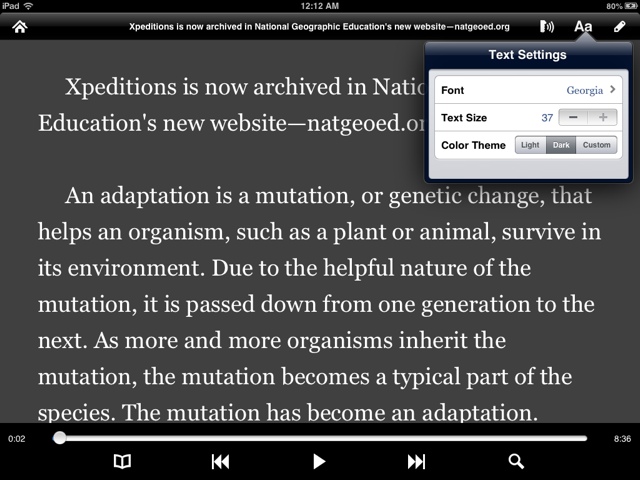
Vision and Reading Difficulties- A mulitude of customizable settings for users with vision or reading problems. There is customization of text size, style and color. The background can be set to light, dark, or any custom color you want through the use of a color picker. The text color, as well as the line color, spoken word color and selected text color can all be set separately. The text size can be set from 13 to 37 point. ( I would prefer it to go up to much a higher point for more severe vision difficulties.)

Using Voice Dream Reader as an Assistive/Academic Tool
If you are the parent of a special needs child as I am, you probably won't be using this while taking a relaxing bath any time soon, but you may be interested in using this as an assistive tool!

My almost 9 year old son is on the spectrum and has both fine motor and visual motor delays which impact his ability to read and write at grade level. Voice Dream Reader has several features that may assist users with a reading or visual disability. Having access to educational literature that I can load in to Dream Reader is very helpful for my son as a grade schooler, but I imagine even more so as a middle schooler, high schooler or college student, when the educational demands increase.

One of my son's issues is copying from the board. Instructions or materials can be copied and pasted into the Voice Dream Reader from a web page or other sources so he can have the material directly in front of him, and if need be, plug in headphones or turn down the volume and use only the highlighting and font features to assist him.

Dream Voice Reader integrates with Bookshare for individual accounts, and recently organizations as well! Many districts offer access to Bookshare, and when we get back from Winter Break I will definitely be looking into accessing an account through my district- currently there is a very reasonable fee of 99 cents to access Bookshare- this is available as an in-app purchase.

Another neat feature is the search window to find a word or phrase within a text. This is super for going back to reread a portion of a text to answer comprehension questions, or if lecture notes have been entered, to find that exact spot where a specific topic was discussed- The only caution would be that the user know how to spell exactly what he/she is looking for or results will not come up. If the text was entered through the editing feature incorrectly, say the user made a spelling error when they created the text- the user will have to use that same improper spelling to pull up that entry as well.  A poor speller may need someone to help with this feature.

 Another setting I have found useful is the Focused Reading Mode- to access this my son simply pinches the screen to black out the top and bottom of the screen. By the way, you can make it even more focused by changing the background to black, text color to black, then choosing whatever contrasting color to highlight the line that is being read. This way only one line of text will appear on the screen at a time!

Wish List (I always have one):

Technology Limitations- Technology still hasn't quite caught up yet in a few areas: (Intonation and Pronunciation)- As with any non-human, Heather just isn't smart enough to know when to make her voice go up or down, or know how a word is pronounced at all times, especially when it comes to names. She also has a hard time differentiating between words that shift stress according to their part of speech label- for example "content", as in "material" was read as "content" as in "She feels content". This problem is not unique to Heather (this is a top of the line, well-respected text to speech voice)- it is a limitation of text to speech engines in general. But perhaps there could be a work around in place for exceptions that the user can set up manually within the app, such as an "exceptions dictionary".

Access to other ebooks, like iBooks, Kindle books- then I could use this to read my special needs books while on the go. Dream Voice Reader is unable to integrate with copyrighted materials. This is not a fault of this app, so it looks like this will remain on the wish list. Unfortunately, I believe this is a restriction placed by Apple.

Support for images - It would be wonderful if images could be copied along with accompanying text- it can feel a bit disjointed when reading about a picture that cannot be seen.

More support for users with disabilities -   A person with poor spelling will need help accessing the dictionary feature as no result will be found.  This app would be incredible with word prediction support while in text editing mode, and would be a wonderful option for in-app purchase!  Also, I would like to see a setting to turn off editing so that items cannot be deleted accidentally. This would make it more friendly for users with motor difficulties, or for curious fingers.  Additionally, if the text size could be increased to about 80 point, this could help users with more severe vision difficulties too. (Update: the developer is looking in to a larger font size- larger fonts take up memory, so ways to address that will be looked at.)


**FINISHED**


a Rafflecopter giveaway