Showing posts with label iPad. Show all posts

Thursday, April 30, 2015

New and Notables: CSUN 2015 Exhibit Hall


APPS, SOFTWARE & ACCESSORIES

CSUN is a treasure-trove of information and each year there are lots of goodies to be discovered.

Here are some products and resources sighted at this year's CSUN Exhibit Hall:

The hands down favorite find this year was:

Microsoft Sprout by HP
This software was on display for everyone to play with and I was floored at all the possibilities it could open up in an educational or special needs setting, not to mention it being coveted for home use i.e. for scrap booking, for organizing your tax receipts... oh my, I have a really hard time thinking of someone who would NOT think this would be a helpful tool.
The demonstration included an amazing 3D prototype not to mention existing capability to literally place any object down on the mat and have it pretty much instantaneously imported into the software program as an image, using dual (above/below)
document cameras.

Ah, the price tag... At $1,899 it's not cheap, but it is certainly comparable to other programs and devices many school districts are using, with many advantageous features. {Crossing fingers my school district will feel the same}

Microsoft is actively seeking educational and special needs-focused developers for this platform, so if that is you, seek them out.

More info on Microsoft Sprout HP here: http://www.cnet.com/products/hp-sprout/

iYoMube is an app for visually impaired users that reads aloud signs and written print in the environment using Apple's existing VoiceOver technology and camera feature.

I was sold after a demo- the app read aloud several signs more than 10 feet away, but have had trouble with the app on my iPhone 4 sadly.
(FYI this was demonstrated on a newer iPhone, with the latest iOS, and I think that is key- my old iPhone 4 did not perform well)

**I recommend waiting for a lite version of this app to be available in the App Store so potential users can try it out with their device and operating system first.** 
Developer Response: The App works best on iPhone 6 or 6+ for now because of its better camera focusing function.
                   
Here is the premise for how it should work- to use the app you must have VoiceOver feature enabled. You can use the app to "read" photos in your photo album, but even more impressive was live reading of whatever is in your viewfinder. To activate this feature open the app and swipe to the left until you get to the settings page, then choose ''navigation mode" to turn on the "Real Time Speech" (it is off by default).  There are also two modes you can switch in and out of by swiping left or right on the screen- Text mode, where all recognizable words are read at once, or Blocks mode, where each individual part of an image can be read by touching it. You can also choose to save images captured via the app to your photo album, or change the language to be recognized from one of five choices: English, Japanese, Korean, Chinese (simplified) or Chinese (traditional).

I can't vouch whether this app will work for your device or not.  But we have come a long way, technology-wise, a long way indeed!


Also spied, were the tactile Parcheesi and checker sets from Altix Vision
seen at last year's CSUN event...the current sets available are upgraded models with high quality wood and even cooler! They were just being launched last year and basically were in prototype stage, but now they are definitely ready for purchase.

The sets have easy to grasp pieces that are easier to differentiate from one another, so those with visual impairments, as well as any other players, can enjoy!
The games are about $30 each, but do not include shipping.  They are currently seeking distributors in the U.S. so if that is you, you can contact them.

The sets can be ordered by sending a request to: adam.kalbarczyk@altix.pl


While doing further research on the above products, I also came across this web resource on how to offer assistance to people who have low vision or are blind:

http://valenciacollege.edu/osd/documents/BlindnessDraft.pdf

\
Chat Wrap

This iPad case is clearly the object of my desire but at $499 out of reach for some of us. (There may be some confusion on the pricing I was quoted as SilverKite has the ChatWrap case listed at $395 here: https://store.silver-kite.com/product_info.php/products_id/552 ). The sound is very clear and loud, and the case is very sturdy while not adding an extreme amount of weight- it is lighter weight than a popular leading industry competitor that comes to mind. I would like to see a screen protector of some sort included as standard. There is a feature to easily add a lanyard too.  If you are successful with insurance reimbursement, or if more mainstream cases have failed to meet your needs, this would be a worthwhile investment indeed!

There were  also some companies from last year spied again:

 GoTalk Now and a suite of special needs apps and products from Attainment Company, speech and language therapy apps from Virtual Speech Center, Sono Flex and Tobii's eye tracking software (A previous favorite last year was eye tracking software from Sensory Software); Proloquo2Go (and newer 'sister' products Keedogo and Proloquo4Text) from Assistive Ware; L.A.M.P. Words for Life from PRC and Boardmaker from Mayer Johnson. 


Saturday, December 13, 2014

New and Notables: Educational Apps Vol. 2 (Young Learners)

New and Notables: Educational Apps Vol. 2  (Young Learners)


My Very Hungry Caterpillar by StoryToys Entertainment Limited (iPhone / iPad; $3.99 at time of review) NEW

excerpt from iTunes:
Eric Carle’s much-loved character, The Very Hungry Caterpillar™, has won the hearts of millions of children around the world for more than 45 years. Now, for the first time, The Very Hungry Caterpillar is brought to life in a stunning 3D interactive app. 

You'll soon fall in love with your own Very Hungry Caterpillar as you enjoy a range of fun activities together. Hatch him from an egg, drag tasty fruits from a nearby tree, then watch as he eats them! And when My Very Hungry Caterpillar gets sleepy, just tuck him into his bed.

Each time you wake him up, it’s time for an exciting new adventure: push him on a swing, sail on a pond with bobbing Rubber Ducks, and grow flowers and fruit in a magical 3D garden.

The more you play, the more surprises you'll find including new activities, new fruit, and new toys unlocked over time. Chase a bouncing ball, pop floating bubbles and watch out for the wind-up Grouchy Ladybug! 

Day by day, My Very Hungry Caterpillar grows bigger and bigger, until he changes into a beautiful butterfly. Then a new egg is laid and the adventure begins again. 
It's a world of beauty and color you'll return to again and again.


 It's tough to work with preschoolers without being an Eric Carle fan, especially when it comes to that adorable caterpillar!  My Very Hungry Caterpillar app celebrates the charm of that famous little caterpillar, bringing him to life along through interactive play. The illustrations are relevant to the story, colors are vibrant and the activities are easy for a young child to follow- to begin the game touch the egg  on the screen to "hatch" the caterpillar- he will follow where you tap.   Tap on objects in the scenes to discover interactive elements and sound effects. (Visual cues will help guide the child).  You can even plant seeds in a garden and watch them grow as you water them.  There are also fun toys for the little caterpillar to play with.   (I love how the ball bounces to the child's touch but would love to see more engagement with the caterpillar here- like a giggle or a different facial expression on the caterpillar)  After the caterpillar has eaten and played enough, lead him to a tree stump and tuck him in to bed under a leaf- the screen will actually blacken to mimic the passing of a day- wake him up and find new items to explore. Eventually the caterpillar will turn in to a butterfly if nurtured properly through play!

For sticklers to the story, the egg looks different,  and the app doesn't follow the story in terms of presenting the correct number of  foods (none of the yummy treats or leaf to munch through are included either), but to connect play to the story, you could sit down with the child and have him recall how many strawberries or plums were eaten, and have the child set out the correct number of items for the caterpillar to munch through (super satisfying by the way).  For kids who are distracted by background music (it's lovely by the way) the music can be shut off via the Settings tab. This is a satisfying cause and effect app for little ones familiar with the Very Hungry Caterpillar.  

Click on one of the links below to download a free copy of My Very Hungry Caterpillar to your iTunes account: 


Quick Math Jr. by Shiny Things  (Universal, $2.99 at time of review) NEW

excerpt from iTunes:
Quick Math Jr. helps children aged 3-7 learn the important foundations of mathematics: counting, addition, subtraction, handwriting numbers and much more. As your child plays through the 5 fun games it will dynamically adjust the difficulty so they are always receiving questions that are specifically designed for them. Made by the creators of the award-winning Quick Math series, Quick Math Jr. will help your child to become confident in mathematics.

FEATURES
• Five games aligned with international maths curriculums, including US Common Core and the Australian National Curriculum
• Adaptive difficulty to quickly place players at the appropriate level, with challenges to keep them in their zone of proximal development.
• Write answers directly on-screen! Players progress from multiple-choice to handwritten answers.
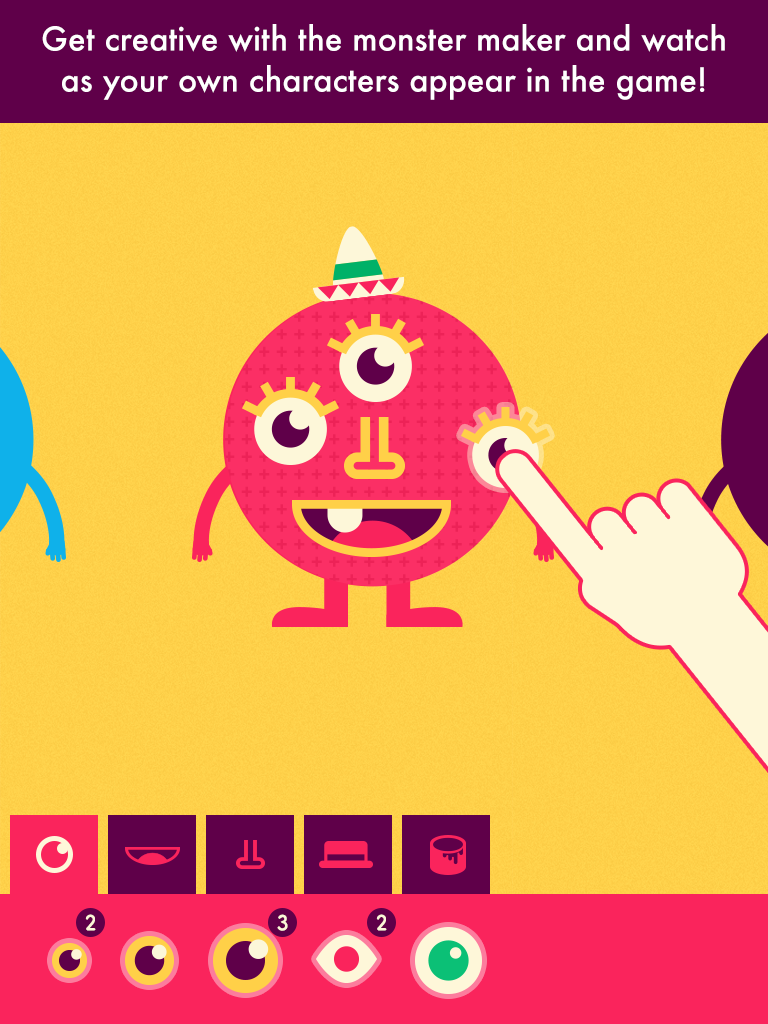
• Create your own monster characters by winning new features, then see your creations appear in the game!
• Unlimited player profiles for easy device sharing

Shiny Things already endeared us with their Shiny Bakery app, so I was eager to try this out with my younger son. Aside from the fun animations and adorable characters designed to keep a young learner's attention, one  of my favorite features is the writing recognition- it even does a really good job understanding my son's handwritten numbers, despite handwriting not being his strong suit.  My son loves creating faces for the Shiny people/creatures and watching them actually come to life as characters in the math activities.  I really like how this incorporates visual memory strategies too- for example one of the tasks shows a certain number of creatures that appear for a brief second before the light flickers out; the user has to pick the dice that corresponds with the number of creatures to play the game. The game play is not punitive either- if a mistake is made, the creatures simply mumble and the incorrect answer is removed from the choices, as many times as necessary until the child chooses the correct answer.  Both educational and fun, it's a keeper!


~~CHECK BACK LATER FOR CODES, COMING SOON! ~~

Draw with Curious George  by Houghton Mifflin Harcourt  (iPad, 99 cents at time of review) 


 excerpt from iTunes:
Does your playful little monkey love drawing on the walls? Have him draw with Curious George instead in this fun and entertaining coloring app! In Draw with Curious George children can color and draw for hours, with a selection of vivid colors, tools, stamps, and stickers. 

Draw with Curious George provides your child with everything he or she needs to create a masterpiece and then share with loved ones through a kid-friendly email system. 

Features & Benefits 
Activities such as:
•Connecting-the-dots
•Tracing animal drawing – everything from birds to bunnies
•Coloring in drawings using different sizes of pencils, paintbrushes, and markers for varying effects
•Painting in opposites with a mirror painting button
•Playing with stamps and stickers
•Having fun cleaning up Curious George’s silly splatters and monkey jumbles
•Sharing art with friends and family through Curious George’s kid-friendly email system


 A very parent and child-friendly app with no in-app purchases or third-party advertising (yay!), Draw with Curious George also thought of a much appreciated feature-an art gallery within the app, so the iPad's photo albums stay uncluttered with tons of artwork while the kids save their masterpieces. (Thank you from the bottom of my heart!)  However my favorite feature is the friendly narration (it's The Man With The Yellow Hat!) so non-readers can easily navigate the app and enjoy all its features. There are many different Curious George themed activities to keep preschoolers and younger elementary aged kiddos entertained-  tracing, connect the dots, coloring with a variety of tools, including stamps, stickers and silly "paint"' options like bananas.  There are fun sound effects for the silly paint tools, and for those of us who grew up on Curious George, he also makes the cutest noises when you tap him. Awwww.  Even better is the easy sharing by email feature- it allows you to add up to three pictures and emails-after you've set it up, the child simply clicks on the picture of the person they want to send their artwork to.  


Tools:

Fun Timer by all4mychild (iPhone/iPad, 99 cents at time of review)  


Fun Timer is a simple visual timer to help children be successful while doing a task or activity. You can set it for either ''earning" or "losing" an activity, for a period of anywhere from 1 to 30 minutes. To customize the app, you can add your own pictures from your photo album, draw a picture, or type in a message.

For earning a privilege, select an image, drawing or type in words showing what you want to do next if behaviors are positive.  Select the earning button when the child is doing the expected behavior, and slowly more and more of the picture will be revealed until the timer ends, and the reward is earned.

For losing a privilege (a child gets off task, or is fighting, or engaging in an unexpected behavior) select the "Losing"' button, then "start'' and over time the image, drawing, or words you added to the timer will disappear, showing that you won't be able to earn or do the fun activity depicted if the behavior continues.  Press ''pause'' to stop the timer for good behavior.  If the behavior continues, the image will eventually go blank after the time you specified and the timer's face will show tears.


Tuesday, April 1, 2014

RocketKeys - AAC app by MyVoice

a Rafflecopter giveaway


RocketKeys by MyVoice ($159.99, iPad-iOS6.1, at time of review) 
 

Learn more about the making of this app via an AppyChat at The Appy Ladies

Enter to win a copy of RocketKeys and a 1:1 training on all its features here: a Rafflecopter giveaway
 

RocketKeys is a switch accessible text based AAC system with sophisticated word prediction suitable for aphasic and dyslexic users; its customizable keyboards and accessible features make it a strong choice for literate users with vision or motor impairment.
For picture based AAC from MyVoice, check out TalkRocket Go or TalkRocket Go Français


There are several features that stand out, the first being accessibility. While RocketKeys can be used by a variety of users, RocketKeys was designed to meet the needs of individuals with significant motor issues.   There are tap and hold features to address users that tap too often and need a more determined motion to select, as well as options for a person unable to lift the hand to tap. There is a feature that allows multiple fingers to rest on the screen without impeding selection of a key. A special keyboard option called Optimus, was developed based on the specific needs of  "one touch" typers, reducing the need for movement by 50%.  Feedback about Optimus to the developer indicates this keyboard option can work for many people, but is especially well suited to those with muscle weakness, paralysis, ALS,MS, stroke, etc. There is also a "stabilize" feature to help offset tremors as well.


The keyboards themselves are customizable too- both the keys and the cursor can be adjusted in size; custom keys can be easily added. Key output is easy to customize as well- For example you can set up a key so it displays one word on the key "Amy" but types and/or voices a different word or set of words "My name is Amy". This is especially useful for words that text to speech may mispronounce- you can adjust the pronunciation without altering how the word looks on the keyboard.  There are three color schemes, including a high contrast black/white option that may be very helpful to users with visual impairment- the iPad itself has an "invert" option which would allow three more color schemes.  The sentence bar and word prediction bar can be set to the top or bottom of the screen through a drag and drop motion in Edit mode.  Voice options can be tweaked to change volume, speed and pitch.  There are some more accessibility features as well:

Note from developer: Voice: Adult and children's voices (Acapela) included, alter volume, speed and pitch. "Primary" speaks final message to others "Secondary" speaks selection of keys and words "Hover" provides voice over for hand placement as cue or for vision impaired based on "dwelling". Benefits: Mixing different voices allows user and listener to distinguish composition from final message with clearly different voices. Like voice over of iPad but more custom.

RocketKeys can store up to seven user profiles, which makes this a viable option for a classroom setting where one iPad is used across the day with different individuals.

The second feature to stand out is the (truly impressive) word prediction capabilities of RocketKeys.  The word prediction engine is based on thousands of utterances in Twitter (US), which means this word prediction is savvy and more conducive to natural speech. The word prediction in RocketKeys includes slang, idioms, proper names, current cultural, literary and popular references not found in other engines. My son was able to bring up Star Wars related words with ease. FYI, we did find one swear word when talking about Siths that snuck through RocketKeys' "scrubbing" process of removing swear words from the predictive speech- this should be addressed in the next update. Personally, I would prefer a profanity filter of some sort, so cognitively aware adults/teens could have the option to use this language in appropriate social circles, but of course these words can always be added as keyboard keys, if so inclined.


Another big plus is how friendly the app is toward poor spellers.  If you know the first letter of the word, the word prediction will help you find the correct choice, even if the other letters are jumbled or misspelled. My son misspelled "cracking" as "craking" and the word prediction offered him several appropriate choices "croaking" "creaking" "cracking" "cranking"; ''yiwning" correctly brought up "yawning" as a choice. More significant spelling errors like "SPC" for special will correctly bring up choices like "special" '"space" "speech" "Spicy" "Spencer" etc. For apraxic and dyslexic users, this means less backspacing to fix errors and quicker communication! (You can change the number of word predictions offered in the Settings- from 1 to 7 words shown).

The fourth stand out feature of RocketKeys is the excellent customer service.  MyVoice is rightly very proud of their AAC app and will bend over backwards to make sure you understand the full potential of RocketKeys.  There are regular, free webinars available.  I am both a visual and auditory learner, and once Tony had pointed out all the features and what their function was, I found it very easy to edit and set up keyboards and Profiles in RocketKeys.
Therapy Box is a participant in Special Apps, Special Kids & The Appy Ladies' collaborative effort for Autism Awareness Month, which we are also calling Autism ACCEPTANCE Month. Awareness leads to Acceptance.


KidBox-carryable case for iPad/ iPad Mini by Kay's Case


KidBox by Kay's Case ($32.99 -$35.99 at time of review)
For iPad 2, 3, 4 or iPad mini


Update: April 2014- FYI I wrote this review nearly a year ago...and my KidBox is still holding up GREAT!

Photos of KidBox on iPad mini
This probably wins the overall gold star for carryable cases for moderate protective needs. (More carryable case options here.) It is lightweight but strong, has a comfy handle that doubles as a stand, and is easy to get on and off. No matter where I go, I get stopped when the KidBox is on. It is a great option for kids who may drop an iPad every now and then, but are generally conscious of the need to be kind to it. It is also a wonderful option for educators working with children. I do recommend purchasing a screen protector to apply to the screen- when one of my students scratched up the screen with the wrong end of a stylus, and I then realized I had a screen protector on, phew- I was definitely relieved.
 

I also should mention that one of my preschoolers decided to forcefully knock my iPad off the table in a KidBox case, and while I wouldn't recommend trying it on purpose, my iPad survived! Yay! The handle/stand feature is one of my favorite aspects of this case. It is so clever and easy to use. I often use the handle in landscape position to enter data, or when I am working one on one or with little ones, sitting on the floor. During group lessons, I stand the iPad up in landscape position or grip it by the handle while facing the iPad toward my students.
This case is really easy to take on and off, if needed. You won't really need to actually- the ports are all super easy to access, and so is the camera. (The headphone access takes a bit of finesse, but is also manageable).  To put the case on, you just slide the iPad in through the opening opposite the handle area, and do the opposite to remove it. I love how easy it is to charge. There is a flap that you flip up to expose the charging port. I was skeptical about the little flap, thinking it may tear, but it has many months and it still flips back into place each time. Obviously if you have a kiddo who likes to play with such appendages, you will have a different story to tell. 
When I first got the KidBox, there were two colors to choose from, the color choices have now grown. Here's a blog post from the developer highlighting the different colors available. FYI, the pink is closer to a hot pink, and black is now available for iPad 2, 3 and 4 (coming soon for iPad mini too, I believe) http://kayscase.wordpress.com/2012/05/17/best-ipad-case-for-kids/
and here is a video of the KidBox in action: http://www.youtube.com/watch?v=haUjVVDpw4k


What I Love:
Sturdy but lightweight material
Easy to grip and carry
Handle doubles as a stand
Provides good drop protection
Easy access to all ports
Variety of fun colors (although I love BLACK personally)
http://kayscase.wordpress.com/2012/05/17/best-ipad-case-for-kids/
and here is a video of the KidBox in action: http://www.youtube.com/watch?v=haUjVVDpw4k

Wish List:
A built-in protective film for the screen to keep out liquids
A snap on lid to better protect the front from damage when in transit

Photos of KidBox on iPad2 :


 GIVEAWAY!
 
Win THIS orange KidBox case for your iPad Mini!
 
 
For a comparison of KidBox and a dozen other carryable cases, see here:

Friday, March 21, 2014

New & Notables : CSUN 2014 (Part 1)

CSUN is a treasure-trove of information and each year there are lots of goodies to be discovered.

Here are some products and resources sighted at this year's CSUN Exhibit Hall, more yet to come! 


ATNetwork. Did you know there are 13 Loan Libraries as part of the ATNetwork in California? By the way, if you are securing a device /item to trial on behalf of a school, all you pay is shipping.


Access4Kids by Zyrobotics. To my frustration, I cannot find an image of the delightful plush ladybug switch device for kids I spied... apparently it is still in the prototype stage.  In the meantime you can visit Zyrobotics on  Facebook on and at their website.


Tactalis.  This system uses switchable magnets that allow you to feel locations on the screen- the magnet in the fingertip stylus pulls and can be used to select buttons or spots on the screen, trigger audio, access web links etc.  You can create your own content- which means teachers can create lesson plans to push to the system, and in turn students can manipulate and send back information to the teacher.

If you are developer seeking to make your apps accessible on their Origin platform, contact them at info@tactalis.com


Braille Institute has several FREE apps for vision impairment, including a full screen, high contrast browser app to compensate for iPad's shortcomings in this area!  There is also an app to help you find more apps for blind or low vision users, an app that helps simulate different vision issues, and an app to help you access information on the Telephone Reader Program (TRP).  Check them all out here:

AlexandraVision. AlexandraVision has a really neat tactile vibrating watch for people with visual impairments. The device tells the time through a series of short or long vibrations to represent the hour, tens of minutes (ie. three short vibrations equal 30 minutes past the hour), or minutes.  There is a new lanyard feature for the pocket watches so you can wear the watch around your neck if desired or there are gorgeous  pendant style watches that look like a fashion forward necklace too.


.