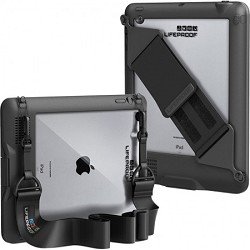
Finding a case to protect iDevices is no easy task...I won't say how many cases we have experimented with, but suffice it to say, few have made the cut. One of the biggest obstacles has been finding cases with handles or straps to make carrying around these precious devices easier and safer. Here are some options we have found particularly HAND-y (Couldn't resist the pun...).
Share This on Twitter
KidBox by Kay's Case
for iPad 2, 3 4 or iPad mini
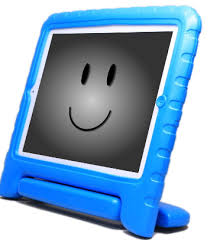

This is so lightweight and yet still protective from drops and bumps. I feel comfortable using this on my work iPad that I am in charge of handling, and I think for many children this would be a safe choice. Pluses of course are it is SO LIGHTWEIGHT while still offering protection and its unique handle can be folded into an upright stand as well as be folded into a comfortable keyboarding position. I love the stand feature and use it all the time, and being able to carry my iPad instead of balancing it on a stack of materials is a no brainer. In fact, I have been stopped numerous times while carrying the KidBox around with a "Where did you get that!?" followed by oohs and ahs (OK not the last part, although nearly...). Not only do I use the iPad with students, I have used it to enter sessions into a data tracking system our district uses. Using the case in Keyboard position is perfect for this.When I first got this it only came in pink or blue. You can now choose from pink, blue, green, orange and black. FULL REVIEW HERE GIVEAWAY April 1-30 here.
GoNow Case by Attainment Company, Inc.
For iPad 2, 3, 4 or iPad mini
From the makers of iOS AAC app
GoTalk Now, this easy to grip case has a really neat feature- a "speaker' of sorts that naturally amplifies sound without the need for batteries. I was skeptical but very hopeful, so tried it for myself. Using the same app and settings on both, I compared an iPad2 in a GoNowCase to an iPad2 in a Griffin Survivor... the volume of the iPad in the GoNow case was most definitely noticeably louder! Loudness Demo
here. I tried this with several other cases with the same results. Another benefit is the material. For chewers, this plastic may be just the trick! The case actually screws on for extra security while keeping access to all ports open. There is now an iPad mini version available as well!
FULL REVIEW HERE
OtterBox Defender / Utility Series Latch Kit by OtterBox
for iPad 1 or 2, 3, 4 ; (cases without the kit are available for iPhone, iPod touch and iPad mini)
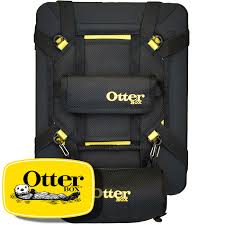
I am oh so glad to have this when protection is a must. This and the Griffin Survivor are the only two cases I have tried that I feel completely comfortable handing over to my young preschoolers to
hold on their own, due to their protective screen covers* to protect against scratches, spills etc. I have a child who tends to throw and I was previously reluctant to bring out the iPad. Now I can keep the iPad in the Latch system strapped to me while we explore it together. We are partial to black but the new style for OtterBox has several options for fun bursts of color too, if you prefer! This is one of few cases with a protective lid to cover the  screen when not in use- and when paired with the Utility Series Latch Kit, it becomes a hands-free powerhouse! Here is a video of the Latch Kit being used to secure an iPad to a wheelchair, kudos to OtterBox for creating this wheelchair friendly accessory: http://youtu.be/JCx4JkrPYY8
*the newer style OtterBox case has a protective screen cover, earlier models do not
FULL REVIEW HERE
Gab n ' Go Harness by Safe n Sound Mobile

for iPhone/ iPod or for iPad Mini (other small tablets may work)
This one wins my sincere admiration- this is not "a case"- it is a holder paired with an iDevice and case, this is truly a very innovative communication system. Adjustables straps and buckles allow the user to bring his/her device wherever they go, and the bluetooth speaker system is unbelievably loud for a device smaller than my fist. If you have a child using an iPhone, iPod touch or iPad mini as an AAC/ communication device, this is a very powerful adaptive tool! FYI, the latest version has replaced the danglet system (that plugged into the iPhone charge port) with a better system that should attach to a variety of non iOS devices. I have found the Gab n' Go Harness very useful to keep iDevices from flying through the air.
FULL REVIEW HERE
CHAT Bag (Communication Has A Tool)
for iPad 1, 2, 3 or 4, iPad mini, iPod touch or iPhone; other custom sizes available

Originally a case just for iPad, the CHAT bag is now available for iPad mini, iPhone and iPod too. Custom orders are also possible. If you have a kiddo who is a chewer, several parents have used this to cover up a rubber case successfully while adding portability with a carrying strap! I had one made to go over an Otterbox, and requested more coverage around the screen. These are customizable to ANY case. Ports/buttons are covered, but you may be able to customize if that is a problem. With the sky the limit for color/prints etc., CHAT Bag may be your most stylish of the bunch.
FULL REVIEW HERE

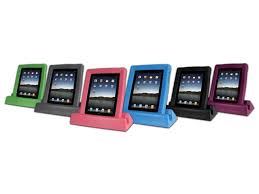 Big Grips Case/ Big Grips Hipster by Big Grips
for iPad 1 or iPad 2, 3, 4 (Buddy case also avail. for iPod touch 4th gen)
Big Grips are chunky, lightweight and easy to grip cases for your iPad. Big Grips has an optional stand available too and the combination has become popular in the special needs community. Recently the line has expanded to include a bag with handles (The Hipster), and Buddy, a case for iPod touch. The Hipster is so attractive as it allows you to use the iPad while still in its carry case- it can even be hooked to the back of the driver and front passenger's seat to view movies in the car. There is a volume discount available for educators too!
FULL REVIEW HERE
Tabtoob by Cnuffle
for iPad 2, 3 or 4

This is one of the lightest cases, the chunky foam is easy to grasp; an optional strap that easily attaches too! When using the iPad you remove the protective foam cover by flipping it over to the back of the case- upon which it becomes a stand! The lid can be positioned to use the iPad in different orientations. Visit the Cnuffle website to see a video of Tabtoob in action-being dropped and tossed, the thick rails surrounding the iPad screen seem to do a really good job of protecting it and I feel comfortable allowing my child to use an iPad with this case. Did I mention how lightweight this case is?
FULL REVIEW HERE
iAdapter by Advanced Multimedia Devices, Inc.
for iPad 1 (
iAdapter™ 1) or iPad 2, 3, 4 (
iAdapter™ 4); or iPad mini (iAdapter Mini *coming soon*), with new iAdapter Skins


I got a sneak peak of the iAdapter Mini at the CSUN 2013 conference, and was pleased to see AMDI's iAdapter Skins- these are removable skins that you apply to the front of your iAdapter case to make it more personalized. The iAdapter has been a favorite of schools and special needs organizations and does carry a higher price tag. It also has everything you would want in a case- durability, drop protection, built in speaker, built in stand, carrying handle and attachable strap, and home button cover (this is not present in the Mini case and is being phased out, as the new iOS system allows for "locking" a user into an app.) I am familiar with this case and have used this with students in the classroom and feel it is a great case. I like how it is very clear from the case that the iPad is a communication device, not a toy. It also has some heft to it, which should keep it from getting knocked around as much, although it is the heaviest of the cases mentioned. If it is in your budget do take a look as it does a great job of meeting the needs of many.
iMonster by Stormcup
for iPad 2 and up

This is definitely the most adorable case of the bunch- We have seen the cute iGuy before, but you have to admit, this is
way cuter. It also comes in several colors and is pretty darn sturdy. I almost lamented that it didn't come in my favorite color black but then thought, really, a black monster? Nah! Ours came in lime green and the kids love it! It is very easy to get on but will stay put. As you guessed, easy on means easy off- you will need a kiddo who knows to leave the case be. Wouldn't this make a great case for using to assess a reluctant child in a hospital, or therapy setting? We think so. Watch a video of someone trying to shake an iPad out of its iMonster case
here. It stays put.
FULL REVIEW HERE
Gripcase by Gripcase USA
for iPad 1(hard to find) OR iPad 2 and up OR iPad Mini

This has to be the lightest at 7.05 ounces! Obviously this won't be providing as much protection with its more open design, but it should protect from accidental drops. The openings on each side of the case serve as handles; all the ports/buttons are easily accessible. There is also an optional stand available. I could see this case being perfect for relatives and friends who hand your kid their iDevice with no case (or is that just mine?)- slip this puppy on easily and have more peace of mind. You don't really want to pay back Grandpa for his broken iPad, do you?
FULL REVIEW HERE
Apptivity Case by Fisher Price
for iPad 1, 2, 3, 4 OR iPhone/ iPod
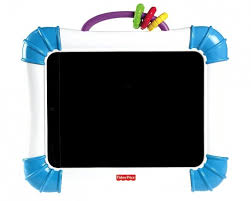
Admittedly the most "young" looking case of the bunch, with plastic beads on the handle, this case has become a favorite of both parents of young children and children with special needs because it is hard to open and has a screen cover to prevent spills. You will need a coin to open the case (the back of the case lifts off to get the iPad in and out. With the advent of iOS 6.0 this is not as needed, but another clever feature is how the case is designed- depending on which way you put it in, you can cover the home button so the child cannot exit out of an app. There is also an Apptivity case for iPod touch.
I haven't seen these in person but the following cases look HAND-Y too:
RJ Cooper Ultimate iPad case by RJ Cooper
for iPad 1 or iPad 2, 3, 4

Rj cooper ultimate iPad case; the creator of this adapted case is well known for creative solutions for the special needs community, including
arms to attach iPads to wheelchairs and more!
 The Traveller II by iBaggs.com
for iPad 2, 3, 4
This can be carried around the waist with an optional belt loop extension. There are quite a few colors to pick from and two patterns- camo and cheetah print.
 Tablet Teddy by Dean Designs
Awwww... It is an actual backpack with straps and a comfy zippered compartment to store an iPad... designed by a former pediatric therapist; need I say more?
iPad cases by Uzibull
for iPad 1 or iPad 2, 3, 4
On the left- Ektopad for iPad1 has openings to thread a strap through; Middle- Ekto2 for iPad 2 & up has spots to attach a strap as well as a variety of handy accessories with an optional accessory pack added; On the right- Ekto + , like Ekto2 but designed specifically for schools- there is an open space at the back to allow a place for labeling the iPad, for example.
 AddyCase
for iPad 2,3,4
This case covers the home button cover, but can still be accessed by an adult, with a harder press.
Griffin Survivor with Harness by Griffin
for iPad 1 or 2, 3, 4

The Griffin Survivor is another case I love for its protection factor, and the Harness system makes it more portable too! The Griffin Harness system comes with several accessories including a strap, rain cover and more. I would love to see the straps up close to see how well they grip the iPad, not only on the Griffin case, but with other cases as well.
Lifeproof Case w/ Accessory Pack by Lifeproof

for iPad 2, 3, 4
Some parents have found success with Lifeproof cases for children who need a heavy duty case that is protective, waterproof, and hard to remove. Lifeproof owners should be happy to learn there is a hands-free accessory kit!
Philip's Kids Case for iPad 2 (DISCONTINUED) *
for iPad 2, 3, 4

* This one has bad reviews that center around no access to ports. If you don't want your child fiddling with the charger port area, headphone jack or volume control...this might actually be a good thing! You should be able to find it on Amazon or Ebay.
For more case ideas, visit Special Apps, Special Kids on Pinterest: http://pinterest.com/specialappssk/ios-cases-accessories/
Do you have a case with a handle or straps to be added to this list? Send SASK a message at specialappsspecialkids@gmail.com