Showing posts with label special needs. Show all posts

Thursday, April 30, 2015

New and Notables: CSUN 2015 Exhibit Hall


APPS, SOFTWARE & ACCESSORIES

CSUN is a treasure-trove of information and each year there are lots of goodies to be discovered.

Here are some products and resources sighted at this year's CSUN Exhibit Hall:

The hands down favorite find this year was:

Microsoft Sprout by HP
This software was on display for everyone to play with and I was floored at all the possibilities it could open up in an educational or special needs setting, not to mention it being coveted for home use i.e. for scrap booking, for organizing your tax receipts... oh my, I have a really hard time thinking of someone who would NOT think this would be a helpful tool.
The demonstration included an amazing 3D prototype not to mention existing capability to literally place any object down on the mat and have it pretty much instantaneously imported into the software program as an image, using dual (above/below)
document cameras.

Ah, the price tag... At $1,899 it's not cheap, but it is certainly comparable to other programs and devices many school districts are using, with many advantageous features. {Crossing fingers my school district will feel the same}

Microsoft is actively seeking educational and special needs-focused developers for this platform, so if that is you, seek them out.

More info on Microsoft Sprout HP here: http://www.cnet.com/products/hp-sprout/

iYoMube is an app for visually impaired users that reads aloud signs and written print in the environment using Apple's existing VoiceOver technology and camera feature.

I was sold after a demo- the app read aloud several signs more than 10 feet away, but have had trouble with the app on my iPhone 4 sadly.
(FYI this was demonstrated on a newer iPhone, with the latest iOS, and I think that is key- my old iPhone 4 did not perform well)

**I recommend waiting for a lite version of this app to be available in the App Store so potential users can try it out with their device and operating system first.** 
Developer Response: The App works best on iPhone 6 or 6+ for now because of its better camera focusing function.
                   
Here is the premise for how it should work- to use the app you must have VoiceOver feature enabled. You can use the app to "read" photos in your photo album, but even more impressive was live reading of whatever is in your viewfinder. To activate this feature open the app and swipe to the left until you get to the settings page, then choose ''navigation mode" to turn on the "Real Time Speech" (it is off by default).  There are also two modes you can switch in and out of by swiping left or right on the screen- Text mode, where all recognizable words are read at once, or Blocks mode, where each individual part of an image can be read by touching it. You can also choose to save images captured via the app to your photo album, or change the language to be recognized from one of five choices: English, Japanese, Korean, Chinese (simplified) or Chinese (traditional).

I can't vouch whether this app will work for your device or not.  But we have come a long way, technology-wise, a long way indeed!


Also spied, were the tactile Parcheesi and checker sets from Altix Vision
seen at last year's CSUN event...the current sets available are upgraded models with high quality wood and even cooler! They were just being launched last year and basically were in prototype stage, but now they are definitely ready for purchase.

The sets have easy to grasp pieces that are easier to differentiate from one another, so those with visual impairments, as well as any other players, can enjoy!
The games are about $30 each, but do not include shipping.  They are currently seeking distributors in the U.S. so if that is you, you can contact them.

The sets can be ordered by sending a request to: adam.kalbarczyk@altix.pl


While doing further research on the above products, I also came across this web resource on how to offer assistance to people who have low vision or are blind:

http://valenciacollege.edu/osd/documents/BlindnessDraft.pdf

\
Chat Wrap

This iPad case is clearly the object of my desire but at $499 out of reach for some of us. (There may be some confusion on the pricing I was quoted as SilverKite has the ChatWrap case listed at $395 here: https://store.silver-kite.com/product_info.php/products_id/552 ). The sound is very clear and loud, and the case is very sturdy while not adding an extreme amount of weight- it is lighter weight than a popular leading industry competitor that comes to mind. I would like to see a screen protector of some sort included as standard. There is a feature to easily add a lanyard too.  If you are successful with insurance reimbursement, or if more mainstream cases have failed to meet your needs, this would be a worthwhile investment indeed!

There were  also some companies from last year spied again:

 GoTalk Now and a suite of special needs apps and products from Attainment Company, speech and language therapy apps from Virtual Speech Center, Sono Flex and Tobii's eye tracking software (A previous favorite last year was eye tracking software from Sensory Software); Proloquo2Go (and newer 'sister' products Keedogo and Proloquo4Text) from Assistive Ware; L.A.M.P. Words for Life from PRC and Boardmaker from Mayer Johnson


Thursday, April 2, 2015

Giveaways & FREE / Sale Lists: Autism Awareness Month 2015


Many apps are deeply discounted on April 2, 2015, for World Autism Awareness Day, click below for 100s of dollars in savings:


>>>>>>>>>>SASK FREE &SALE Apps List Autism Awareness Month<<<<<<<<<<<<


https://www.facebook.com/SpecialAppsSpecialKids/posts/1093970933953510


*Giveaway for three ChooseIt! Curriculum apps from Inclusive Technology is ongoing at the SASK facebook page via the link above*
More Savings:


More places to check for other FREE/SALE apps and GIVEAWAYS during Autism Awareness Month:


Smart Apps for Kids has many goodies listed here: http://www.smartappsforkids.com/2015/04/autism-acceptance-month-april-2nd-featured-free-and-discounted-apps.html#more


The iMums have some free apps AND several giveaways listed, including a giveaway for a suite of Otterbox products and a year's subscription to a sensory processing therapy tool from Sensory TreatsAND a $100 iTunes giveaway from Old Macdonald Sing & Play by ChocChip http://theimum.com/2015/04/fast-freediscounted-apps-and-free-books-apr-2/


The blog Parenting Healthy has a giveaway of autism related books spanning from a book on sensory processing to Dr. Temple Grandin's The Way I See It, enter here: http://www.parentinghealthy.com/2015/03/book-giveaways-for-national-autism.html


Products:

Gripcase has a discount code for you!

Sue Larkey is offering a FREE E-book with excellent tips on understanding Autism- perfect for enlightening your child's teachers!

 To have the E-book sent to you click this linkhttp://suelarkey.com.au/Free_Downloads.php


Posts on Special Needs Apps & Products:


AAC Apps:
http://specialappsspecialkids.blogspot.com/2014/03/10-innovative-aac-apps.html


Always FREE Apps:
http://specialappsspecialkids.blogspot.com/2014/05/50-totally-free-apps-for-special-needs.html


Handy iPad/Mini cases post: http://specialappsspecialkids.blogspot.com/2013/04/handy-ios-cases-for-kids-with-or-wo.html


Top 10 Special Needs Developers: http://specialappsspecialkids.blogspot.com/2014/03/10-tried-and-true-special-needs-app.html


Android Apps List:
http://specialappsspecialkids.blogspot.com/2012/01/android-apps-for-special-needs.html?showComment=1391766342990#c8444413872457559518


Posts on Special Needs Topics:


Thursday, January 1, 2015

Top Ten Apps of 2014


Top 10 Apps of the Year

AAC apps have purposely been excluded from this Top 10 Apps of the Year post, because that would require a whole new post by itself! In fact, Special Apps, Special Kids did just that in the past- take a look here: http://specialappsspecialkids.blogspot.com/2014/03/10-innovative-aac-apps.html

You might also enjoy: http://specialappsspecialkids.blogspot.com/2014/03/10-tried-and-true-special-needs-app.html


Finger Paint with Sounds  by Inclusive Technology Ltd FREE
Finger Paint with Sounds is a perfect beginning cause and effect app for special needs, using both color and sound to captivate the interest of the user.  Simply touch the screen and the magic will begin!  You can change the settings so any touch on the screen the will work, or use it to work on more control using just one finger at a time. Settings also allow you to choose music or sound effects to play as you draw. This app is designed with special needs in mind- to exit the screen you have to double tap in the upper corner to prevent accidental exits.  Doing so will also allow access to settings, clearing the drawing, or saving the drawing to your Photos.
For some out of the box ideas on how to repurpose this app for use in speech and language therapy, visit this app's profile on yappguru.com: http://www.yappguru.com/experts/review_item/318


Sharing with Duckie Deck by Duckie Deck Development

It is hit or miss with some of the other apps from this developer, but Sharing with Duckie Deck has a couple of activities perfectly aligned with social thinking skills. In one activity, the player must be thinking about what all of the characters in a particular scene want, in order to successfully hand out the objects and move on to the next scene. In another activity the player is given food items to hand out to four characters- if a character is missed, he/she will express his disappointment with a frown and "aw!" The kids LOVE it.   You can also decorate a cake, play a memory game, or play with toys, but we keep coming back to the above activities.


iMommy by K & N Ventures
(there is also a FREE ad supported version  w/ in-apps)
iMommy is an app I get a lot of use out of with my special education early childhood preschoolers. Several of my students are beginning communicators, and this app has fun, meaningful content that encourages language use.  It is a great way to focus on simple verbs and common nouns in a young child's environment, as well as basic sentence structures.  There are five environments for the child to explore: kitchen, bedroom, playroom, bath, changing room, picnic and closet.  I tend to focus on the kitchen, bedroom and bath areas.  I have my students use their language to request what the baby will do, or model it for them and have them repeat if they are unable to do so on their own.  Some of my students are using ASL, so we do the signs for simple vocabulary in the app such as eat, drink, play, sleep, wash, apple, milk, teddy bear, ball, blanket etc.


First Phrases HD by Hamaguchi Apps for Speech, Language and Auditory Development
(there is a lite version available for 99 cents, as well as a version for iPhone)

First Phrases HD is one of many quality speech therapy apps from this developer.  This is a perfect app for young students who are just learning to combine 2 or 3 words together to communicate. The app provides  Verb +  Noun phrases such as cut + the cake, or eat + the + banana. The app also includes phrasal verbs (verb + preposition) like put away or turn on.    First Phrases HD is my favorite app in this series and also the biggest hit among my young students with speech and language delays. They love the cause and effect aspect of this app- tap a phrase and the character will animate it. Even more enticing, is the record feature.  After the child records the phrase, they can listen to their recording, causing the animation to repeat.  This is really delightful for my students who understand the character is doing what they requested through their own verbal language!


Happy Geese by Appically (FREE version reviewed, full version also avail.)
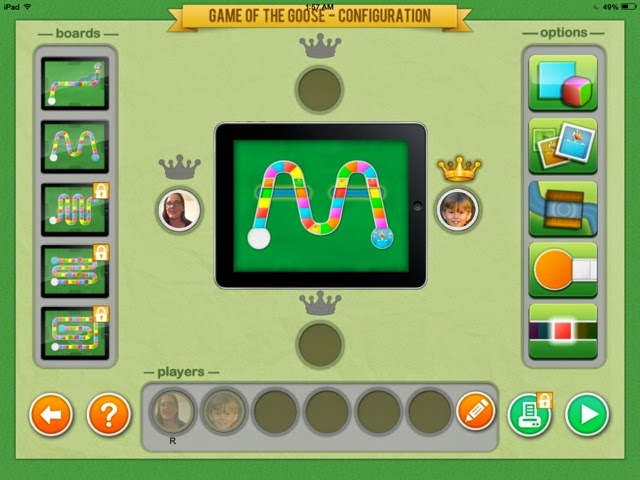
There are very few board games in the app store suited for special needs, but Happy Geese fits the bill.  It was created specifically with special needs users in mind, although it is perfect for my typical preschoolers as well. Players can choose from one of two board layouts, as well as several different dice/game play options. .  (There are also small in-app purchases to access more layouts and options, or you can purchase the full version of Happy Geese: Happy Geese Full)  For the basic free version you can choose whether players use number dice or simply colors, whether a spinner is used, and whether more challenges are added to the game. For example you can choose to add snakes for a player to slide down, ladders for a player to climb up, and also set whether a single color needs to be chosen to win, or whether any color rolled at the end of the game will win.  A favorite feature, however is the winner's crown- select it to ensure a player will win- when first introducing the concept of turn taking/ game playing with a young student who hasn't quite established strong emotional regulation skills, I appreciate taking away the possibility of a mega meltdown that may ensue from losing the game. Another fun and very functional feature is the ability to add pictures of each child to the game markers to make them personalized/more meaningful.

Pogg - kids game to learn spelling, language and vocabulary such as verbs, especially in slp and special education like autism and speech therapy by Ricky Vuckovic

Pogg is a lovable odd creature that acts out a variety of simple, everyday actions (and a few nouns) when a word is selected from the menu of pictures OR when one of the words is spelled out via the keyboard.  The latter option makes this perfect for spelling practice- if a word is misspelled, Pogg will appear, scratching his head in confusion. 


Niki Story by Alessandro LaRocca

Niki Story makes it really easy to create picture symbol sentences to support whatever literacy or language activity you are doing at the time. This app also allows you to embed videos, record sound, or draw directly on a scene as well- every step is simple to do.  This app is super versatile, affordable, and perfect for creating lessons for just about anything.  We've been using it lately to target language development goals such as AVOs (agent + verb+ object). You can organize your lessons into different folders, and easily edit. (There is a lock feature you must unlock to do this- you must enter a mathematical equation to unlock it)


WordToob: Language Learning with Video Modeling by John Halloran

WordToob is essentially a living dictionary, although it has many other uses (see link at the end of this paragraph).  It comes programmed with some basic core vocabulary acted out in videos, and it is easy to program your own mulitple short videos per vocabulary word- this way a person can learn multiple examples of a word across different setting. By doing so they learn to generalize the word's meaning. For example, to combat someone thinking "eat"' is something you do only at your blue kitchen table with an ABC place mat.- you can take videos of someone eating pizza in the cafeteria, or eating a snack at a bench during recess, or eating a peanut butter sandwich on a field trip, and so on. The app allows you to easily make copies of existing boards, and hide words on the board as well.  Other people have had success using WordToob for different purposes too- as a visual schedule, for teaching social skills and so on.  One clever use listed on the app's webpage is using it is a communication book to go back and forth from school/home- the teachers take snippets of videos throughout the day to share what they did.  For a video outlining other ways to use WordToob visit here:


IWash My Cats by Portegno Apps
(this is an iPhone app, but fills the iPad screen too- the graphics won't knock your socks off, but my students don't care)

IWash My Cats is a simple and fun pretend play game for preschool or young elementary school students.  Each time you play a new, muddy messy cat appears on the screen for the child to wash. The steps are always the same= scrub with soap, rinse, dry, and brush.  Audio instructions will announce each step "Let's brush!" There are different sound effects for each step as well as stars that sparkle on the screen after completing each step.  This is perfect for introducing the concept of sequencing.  If you have a stuffed animal cat and some props, you can act out each of the steps practiced in the app too for further understanding and fun. I use this app for younger kids working on /sh/ sounds frequently as a reward after practicing their sounds.  They don't care that they are still working on their sounds, because they are busy having so much fun- we can use "'wash" (or 'scrub'if working on s blends), "brush" and then ''shhhh" to mimic the sound of the hair dryer and "shiny" to talk about their fur after washing.  we also refer to each cat as ''she" or give them /sh/ names like Sharlee, Shad, Sheila etc...

 Toca kitchen 2 by Toca Boca
I've been using the original Toca Kitchen as a staple with my young students, but with Toca Kitchen 2 just out, this is now the bee's knees. The characters have a whole new look that I find strange but that is highly appealing to my little ones, so kudos to the developers for catching on to this. There are new, more realistic looking foods and features. There is even a whole new set of condiments, including lemon you can squeeze, and hot sauce. Try to give something too hot to someone to see the character react and blow on the food. Another new feature is the ability to make smoothies. Have you ever had a shrimp-corn-tabasco smoothie? I do not recommend it for consumption but do try serving it to a character in Toca Kitchen 2- the reaction is priceless!


The Zones of Regulation by Selosoft

Zones of Regulation is a great tool for adult and child to use together.  It is actually a game a child can navigate through to learn concepts from the Zones of Regulation book/ program. I don't have the program, but others have noted in reviews it is not as complete- for someone with general knowledge of the program, the app should be perfect as it is a great way to introduce and learn techniques to help someone identify and understand his/her feelings, as well as cope with those feelings using the strategies in the app.  There are two main sections- a game area where you navigate a character to one of the four zones to answer questions about them, and a "More Content" button with four new activities (Picture Studio, Match the Face, Lazy 8 breathing, and Six Sides of Breathing). The new tools that have been added to the app for breathing to calm down, and identification of emotions and their "zones" - blue, green, yellow or red, are great. Game play is not overly punitive either- if you get an answer incorrect, you get one coin instead of 3, and are simply told to try again.  During play there are icons for each zone that you can refer to at any time, or you can go back to the main menu to access additional activities under the More Content button. There is one caveat- there is a bug that makes the camera feature crash, at least on my (older) iPad mini with iOS 7.1.2 installed.  To get around this you will have to take pictures of your different feelings beforehand and then select "Choose existing photo".
Just counted and that's 11. Ah, top 11 Apps of the Year to you!

Saturday, December 13, 2014

New and Notables: Educational Apps Vol. 2 (Young Learners)

New and Notables: Educational Apps Vol. 2  (Young Learners)


My Very Hungry Caterpillar by StoryToys Entertainment Limited (iPhone / iPad; $3.99 at time of review) NEW

excerpt from iTunes:
Eric Carle’s much-loved character, The Very Hungry Caterpillar™, has won the hearts of millions of children around the world for more than 45 years. Now, for the first time, The Very Hungry Caterpillar is brought to life in a stunning 3D interactive app. 

You'll soon fall in love with your own Very Hungry Caterpillar as you enjoy a range of fun activities together. Hatch him from an egg, drag tasty fruits from a nearby tree, then watch as he eats them! And when My Very Hungry Caterpillar gets sleepy, just tuck him into his bed.

Each time you wake him up, it’s time for an exciting new adventure: push him on a swing, sail on a pond with bobbing Rubber Ducks, and grow flowers and fruit in a magical 3D garden.

The more you play, the more surprises you'll find including new activities, new fruit, and new toys unlocked over time. Chase a bouncing ball, pop floating bubbles and watch out for the wind-up Grouchy Ladybug! 

Day by day, My Very Hungry Caterpillar grows bigger and bigger, until he changes into a beautiful butterfly. Then a new egg is laid and the adventure begins again. 
It's a world of beauty and color you'll return to again and again.


 It's tough to work with preschoolers without being an Eric Carle fan, especially when it comes to that adorable caterpillar!  My Very Hungry Caterpillar app celebrates the charm of that famous little caterpillar, bringing him to life along through interactive play. The illustrations are relevant to the story, colors are vibrant and the activities are easy for a young child to follow- to begin the game touch the egg  on the screen to "hatch" the caterpillar- he will follow where you tap.   Tap on objects in the scenes to discover interactive elements and sound effects. (Visual cues will help guide the child).  You can even plant seeds in a garden and watch them grow as you water them.  There are also fun toys for the little caterpillar to play with.   (I love how the ball bounces to the child's touch but would love to see more engagement with the caterpillar here- like a giggle or a different facial expression on the caterpillar)  After the caterpillar has eaten and played enough, lead him to a tree stump and tuck him in to bed under a leaf- the screen will actually blacken to mimic the passing of a day- wake him up and find new items to explore. Eventually the caterpillar will turn in to a butterfly if nurtured properly through play!

For sticklers to the story, the egg looks different,  and the app doesn't follow the story in terms of presenting the correct number of  foods (none of the yummy treats or leaf to munch through are included either), but to connect play to the story, you could sit down with the child and have him recall how many strawberries or plums were eaten, and have the child set out the correct number of items for the caterpillar to munch through (super satisfying by the way).  For kids who are distracted by background music (it's lovely by the way) the music can be shut off via the Settings tab. This is a satisfying cause and effect app for little ones familiar with the Very Hungry Caterpillar.  

Click on one of the links below to download a free copy of My Very Hungry Caterpillar to your iTunes account: 


Quick Math Jr. by Shiny Things  (Universal, $2.99 at time of review) NEW

excerpt from iTunes:
Quick Math Jr. helps children aged 3-7 learn the important foundations of mathematics: counting, addition, subtraction, handwriting numbers and much more. As your child plays through the 5 fun games it will dynamically adjust the difficulty so they are always receiving questions that are specifically designed for them. Made by the creators of the award-winning Quick Math series, Quick Math Jr. will help your child to become confident in mathematics.

FEATURES
• Five games aligned with international maths curriculums, including US Common Core and the Australian National Curriculum
• Adaptive difficulty to quickly place players at the appropriate level, with challenges to keep them in their zone of proximal development.
• Write answers directly on-screen! Players progress from multiple-choice to handwritten answers.
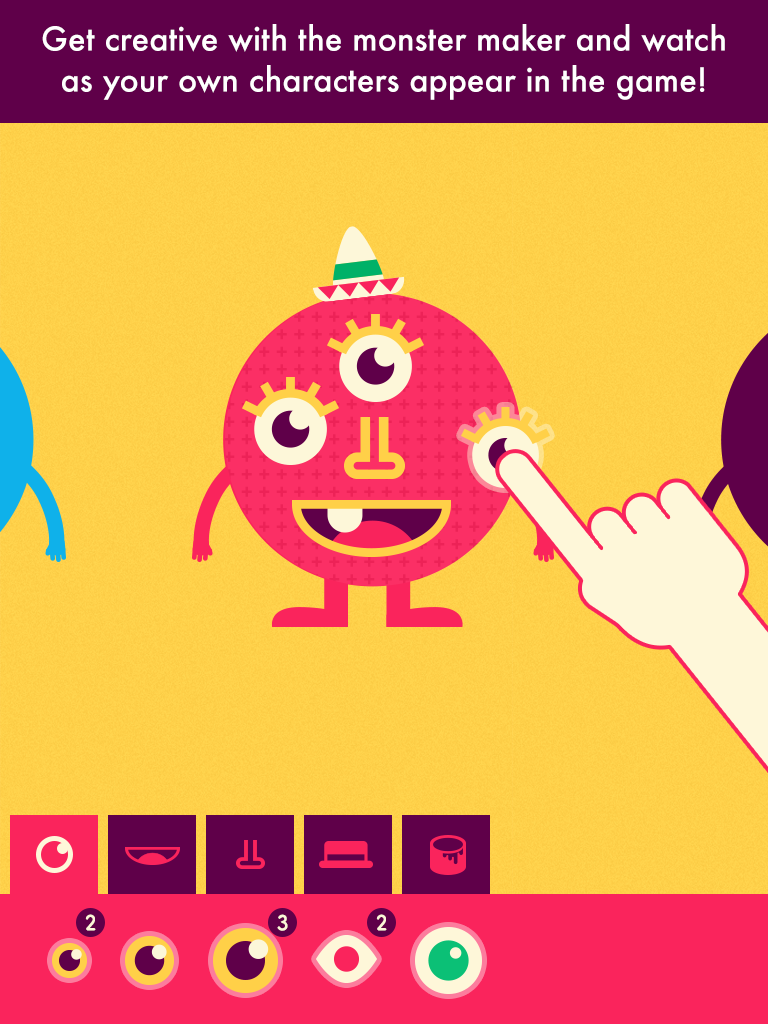
• Create your own monster characters by winning new features, then see your creations appear in the game!
• Unlimited player profiles for easy device sharing

Shiny Things already endeared us with their Shiny Bakery app, so I was eager to try this out with my younger son. Aside from the fun animations and adorable characters designed to keep a young learner's attention, one  of my favorite features is the writing recognition- it even does a really good job understanding my son's handwritten numbers, despite handwriting not being his strong suit.  My son loves creating faces for the Shiny people/creatures and watching them actually come to life as characters in the math activities.  I really like how this incorporates visual memory strategies too- for example one of the tasks shows a certain number of creatures that appear for a brief second before the light flickers out; the user has to pick the dice that corresponds with the number of creatures to play the game. The game play is not punitive either- if a mistake is made, the creatures simply mumble and the incorrect answer is removed from the choices, as many times as necessary until the child chooses the correct answer.  Both educational and fun, it's a keeper!


~~CHECK BACK LATER FOR CODES, COMING SOON! ~~

Draw with Curious George  by Houghton Mifflin Harcourt  (iPad, 99 cents at time of review) 


 excerpt from iTunes:
Does your playful little monkey love drawing on the walls? Have him draw with Curious George instead in this fun and entertaining coloring app! In Draw with Curious George children can color and draw for hours, with a selection of vivid colors, tools, stamps, and stickers. 

Draw with Curious George provides your child with everything he or she needs to create a masterpiece and then share with loved ones through a kid-friendly email system. 

Features & Benefits 
Activities such as:
•Connecting-the-dots
•Tracing animal drawing – everything from birds to bunnies
•Coloring in drawings using different sizes of pencils, paintbrushes, and markers for varying effects
•Painting in opposites with a mirror painting button
•Playing with stamps and stickers
•Having fun cleaning up Curious George’s silly splatters and monkey jumbles
•Sharing art with friends and family through Curious George’s kid-friendly email system


 A very parent and child-friendly app with no in-app purchases or third-party advertising (yay!), Draw with Curious George also thought of a much appreciated feature-an art gallery within the app, so the iPad's photo albums stay uncluttered with tons of artwork while the kids save their masterpieces. (Thank you from the bottom of my heart!)  However my favorite feature is the friendly narration (it's The Man With The Yellow Hat!) so non-readers can easily navigate the app and enjoy all its features. There are many different Curious George themed activities to keep preschoolers and younger elementary aged kiddos entertained-  tracing, connect the dots, coloring with a variety of tools, including stamps, stickers and silly "paint"' options like bananas.  There are fun sound effects for the silly paint tools, and for those of us who grew up on Curious George, he also makes the cutest noises when you tap him. Awwww.  Even better is the easy sharing by email feature- it allows you to add up to three pictures and emails-after you've set it up, the child simply clicks on the picture of the person they want to send their artwork to.  


Tools:

Fun Timer by all4mychild (iPhone/iPad, 99 cents at time of review)  


Fun Timer is a simple visual timer to help children be successful while doing a task or activity. You can set it for either ''earning" or "losing" an activity, for a period of anywhere from 1 to 30 minutes. To customize the app, you can add your own pictures from your photo album, draw a picture, or type in a message.

For earning a privilege, select an image, drawing or type in words showing what you want to do next if behaviors are positive.  Select the earning button when the child is doing the expected behavior, and slowly more and more of the picture will be revealed until the timer ends, and the reward is earned.

For losing a privilege (a child gets off task, or is fighting, or engaging in an unexpected behavior) select the "Losing"' button, then "start'' and over time the image, drawing, or words you added to the timer will disappear, showing that you won't be able to earn or do the fun activity depicted if the behavior continues.  Press ''pause'' to stop the timer for good behavior.  If the behavior continues, the image will eventually go blank after the time you specified and the timer's face will show tears.