Tweet
Top 10 Apps of the Year
AAC apps have purposely been excluded from this Top 10 Apps of the Year post, because that would require a whole new post by itself! In fact, Special Apps, Special Kids did just that in the past- take a look here: http://specialappsspecialkids.blogspot.com/2014/03/10-innovative-aac-apps.html
You might also enjoy: http://specialappsspecialkids.blogspot.com/2014/03/10-tried-and-true-special-needs-app.html
Finger Paint with Sounds by Inclusive Technology Ltd FREE
Finger Paint with Sounds is a perfect beginning cause and effect app for special needs, using both color and sound to captivate the interest of the user. Simply touch the screen and the magic will begin! You can change the settings so any touch on the screen the will work, or use it to work on more control using just one finger at a time. Settings also allow you to choose music or sound effects to play as you draw. This app is designed with special needs in mind- to exit the screen you have to double tap in the upper corner to prevent accidental exits. Doing so will also allow access to settings, clearing the drawing, or saving the drawing to your Photos.
For some out of the box ideas on how to repurpose this app for use in speech and language therapy, visit this app's profile on yappguru.com: http://www.yappguru.com/experts/review_item/318


Sharing with Duckie Deck by Duckie Deck Development
It is hit or miss with some of the other apps from this developer, but Sharing with Duckie Deck has a couple of activities perfectly aligned with social thinking skills. In one activity, the player must be thinking about what all of the characters in a particular scene want, in order to successfully hand out the objects and move on to the next scene. In another activity the player is given food items to hand out to four characters- if a character is missed, he/she will express his disappointment with a frown and "aw!" The kids LOVE it. You can also decorate a cake, play a memory game, or play with toys, but we keep coming back to the above activities.


iMommy by K & N Ventures
(there is also a FREE ad supported version w/ in-apps)
iMommy is an app I get a lot of use out of with my special education early childhood preschoolers. Several of my students are beginning communicators, and this app has fun, meaningful content that encourages language use. It is a great way to focus on simple verbs and common nouns in a young child's environment, as well as basic sentence structures. There are five environments for the child to explore: kitchen, bedroom, playroom, bath, changing room, picnic and closet. I tend to focus on the kitchen, bedroom and bath areas. I have my students use their language to request what the baby will do, or model it for them and have them repeat if they are unable to do so on their own. Some of my students are using ASL, so we do the signs for simple vocabulary in the app such as eat, drink, play, sleep, wash, apple, milk, teddy bear, ball, blanket etc.


First Phrases HD by Hamaguchi Apps for Speech, Language and Auditory Development
(there is a lite version available for 99 cents, as well as a version for iPhone)
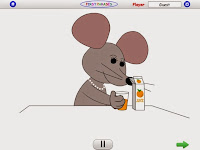
First Phrases HD is one of many quality speech therapy apps from this developer. This is a perfect app for young students who are just learning to combine 2 or 3 words together to communicate. The app provides Verb + Noun phrases such as cut + the cake, or eat + the + banana. The app also includes phrasal verbs (verb + preposition) like put away or turn on. First Phrases HD is my favorite app in this series and also the biggest hit among my young students with speech and language delays. They love the cause and effect aspect of this app- tap a phrase and the character will animate it. Even more enticing, is the record feature. After the child records the phrase, they can listen to their recording, causing the animation to repeat. This is really delightful for my students who understand the character is doing what they requested through their own verbal language!
Happy Geese by Appically (FREE version reviewed, full version also avail.)
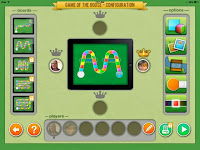
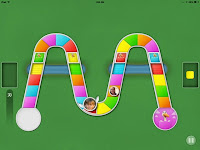
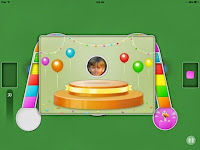
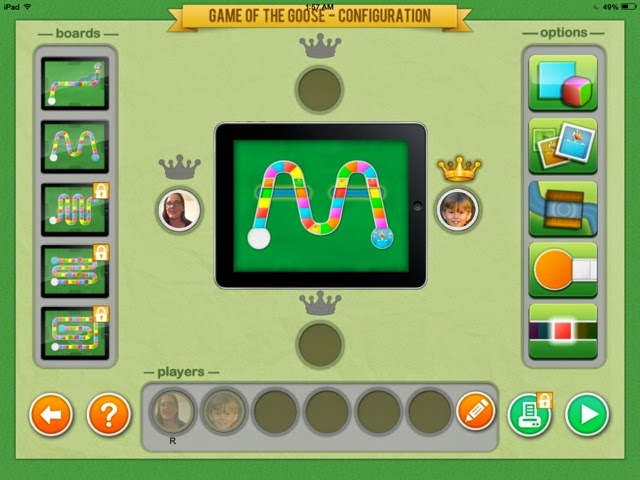
There are very few board games in the app store suited for special needs, but Happy Geese fits the bill. It was created specifically with special needs users in mind, although it is perfect for my typical preschoolers as well. Players can choose from one of two board layouts, as well as several different dice/game play options. . (There are also small in-app purchases to access more layouts and options, or you can purchase the full version of Happy Geese: Happy Geese Full) For the basic free version you can choose whether players use number dice or simply colors, whether a spinner is used, and whether more challenges are added to the game. For example you can choose to add snakes for a player to slide down, ladders for a player to climb up, and also set whether a single color needs to be chosen to win, or whether any color rolled at the end of the game will win. A favorite feature, however is the winner's crown- select it to ensure a player will win- when first introducing the concept of turn taking/ game playing with a young student who hasn't quite established strong emotional regulation skills, I appreciate taking away the possibility of a mega meltdown that may ensue from losing the game. Another fun and very functional feature is the ability to add pictures of each child to the game markers to make them personalized/more meaningful.


iMommy by K & N Ventures
(there is also a FREE ad supported version w/ in-apps)
iMommy is an app I get a lot of use out of with my special education early childhood preschoolers. Several of my students are beginning communicators, and this app has fun, meaningful content that encourages language use. It is a great way to focus on simple verbs and common nouns in a young child's environment, as well as basic sentence structures. There are five environments for the child to explore: kitchen, bedroom, playroom, bath, changing room, picnic and closet. I tend to focus on the kitchen, bedroom and bath areas. I have my students use their language to request what the baby will do, or model it for them and have them repeat if they are unable to do so on their own. Some of my students are using ASL, so we do the signs for simple vocabulary in the app such as eat, drink, play, sleep, wash, apple, milk, teddy bear, ball, blanket etc.


First Phrases HD by Hamaguchi Apps for Speech, Language and Auditory Development
(there is a lite version available for 99 cents, as well as a version for iPhone)
First Phrases HD is one of many quality speech therapy apps from this developer. This is a perfect app for young students who are just learning to combine 2 or 3 words together to communicate. The app provides Verb + Noun phrases such as cut + the cake, or eat + the + banana. The app also includes phrasal verbs (verb + preposition) like put away or turn on. First Phrases HD is my favorite app in this series and also the biggest hit among my young students with speech and language delays. They love the cause and effect aspect of this app- tap a phrase and the character will animate it. Even more enticing, is the record feature. After the child records the phrase, they can listen to their recording, causing the animation to repeat. This is really delightful for my students who understand the character is doing what they requested through their own verbal language!


There are very few board games in the app store suited for special needs, but Happy Geese fits the bill. It was created specifically with special needs users in mind, although it is perfect for my typical preschoolers as well. Players can choose from one of two board layouts, as well as several different dice/game play options. . (There are also small in-app purchases to access more layouts and options, or you can purchase the full version of Happy Geese: Happy Geese Full) For the basic free version you can choose whether players use number dice or simply colors, whether a spinner is used, and whether more challenges are added to the game. For example you can choose to add snakes for a player to slide down, ladders for a player to climb up, and also set whether a single color needs to be chosen to win, or whether any color rolled at the end of the game will win. A favorite feature, however is the winner's crown- select it to ensure a player will win- when first introducing the concept of turn taking/ game playing with a young student who hasn't quite established strong emotional regulation skills, I appreciate taking away the possibility of a mega meltdown that may ensue from losing the game. Another fun and very functional feature is the ability to add pictures of each child to the game markers to make them personalized/more meaningful.


Pogg - kids game to learn spelling, language and vocabulary such as verbs, especially in slp and special education like autism and speech therapy by Ricky Vuckovic
Pogg is a lovable odd creature that acts out a variety of simple, everyday actions (and a few nouns) when a word is selected from the menu of pictures OR when one of the words is spelled out via the keyboard. The latter option makes this perfect for spelling practice- if a word is misspelled, Pogg will appear, scratching his head in confusion.


Niki Story by Alessandro LaRocca
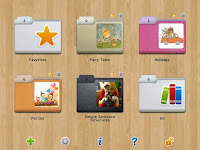
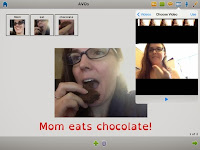
Niki Story makes it really easy to create picture symbol sentences to support whatever literacy or language activity you are doing at the time. This app also allows you to embed videos, record sound, or draw directly on a scene as well- every step is simple to do. This app is super versatile, affordable, and perfect for creating lessons for just about anything. We've been using it lately to target language development goals such as AVOs (agent + verb+ object). You can organize your lessons into different folders, and easily edit. (There is a lock feature you must unlock to do this- you must enter a mathematical equation to unlock it)
WordToob: Language Learning with Video Modeling by John Halloran
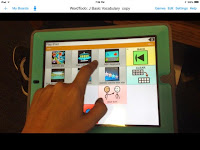
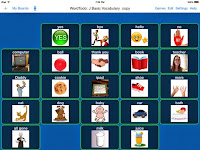
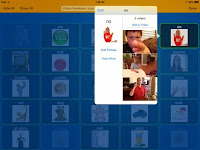
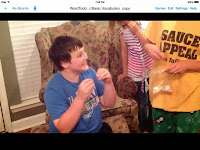
WordToob is essentially a living dictionary, although it has many other uses (see link at the end of this paragraph). It comes programmed with some basic core vocabulary acted out in videos, and it is easy to program your own mulitple short videos per vocabulary word- this way a person can learn multiple examples of a word across different setting. By doing so they learn to generalize the word's meaning. For example, to combat someone thinking "eat"' is something you do only at your blue kitchen table with an ABC place mat.- you can take videos of someone eating pizza in the cafeteria, or eating a snack at a bench during recess, or eating a peanut butter sandwich on a field trip, and so on. The app allows you to easily make copies of existing boards, and hide words on the board as well. Other people have had success using WordToob for different purposes too- as a visual schedule, for teaching social skills and so on. One clever use listed on the app's webpage is using it is a communication book to go back and forth from school/home- the teachers take snippets of videos throughout the day to share what they did. For a video outlining other ways to use WordToob visit here:


WordToob: Language Learning with Video Modeling by John Halloran
WordToob is essentially a living dictionary, although it has many other uses (see link at the end of this paragraph). It comes programmed with some basic core vocabulary acted out in videos, and it is easy to program your own mulitple short videos per vocabulary word- this way a person can learn multiple examples of a word across different setting. By doing so they learn to generalize the word's meaning. For example, to combat someone thinking "eat"' is something you do only at your blue kitchen table with an ABC place mat.- you can take videos of someone eating pizza in the cafeteria, or eating a snack at a bench during recess, or eating a peanut butter sandwich on a field trip, and so on. The app allows you to easily make copies of existing boards, and hide words on the board as well. Other people have had success using WordToob for different purposes too- as a visual schedule, for teaching social skills and so on. One clever use listed on the app's webpage is using it is a communication book to go back and forth from school/home- the teachers take snippets of videos throughout the day to share what they did. For a video outlining other ways to use WordToob visit here:


IWash My Cats by Portegno Apps
(this is an iPhone app, but fills the iPad screen too- the graphics won't knock your socks off, but my students don't care)
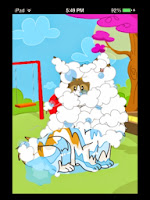
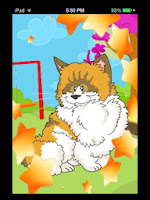
IWash My Cats is a simple and fun pretend play game for preschool or young elementary school students. Each time you play a new, muddy messy cat appears on the screen for the child to wash. The steps are always the same= scrub with soap, rinse, dry, and brush. Audio instructions will announce each step "Let's brush!" There are different sound effects for each step as well as stars that sparkle on the screen after completing each step. This is perfect for introducing the concept of sequencing. If you have a stuffed animal cat and some props, you can act out each of the steps practiced in the app too for further understanding and fun. I use this app for younger kids working on /sh/ sounds frequently as a reward after practicing their sounds. They don't care that they are still working on their sounds, because they are busy having so much fun- we can use "'wash" (or 'scrub'if working on s blends), "brush" and then ''shhhh" to mimic the sound of the hair dryer and "shiny" to talk about their fur after washing. we also refer to each cat as ''she" or give them /sh/ names like Sharlee, Shad, Sheila etc...
(this is an iPhone app, but fills the iPad screen too- the graphics won't knock your socks off, but my students don't care)
IWash My Cats is a simple and fun pretend play game for preschool or young elementary school students. Each time you play a new, muddy messy cat appears on the screen for the child to wash. The steps are always the same= scrub with soap, rinse, dry, and brush. Audio instructions will announce each step "Let's brush!" There are different sound effects for each step as well as stars that sparkle on the screen after completing each step. This is perfect for introducing the concept of sequencing. If you have a stuffed animal cat and some props, you can act out each of the steps practiced in the app too for further understanding and fun. I use this app for younger kids working on /sh/ sounds frequently as a reward after practicing their sounds. They don't care that they are still working on their sounds, because they are busy having so much fun- we can use "'wash" (or 'scrub'if working on s blends), "brush" and then ''shhhh" to mimic the sound of the hair dryer and "shiny" to talk about their fur after washing. we also refer to each cat as ''she" or give them /sh/ names like Sharlee, Shad, Sheila etc...


Toca kitchen 2 by Toca Boca
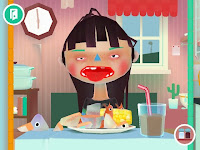
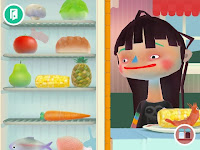
I've been using the original Toca Kitchen as a staple with my young students, but with Toca Kitchen 2 just out, this is now the bee's knees. The characters have a whole new look that I find strange but that is highly appealing to my little ones, so kudos to the developers for catching on to this. There are new, more realistic looking foods and features. There is even a whole new set of condiments, including lemon you can squeeze, and hot sauce. Try to give something too hot to someone to see the character react and blow on the food. Another new feature is the ability to make smoothies. Have you ever had a shrimp-corn-tabasco smoothie? I do not recommend it for consumption but do try serving it to a character in Toca Kitchen 2- the reaction is priceless!
The Zones of Regulation by Selosoft
Zones of Regulation is a great tool for adult and child to use together. It is actually a game a child can navigate through to learn concepts from the Zones of Regulation book/ program. I don't have the program, but others have noted in reviews it is not as complete- for someone with general knowledge of the program, the app should be perfect as it is a great way to introduce and learn techniques to help someone identify and understand his/her feelings, as well as cope with those feelings using the strategies in the app. There are two main sections- a game area where you navigate a character to one of the four zones to answer questions about them, and a "More Content" button with four new activities (Picture Studio, Match the Face, Lazy 8 breathing, and Six Sides of Breathing). The new tools that have been added to the app for breathing to calm down, and identification of emotions and their "zones" - blue, green, yellow or red, are great. Game play is not overly punitive either- if you get an answer incorrect, you get one coin instead of 3, and are simply told to try again. During play there are icons for each zone that you can refer to at any time, or you can go back to the main menu to access additional activities under the More Content button. There is one caveat- there is a bug that makes the camera feature crash, at least on my (older) iPad mini with iOS 7.1.2 installed. To get around this you will have to take pictures of your different feelings beforehand and then select "Choose existing photo".


 Just counted and that's 11. Ah, top 11 Apps of the Year to you!
I've been using the original Toca Kitchen as a staple with my young students, but with Toca Kitchen 2 just out, this is now the bee's knees. The characters have a whole new look that I find strange but that is highly appealing to my little ones, so kudos to the developers for catching on to this. There are new, more realistic looking foods and features. There is even a whole new set of condiments, including lemon you can squeeze, and hot sauce. Try to give something too hot to someone to see the character react and blow on the food. Another new feature is the ability to make smoothies. Have you ever had a shrimp-corn-tabasco smoothie? I do not recommend it for consumption but do try serving it to a character in Toca Kitchen 2- the reaction is priceless!


The Zones of Regulation by Selosoft
Zones of Regulation is a great tool for adult and child to use together. It is actually a game a child can navigate through to learn concepts from the Zones of Regulation book/ program. I don't have the program, but others have noted in reviews it is not as complete- for someone with general knowledge of the program, the app should be perfect as it is a great way to introduce and learn techniques to help someone identify and understand his/her feelings, as well as cope with those feelings using the strategies in the app. There are two main sections- a game area where you navigate a character to one of the four zones to answer questions about them, and a "More Content" button with four new activities (Picture Studio, Match the Face, Lazy 8 breathing, and Six Sides of Breathing). The new tools that have been added to the app for breathing to calm down, and identification of emotions and their "zones" - blue, green, yellow or red, are great. Game play is not overly punitive either- if you get an answer incorrect, you get one coin instead of 3, and are simply told to try again. During play there are icons for each zone that you can refer to at any time, or you can go back to the main menu to access additional activities under the More Content button. There is one caveat- there is a bug that makes the camera feature crash, at least on my (older) iPad mini with iOS 7.1.2 installed. To get around this you will have to take pictures of your different feelings beforehand and then select "Choose existing photo".