Showing posts with label special education. Show all posts

Thursday, April 30, 2015

New and Notables: CSUN 2015 Exhibit Hall


APPS, SOFTWARE & ACCESSORIES

CSUN is a treasure-trove of information and each year there are lots of goodies to be discovered.

Here are some products and resources sighted at this year's CSUN Exhibit Hall:

The hands down favorite find this year was:

Microsoft Sprout by HP
This software was on display for everyone to play with and I was floored at all the possibilities it could open up in an educational or special needs setting, not to mention it being coveted for home use i.e. for scrap booking, for organizing your tax receipts... oh my, I have a really hard time thinking of someone who would NOT think this would be a helpful tool.
The demonstration included an amazing 3D prototype not to mention existing capability to literally place any object down on the mat and have it pretty much instantaneously imported into the software program as an image, using dual (above/below)
document cameras.

Ah, the price tag... At $1,899 it's not cheap, but it is certainly comparable to other programs and devices many school districts are using, with many advantageous features. {Crossing fingers my school district will feel the same}

Microsoft is actively seeking educational and special needs-focused developers for this platform, so if that is you, seek them out.

More info on Microsoft Sprout HP here: http://www.cnet.com/products/hp-sprout/

iYoMube is an app for visually impaired users that reads aloud signs and written print in the environment using Apple's existing VoiceOver technology and camera feature.

I was sold after a demo- the app read aloud several signs more than 10 feet away, but have had trouble with the app on my iPhone 4 sadly.
(FYI this was demonstrated on a newer iPhone, with the latest iOS, and I think that is key- my old iPhone 4 did not perform well)

**I recommend waiting for a lite version of this app to be available in the App Store so potential users can try it out with their device and operating system first.** 
Developer Response: The App works best on iPhone 6 or 6+ for now because of its better camera focusing function.
                   
Here is the premise for how it should work- to use the app you must have VoiceOver feature enabled. You can use the app to "read" photos in your photo album, but even more impressive was live reading of whatever is in your viewfinder. To activate this feature open the app and swipe to the left until you get to the settings page, then choose ''navigation mode" to turn on the "Real Time Speech" (it is off by default).  There are also two modes you can switch in and out of by swiping left or right on the screen- Text mode, where all recognizable words are read at once, or Blocks mode, where each individual part of an image can be read by touching it. You can also choose to save images captured via the app to your photo album, or change the language to be recognized from one of five choices: English, Japanese, Korean, Chinese (simplified) or Chinese (traditional).

I can't vouch whether this app will work for your device or not.  But we have come a long way, technology-wise, a long way indeed!


Also spied, were the tactile Parcheesi and checker sets from Altix Vision
seen at last year's CSUN event...the current sets available are upgraded models with high quality wood and even cooler! They were just being launched last year and basically were in prototype stage, but now they are definitely ready for purchase.

The sets have easy to grasp pieces that are easier to differentiate from one another, so those with visual impairments, as well as any other players, can enjoy!
The games are about $30 each, but do not include shipping.  They are currently seeking distributors in the U.S. so if that is you, you can contact them.

The sets can be ordered by sending a request to: adam.kalbarczyk@altix.pl


While doing further research on the above products, I also came across this web resource on how to offer assistance to people who have low vision or are blind:

http://valenciacollege.edu/osd/documents/BlindnessDraft.pdf

\
Chat Wrap

This iPad case is clearly the object of my desire but at $499 out of reach for some of us. (There may be some confusion on the pricing I was quoted as SilverKite has the ChatWrap case listed at $395 here: https://store.silver-kite.com/product_info.php/products_id/552 ). The sound is very clear and loud, and the case is very sturdy while not adding an extreme amount of weight- it is lighter weight than a popular leading industry competitor that comes to mind. I would like to see a screen protector of some sort included as standard. There is a feature to easily add a lanyard too.  If you are successful with insurance reimbursement, or if more mainstream cases have failed to meet your needs, this would be a worthwhile investment indeed!

There were  also some companies from last year spied again:

 GoTalk Now and a suite of special needs apps and products from Attainment Company, speech and language therapy apps from Virtual Speech Center, Sono Flex and Tobii's eye tracking software (A previous favorite last year was eye tracking software from Sensory Software); Proloquo2Go (and newer 'sister' products Keedogo and Proloquo4Text) from Assistive Ware; L.A.M.P. Words for Life from PRC and Boardmaker from Mayer Johnson


Thursday, January 1, 2015

Top Ten Apps of 2014


Top 10 Apps of the Year

AAC apps have purposely been excluded from this Top 10 Apps of the Year post, because that would require a whole new post by itself! In fact, Special Apps, Special Kids did just that in the past- take a look here: http://specialappsspecialkids.blogspot.com/2014/03/10-innovative-aac-apps.html

You might also enjoy: http://specialappsspecialkids.blogspot.com/2014/03/10-tried-and-true-special-needs-app.html


Finger Paint with Sounds  by Inclusive Technology Ltd FREE
Finger Paint with Sounds is a perfect beginning cause and effect app for special needs, using both color and sound to captivate the interest of the user.  Simply touch the screen and the magic will begin!  You can change the settings so any touch on the screen the will work, or use it to work on more control using just one finger at a time. Settings also allow you to choose music or sound effects to play as you draw. This app is designed with special needs in mind- to exit the screen you have to double tap in the upper corner to prevent accidental exits.  Doing so will also allow access to settings, clearing the drawing, or saving the drawing to your Photos.
For some out of the box ideas on how to repurpose this app for use in speech and language therapy, visit this app's profile on yappguru.com: http://www.yappguru.com/experts/review_item/318


Sharing with Duckie Deck by Duckie Deck Development

It is hit or miss with some of the other apps from this developer, but Sharing with Duckie Deck has a couple of activities perfectly aligned with social thinking skills. In one activity, the player must be thinking about what all of the characters in a particular scene want, in order to successfully hand out the objects and move on to the next scene. In another activity the player is given food items to hand out to four characters- if a character is missed, he/she will express his disappointment with a frown and "aw!" The kids LOVE it.   You can also decorate a cake, play a memory game, or play with toys, but we keep coming back to the above activities.


iMommy by K & N Ventures
(there is also a FREE ad supported version  w/ in-apps)
iMommy is an app I get a lot of use out of with my special education early childhood preschoolers. Several of my students are beginning communicators, and this app has fun, meaningful content that encourages language use.  It is a great way to focus on simple verbs and common nouns in a young child's environment, as well as basic sentence structures.  There are five environments for the child to explore: kitchen, bedroom, playroom, bath, changing room, picnic and closet.  I tend to focus on the kitchen, bedroom and bath areas.  I have my students use their language to request what the baby will do, or model it for them and have them repeat if they are unable to do so on their own.  Some of my students are using ASL, so we do the signs for simple vocabulary in the app such as eat, drink, play, sleep, wash, apple, milk, teddy bear, ball, blanket etc.


First Phrases HD by Hamaguchi Apps for Speech, Language and Auditory Development
(there is a lite version available for 99 cents, as well as a version for iPhone)

First Phrases HD is one of many quality speech therapy apps from this developer.  This is a perfect app for young students who are just learning to combine 2 or 3 words together to communicate. The app provides  Verb +  Noun phrases such as cut + the cake, or eat + the + banana. The app also includes phrasal verbs (verb + preposition) like put away or turn on.    First Phrases HD is my favorite app in this series and also the biggest hit among my young students with speech and language delays. They love the cause and effect aspect of this app- tap a phrase and the character will animate it. Even more enticing, is the record feature.  After the child records the phrase, they can listen to their recording, causing the animation to repeat.  This is really delightful for my students who understand the character is doing what they requested through their own verbal language!


Happy Geese by Appically (FREE version reviewed, full version also avail.)
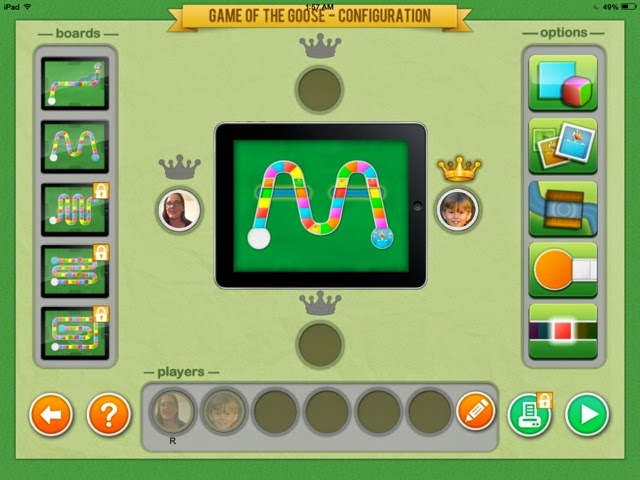
There are very few board games in the app store suited for special needs, but Happy Geese fits the bill.  It was created specifically with special needs users in mind, although it is perfect for my typical preschoolers as well. Players can choose from one of two board layouts, as well as several different dice/game play options. .  (There are also small in-app purchases to access more layouts and options, or you can purchase the full version of Happy Geese: Happy Geese Full)  For the basic free version you can choose whether players use number dice or simply colors, whether a spinner is used, and whether more challenges are added to the game. For example you can choose to add snakes for a player to slide down, ladders for a player to climb up, and also set whether a single color needs to be chosen to win, or whether any color rolled at the end of the game will win.  A favorite feature, however is the winner's crown- select it to ensure a player will win- when first introducing the concept of turn taking/ game playing with a young student who hasn't quite established strong emotional regulation skills, I appreciate taking away the possibility of a mega meltdown that may ensue from losing the game. Another fun and very functional feature is the ability to add pictures of each child to the game markers to make them personalized/more meaningful.

Pogg - kids game to learn spelling, language and vocabulary such as verbs, especially in slp and special education like autism and speech therapy by Ricky Vuckovic

Pogg is a lovable odd creature that acts out a variety of simple, everyday actions (and a few nouns) when a word is selected from the menu of pictures OR when one of the words is spelled out via the keyboard.  The latter option makes this perfect for spelling practice- if a word is misspelled, Pogg will appear, scratching his head in confusion. 


Niki Story by Alessandro LaRocca

Niki Story makes it really easy to create picture symbol sentences to support whatever literacy or language activity you are doing at the time. This app also allows you to embed videos, record sound, or draw directly on a scene as well- every step is simple to do.  This app is super versatile, affordable, and perfect for creating lessons for just about anything.  We've been using it lately to target language development goals such as AVOs (agent + verb+ object). You can organize your lessons into different folders, and easily edit. (There is a lock feature you must unlock to do this- you must enter a mathematical equation to unlock it)


WordToob: Language Learning with Video Modeling by John Halloran

WordToob is essentially a living dictionary, although it has many other uses (see link at the end of this paragraph).  It comes programmed with some basic core vocabulary acted out in videos, and it is easy to program your own mulitple short videos per vocabulary word- this way a person can learn multiple examples of a word across different setting. By doing so they learn to generalize the word's meaning. For example, to combat someone thinking "eat"' is something you do only at your blue kitchen table with an ABC place mat.- you can take videos of someone eating pizza in the cafeteria, or eating a snack at a bench during recess, or eating a peanut butter sandwich on a field trip, and so on. The app allows you to easily make copies of existing boards, and hide words on the board as well.  Other people have had success using WordToob for different purposes too- as a visual schedule, for teaching social skills and so on.  One clever use listed on the app's webpage is using it is a communication book to go back and forth from school/home- the teachers take snippets of videos throughout the day to share what they did.  For a video outlining other ways to use WordToob visit here:


IWash My Cats by Portegno Apps
(this is an iPhone app, but fills the iPad screen too- the graphics won't knock your socks off, but my students don't care)

IWash My Cats is a simple and fun pretend play game for preschool or young elementary school students.  Each time you play a new, muddy messy cat appears on the screen for the child to wash. The steps are always the same= scrub with soap, rinse, dry, and brush.  Audio instructions will announce each step "Let's brush!" There are different sound effects for each step as well as stars that sparkle on the screen after completing each step.  This is perfect for introducing the concept of sequencing.  If you have a stuffed animal cat and some props, you can act out each of the steps practiced in the app too for further understanding and fun. I use this app for younger kids working on /sh/ sounds frequently as a reward after practicing their sounds.  They don't care that they are still working on their sounds, because they are busy having so much fun- we can use "'wash" (or 'scrub'if working on s blends), "brush" and then ''shhhh" to mimic the sound of the hair dryer and "shiny" to talk about their fur after washing.  we also refer to each cat as ''she" or give them /sh/ names like Sharlee, Shad, Sheila etc...

 Toca kitchen 2 by Toca Boca
I've been using the original Toca Kitchen as a staple with my young students, but with Toca Kitchen 2 just out, this is now the bee's knees. The characters have a whole new look that I find strange but that is highly appealing to my little ones, so kudos to the developers for catching on to this. There are new, more realistic looking foods and features. There is even a whole new set of condiments, including lemon you can squeeze, and hot sauce. Try to give something too hot to someone to see the character react and blow on the food. Another new feature is the ability to make smoothies. Have you ever had a shrimp-corn-tabasco smoothie? I do not recommend it for consumption but do try serving it to a character in Toca Kitchen 2- the reaction is priceless!


The Zones of Regulation by Selosoft

Zones of Regulation is a great tool for adult and child to use together.  It is actually a game a child can navigate through to learn concepts from the Zones of Regulation book/ program. I don't have the program, but others have noted in reviews it is not as complete- for someone with general knowledge of the program, the app should be perfect as it is a great way to introduce and learn techniques to help someone identify and understand his/her feelings, as well as cope with those feelings using the strategies in the app.  There are two main sections- a game area where you navigate a character to one of the four zones to answer questions about them, and a "More Content" button with four new activities (Picture Studio, Match the Face, Lazy 8 breathing, and Six Sides of Breathing). The new tools that have been added to the app for breathing to calm down, and identification of emotions and their "zones" - blue, green, yellow or red, are great. Game play is not overly punitive either- if you get an answer incorrect, you get one coin instead of 3, and are simply told to try again.  During play there are icons for each zone that you can refer to at any time, or you can go back to the main menu to access additional activities under the More Content button. There is one caveat- there is a bug that makes the camera feature crash, at least on my (older) iPad mini with iOS 7.1.2 installed.  To get around this you will have to take pictures of your different feelings beforehand and then select "Choose existing photo".
Just counted and that's 11. Ah, top 11 Apps of the Year to you!

Saturday, August 9, 2014

Build to 100 by Fuzzy Bees


Build to 100 by Fuzzy Bees ($1.99, iPad only) [Also on ANDROID here]


If you are familiar with Fuzzy Bees' app Count to 100! See Review here   you know ''educational quality' & "parent-friendly'' are words of high importance to Fuzzy Bees.  Build to 100 is a natural extension of the Count to 100! app, which introduces counting to 100, with features that allow the child to drag numbers from 1 to 100 to their correct place on the number grid.  Kids can learn to associate where numbers belong in relation to each other and build on patterns by skip counting by 2s up to 10s.   Like its predecessor, auditory and visual cues are used to signal a correct or incorrect answer.  There is also a lock feature to keep a child from accidentally exiting the screen (2 quick taps in a row are needed) or getting in to Parent/Teacher areas (three quick taps are needed).


A new addition to this app is a Record Time feature where students can gauge how fast they can build the number grid. This is especially important as teachers and parents can use it to see how a student's understanding is developing and improving over time.

Flexible settings mean a parent or educator can set up the app to target the numbers a child is most struggling with, and auditory cues can be shut off if not needed or wanted.

This is not a toy/game app, it is a tool appropriate for an educational setting, or to supplement learning at home, or to have handy during homework time.  It is hands on and its sound effects should provide an engaging alternative to the old-school paper and pencil method of writing in numbers one by one on a number grid . For children with motor skills delays, using the iPad screen will be a less physically demanding option than the scenario just described.


Favorite Features


Family/educator friendly - no IAPs, locks to block settings & educational tips page. Build to 100! is a Moms with Apps member, a label that upholds the following promises: for kids, privacy best practices, no surprises
Auditory cues- two distinct sounds are used for correct/incorrect number placements
Visual cues- number will jump away from the screen if placed in the wrong spot, and flash as they are placed in a correct spot
Flexible settings- choose perimeters for numbers to focus on, turn correct or incorrect sound effects on or off independently, choose to record time, determine whether building of the number board is random or based on a pattern, choose whether numbers on the board are hidden, and whether number squares are displayed one row at a time, or in their entirety.
Positive Reinforcement - errors are ignored and signaled only by a distinct tone; praise is given after the grid is finished- complete with the app's adorable bee mascots, cheering and a banner bearing different praises "Excellent" ''Awesome" "Outstanding" or "Fantastic". (you can choose to shut off the cheering sound effects for this).

Wish List
I would love to see the white buttons with the bright yellow ''lights" seen in Count to 100! return as an option.

An update is being considered for adding speech to the numbers as well, for additional auditory feedback.

Screenshot from Android device

Thursday, May 1, 2014

50+ Totally FREE Apps for Special Needs ( iOS)


In case you missed some of the Autism Awareness Month specials during April, Special Apps, Special Kids has rounded up their favorite fully functional, ALWAYS FREE apps- many developed with special needs in mind.

These are quality, stand-alone apps and child-friendly- currently free of ads and links to apps with  consumable IAP (repeating In-App Purchases), for example, although there may be links to a developer's own apps present.  A few included apps have one time IAPs to unlock additional content that is not needed to enjoy the app- this will be stated if that is the case at the time of publication if known).

(Check in iTunes before downloading as developers do make price, IAP or ad changes from time to time)


AAC & Assistive Technology:
Grid Player by Sensory Software International
Alexicom AAC by Alexicom Tech LLC
AZAHAR by FUNDACION ORANGE
C.P.A by CPA
Verbally by Intuary (has one time IAP for Verbally Premium- make sure IAPs are set to off )
SoundingBoard by AbleNet (has IAPs for more content)
Cardnival: share FREE audio visual cards for special education (autistic & dyslexia) by MB & Partners Limited


Academic Tools:
30hands: Create & Show What You Know by 30hands Learning, Inc.  (ungated links to social media)
Educreations Interactive Whiteboard by Educreations, Inc
Khan Academy
GuidedVideo by GuidedVideo LLC  (Temporarily FREE w/ planned update, grab it while you can!)
Geoboard, by the Math Learning Center by Clarity Innovations
NASA has many free apps
Smithsonian Channel for iPad by Smithsonian Networks


Behavior & Emotional Regulation Tools:
Fun Time Timer by CodigoDelSur
Spectrum Timer by Richard Humphrey
Breathe, Think, Do with Sesame by Sesame Street


Cause & Effect:
Sensory Room by Inclusive Technology Ltd  SWITCH ACCESSIBLE
Finger Paint with Sounds by Inclusive Technology Ltd  SWITCH ACESSIBLE
Touch & Say SD by Interbots Touch & Say by Interbots (for iPad)


Data Collection & Organizational Tools:
ATEC by Autism Research Institute
Get Well Stay Well by The Thanksgiving Game, Inc.
My Autism Day by Little App Helpers
Palu Shared Handwriting Calendar by MetaMoJi Corporation  (IAPs to remove (unobtrusive) ads & add more calendars)
Scholastic Reading Timer by Scholastic


Emotions & Feelings:
Autism Emotion by Model Me Kids, LLC,

Feel Electric! by Sesame Street
Tolva and Ting's Moods - Who's in a Mood? by Me and the Giants
Emotionary by Me.Mu by leehsueh


Grammar, Language & Vocabulary:
Let's Name Things Fun Deck by Super Duper Publications
NLConcepts Autism: Sort & Categorize by Natural Learning Concepts
SpeakColors by Robert Harrison (link to fuller version, SpeakColors HD, on a separate adult targeted screen)
Using I and Me Fun Deck by Super Duper Publications


Life Skills, Life Events & Safety:

Big Moving Adventure by Sesame Street
Danger Rangers Fire Safety App: Videos, Games, Photos, Books & Interactive Play & Learn Activities for Kids... by Playrific
DialSafe Pro by Little Bit Studio, LLC (phone safety, 911)
Just Me and My Mom - Little Critter by Oceanhouse Media
Model Me Going Places 2 by Model Me Kids, LLC (video modeling: hairdresser, mall, doctor, playground, grocery store, restaurant)
Put It Away by leehsueh
Rockford's Rock Opera 1 - Children's Musical Audio Book by Sweetapple Ltd (stranger danger, environmental awareness & more)
Sesame Street for Military Families by Sesame Street
Sesame Street: Divorce by Sesame Street
Sesame Street: Incarceration by Sesame Street
Shoperone: Assisting with Grocery Shopping by Jackson13.info
Sparky's Birthday Surprise by Cupcake Digital (fire safety)
Step By Step Getting Dressed by Wonkido
Stewie the Duck Learns to Swim by Stew Leonard's


Math:
Sushi Monster by Scholastic


Motor Skills- Fine Motor/ Visual Motor:
Trace & Share by True Digital Content and Media Limited
Match Blitz by Shiny Things


Music:
GlowTunes Christmas by AppHappyStudios LLC (has single IAP for extra content, 99 cents)
Children's Xmas App - Rockford's Christmas Song by Sweetapple Ltd


Play Themes:
Bamba Ice Cream by Mezmedia (price has changed recently, confirm)
Daily Tasks by True Digital Content and Media Limited
Toca Kitchen Monsters by Toca Boca
Toca Hair Salon - Christmas Gift by Toca Boca


Reading:
SEN Press- for teenagers with special needs by SEN Press Ltd (has one complete, free book of high quality; IAP for full library/ single books for purchase is gated- however it is expensive and we recommend turning on guided access and drawing around the shop button to further protect against unwanted entry)


Religious Education:
Bible for Kids by LifeChurch.tv


Special Needs Resources:
(may be ad-supported, as these apps are geared toward adults I have not thoroughly checked)

Autism by Autism Research Institute (small, one-time IAP for extra content)
Autism Live by Mark Keller
Braille Institute- Several FREE apps here
FSL App by Cassandra Burgess (Full Spectrum Learning, Cognitive and Behavioral Support Services; has videos and visual supports, as well as a Northern Ontario autism event calendar)
Global Autism Alliance by Autism Research Institute
LittleSteps by Sandra Moyer (free developmental milestones; small, one time IAP for extra content)
National Fragile X Foundation
Rare Diseases E-book from Rare Genomics Institute
Schafer Autism Report by Autism Research Institute
Spectrum Stratergies by madebyeducators


 --------------------------------------------------------------------


 MORE FREE (GENERAL ED.) APPS FOR PRE-K & ELEMENTARY:


Animals:
Disneynature Explore by Disney


Art/Creativity:
Lazoo: Squiggles! by Lazoo Worldwide, Inc
Sago Mini Bug Builder
Toca Fairy Tales by Toca Boca
Tiggly Draw by Tiggly (IAP with parental gate)
Tiggly Stamp by Tiggly (IAP with parental gate)


Reading:
Language Technologies, Inc. has one free LAZ Reader app for each level AA- P)


Shapes:
Tiggly Safari by Tiggly (IAP with Parental Gate)


Developers to Check Out:


Fisher Price has several free apps for the 0-3 crowd.

Grasshopper Apps has many free apps for a variety of areas including memory, matching, vocabulary, fine motor etc. (some have one time IAPs for additional content or features). 

LEGO also has some totally FREE options, as well as others with IAPs.

More information on some of the Grasshopper Apps & LEGO apps on  this list of 10 Autism Apps from Small But Kinda Mighty )

PBS Kids has several free apps for PreK & up.