Showing posts with label low vision. Show all posts

Thursday, April 30, 2015

New and Notables: CSUN 2015 Exhibit Hall


APPS, SOFTWARE & ACCESSORIES

CSUN is a treasure-trove of information and each year there are lots of goodies to be discovered.

Here are some products and resources sighted at this year's CSUN Exhibit Hall:

The hands down favorite find this year was:

Microsoft Sprout by HP
This software was on display for everyone to play with and I was floored at all the possibilities it could open up in an educational or special needs setting, not to mention it being coveted for home use i.e. for scrap booking, for organizing your tax receipts... oh my, I have a really hard time thinking of someone who would NOT think this would be a helpful tool.
The demonstration included an amazing 3D prototype not to mention existing capability to literally place any object down on the mat and have it pretty much instantaneously imported into the software program as an image, using dual (above/below)
document cameras.

Ah, the price tag... At $1,899 it's not cheap, but it is certainly comparable to other programs and devices many school districts are using, with many advantageous features. {Crossing fingers my school district will feel the same}

Microsoft is actively seeking educational and special needs-focused developers for this platform, so if that is you, seek them out.

More info on Microsoft Sprout HP here: http://www.cnet.com/products/hp-sprout/

iYoMube is an app for visually impaired users that reads aloud signs and written print in the environment using Apple's existing VoiceOver technology and camera feature.

I was sold after a demo- the app read aloud several signs more than 10 feet away, but have had trouble with the app on my iPhone 4 sadly.
(FYI this was demonstrated on a newer iPhone, with the latest iOS, and I think that is key- my old iPhone 4 did not perform well)

**I recommend waiting for a lite version of this app to be available in the App Store so potential users can try it out with their device and operating system first.** 
Developer Response: The App works best on iPhone 6 or 6+ for now because of its better camera focusing function.
                   
Here is the premise for how it should work- to use the app you must have VoiceOver feature enabled. You can use the app to "read" photos in your photo album, but even more impressive was live reading of whatever is in your viewfinder. To activate this feature open the app and swipe to the left until you get to the settings page, then choose ''navigation mode" to turn on the "Real Time Speech" (it is off by default).  There are also two modes you can switch in and out of by swiping left or right on the screen- Text mode, where all recognizable words are read at once, or Blocks mode, where each individual part of an image can be read by touching it. You can also choose to save images captured via the app to your photo album, or change the language to be recognized from one of five choices: English, Japanese, Korean, Chinese (simplified) or Chinese (traditional).

I can't vouch whether this app will work for your device or not.  But we have come a long way, technology-wise, a long way indeed!


Also spied, were the tactile Parcheesi and checker sets from Altix Vision
seen at last year's CSUN event...the current sets available are upgraded models with high quality wood and even cooler! They were just being launched last year and basically were in prototype stage, but now they are definitely ready for purchase.

The sets have easy to grasp pieces that are easier to differentiate from one another, so those with visual impairments, as well as any other players, can enjoy!
The games are about $30 each, but do not include shipping.  They are currently seeking distributors in the U.S. so if that is you, you can contact them.

The sets can be ordered by sending a request to: adam.kalbarczyk@altix.pl


While doing further research on the above products, I also came across this web resource on how to offer assistance to people who have low vision or are blind:

http://valenciacollege.edu/osd/documents/BlindnessDraft.pdf

\
Chat Wrap

This iPad case is clearly the object of my desire but at $499 out of reach for some of us. (There may be some confusion on the pricing I was quoted as SilverKite has the ChatWrap case listed at $395 here: https://store.silver-kite.com/product_info.php/products_id/552 ). The sound is very clear and loud, and the case is very sturdy while not adding an extreme amount of weight- it is lighter weight than a popular leading industry competitor that comes to mind. I would like to see a screen protector of some sort included as standard. There is a feature to easily add a lanyard too.  If you are successful with insurance reimbursement, or if more mainstream cases have failed to meet your needs, this would be a worthwhile investment indeed!

There were  also some companies from last year spied again:

 GoTalk Now and a suite of special needs apps and products from Attainment Company, speech and language therapy apps from Virtual Speech Center, Sono Flex and Tobii's eye tracking software (A previous favorite last year was eye tracking software from Sensory Software); Proloquo2Go (and newer 'sister' products Keedogo and Proloquo4Text) from Assistive Ware; L.A.M.P. Words for Life from PRC and Boardmaker from Mayer Johnson. 


Thursday, May 1, 2014

50+ Totally FREE Apps for Special Needs ( iOS)


In case you missed some of the Autism Awareness Month specials during April, Special Apps, Special Kids has rounded up their favorite fully functional, ALWAYS FREE apps- many developed with special needs in mind.

These are quality, stand-alone apps and child-friendly- currently free of ads and links to apps with  consumable IAP (repeating In-App Purchases), for example, although there may be links to a developer's own apps present.  A few included apps have one time IAPs to unlock additional content that is not needed to enjoy the app- this will be stated if that is the case at the time of publication if known).

(Check in iTunes before downloading as developers do make price, IAP or ad changes from time to time)


AAC & Assistive Technology:
Grid Player by Sensory Software International
Alexicom AAC by Alexicom Tech LLC
AZAHAR by FUNDACION ORANGE
C.P.A by CPA
Verbally by Intuary (has one time IAP for Verbally Premium- make sure IAPs are set to off )
SoundingBoard by AbleNet (has IAPs for more content)
Cardnival: share FREE audio visual cards for special education (autistic & dyslexia) by MB & Partners Limited


Academic Tools:
30hands: Create & Show What You Know by 30hands Learning, Inc.  (ungated links to social media)
Educreations Interactive Whiteboard by Educreations, Inc
Khan Academy
GuidedVideo by GuidedVideo LLC  (Temporarily FREE w/ planned update, grab it while you can!)
Geoboard, by the Math Learning Center by Clarity Innovations
NASA has many free apps
Smithsonian Channel for iPad by Smithsonian Networks


Behavior & Emotional Regulation Tools:
Fun Time Timer by CodigoDelSur
Spectrum Timer by Richard Humphrey
Breathe, Think, Do with Sesame by Sesame Street


Cause & Effect:
Sensory Room by Inclusive Technology Ltd  SWITCH ACCESSIBLE
Finger Paint with Sounds by Inclusive Technology Ltd  SWITCH ACESSIBLE
Touch & Say SD by Interbots Touch & Say by Interbots (for iPad)


Data Collection & Organizational Tools:
ATEC by Autism Research Institute
Get Well Stay Well by The Thanksgiving Game, Inc.
My Autism Day by Little App Helpers
Palu Shared Handwriting Calendar by MetaMoJi Corporation  (IAPs to remove (unobtrusive) ads & add more calendars)
Scholastic Reading Timer by Scholastic


Emotions & Feelings:
Autism Emotion by Model Me Kids, LLC,

Feel Electric! by Sesame Street
Tolva and Ting's Moods - Who's in a Mood? by Me and the Giants
Emotionary by Me.Mu by leehsueh


Grammar, Language & Vocabulary:
Let's Name Things Fun Deck by Super Duper Publications
NLConcepts Autism: Sort & Categorize by Natural Learning Concepts
SpeakColors by Robert Harrison (link to fuller version, SpeakColors HD, on a separate adult targeted screen)
Using I and Me Fun Deck by Super Duper Publications


Life Skills, Life Events & Safety:

Big Moving Adventure by Sesame Street
Danger Rangers Fire Safety App: Videos, Games, Photos, Books & Interactive Play & Learn Activities for Kids... by Playrific
DialSafe Pro by Little Bit Studio, LLC (phone safety, 911)
Just Me and My Mom - Little Critter by Oceanhouse Media
Model Me Going Places 2 by Model Me Kids, LLC (video modeling: hairdresser, mall, doctor, playground, grocery store, restaurant)
Put It Away by leehsueh
Rockford's Rock Opera 1 - Children's Musical Audio Book by Sweetapple Ltd (stranger danger, environmental awareness & more)
Sesame Street for Military Families by Sesame Street
Sesame Street: Divorce by Sesame Street
Sesame Street: Incarceration by Sesame Street
Shoperone: Assisting with Grocery Shopping by Jackson13.info
Sparky's Birthday Surprise by Cupcake Digital (fire safety)
Step By Step Getting Dressed by Wonkido
Stewie the Duck Learns to Swim by Stew Leonard's


Math:
Sushi Monster by Scholastic


Motor Skills- Fine Motor/ Visual Motor:
Trace & Share by True Digital Content and Media Limited
Match Blitz by Shiny Things


Music:
GlowTunes Christmas by AppHappyStudios LLC (has single IAP for extra content, 99 cents)
Children's Xmas App - Rockford's Christmas Song by Sweetapple Ltd


Play Themes:
Bamba Ice Cream by Mezmedia (price has changed recently, confirm)
Daily Tasks by True Digital Content and Media Limited
Toca Kitchen Monsters by Toca Boca
Toca Hair Salon - Christmas Gift by Toca Boca


Reading:
SEN Press- for teenagers with special needs by SEN Press Ltd (has one complete, free book of high quality; IAP for full library/ single books for purchase is gated- however it is expensive and we recommend turning on guided access and drawing around the shop button to further protect against unwanted entry)


Religious Education:
Bible for Kids by LifeChurch.tv


Special Needs Resources:
(may be ad-supported, as these apps are geared toward adults I have not thoroughly checked)

Autism by Autism Research Institute (small, one-time IAP for extra content)
Autism Live by Mark Keller
Braille Institute- Several FREE apps here
FSL App by Cassandra Burgess (Full Spectrum Learning, Cognitive and Behavioral Support Services; has videos and visual supports, as well as a Northern Ontario autism event calendar)
Global Autism Alliance by Autism Research Institute
LittleSteps by Sandra Moyer (free developmental milestones; small, one time IAP for extra content)
National Fragile X Foundation
Rare Diseases E-book from Rare Genomics Institute
Schafer Autism Report by Autism Research Institute
Spectrum Stratergies by madebyeducators


 --------------------------------------------------------------------


 MORE FREE (GENERAL ED.) APPS FOR PRE-K & ELEMENTARY:


Animals:
Disneynature Explore by Disney


Art/Creativity:
Lazoo: Squiggles! by Lazoo Worldwide, Inc
Sago Mini Bug Builder
Toca Fairy Tales by Toca Boca
Tiggly Draw by Tiggly (IAP with parental gate)
Tiggly Stamp by Tiggly (IAP with parental gate)


Reading:
Language Technologies, Inc. has one free LAZ Reader app for each level AA- P)


Shapes:
Tiggly Safari by Tiggly (IAP with Parental Gate)


Developers to Check Out:


Fisher Price has several free apps for the 0-3 crowd.

Grasshopper Apps has many free apps for a variety of areas including memory, matching, vocabulary, fine motor etc. (some have one time IAPs for additional content or features). 

LEGO also has some totally FREE options, as well as others with IAPs.

More information on some of the Grasshopper Apps & LEGO apps on  this list of 10 Autism Apps from Small But Kinda Mighty )

PBS Kids has several free apps for PreK & up.

Sunday, March 30, 2014

10 Innovative AAC apps


Full-Featured Picks:
(AAC systems with extensive vocabulary and features pre-programmed; ready or virtually ready to use immediately)

Picture/Icon Based:

Speak For Yourself -Full Review here  GIVEAWAY 1 SFY x4 - 1 for each week in April here.
Speak For Yourself is so efficient at word finding.  Only two taps are necessary to get to the word you want to say. There is an innovative search feature that teaches where a word is stored with visual cues, so care providers and therapists (and the users themselves) can easily find words in Speak For Yourself and model them to the user.  Other features include "Hold that thought" which allows the user to pull from a bank of stored phrases, and a history feature.  Another innovative feature is the app's ability to grow with the user- you can easily close out words until you are ready to use them- which means no rearranging of pages as a user's vocabulary expands- everything is instead right there, waiting to be revealed when the user is ready. There is also an active Facebook group for Speak For Yourself users where you can bounce ideas off of other parents and professionals who are using the app.  Speak For Yourself is also on Google Play (Android) but it has been a varied experience from users depending on their device. Consider ontacting SFY for android tablet recommendations/ compatibility.

AACorn - Full Review at http://theappyladies.com/aacorn

Designed specifically with children in mind, AACorn uses real children's voices, integrates drawing capabilities into the communication icons and has a special mascot, Buddy- an innovative character who provides a step-by-step tutorial of AACorn to help your child become excited and invested in his new AAC voice. AACorn uses a "word tree" format- as the child builds sentences, their words become part of the word tree- it will grow and expand as the user's vocabulary does, with new branches predicting word choices based on the child's unique past sentence history.  AACorn also has the ability to create more than one user profile- you can even set up separate profiles for your child's speech therapist and classroom teacher to get to know AACorn without affecting your child's word tree. There is also a place to include personal information about each child- this will show up in the "About Me" button. As a parent of a child with multiple food allergies, I think this feature is wonderful! Profiles and all their contents can be backed up to iTunes or Dropbox too, so no worries about setting up everything again after updating your iPad.


AutisMate - Full Review here GIVEAWAY 1 AutisMate code April 1-30 here.

AutisMate is incredibly flexible- it is a one stop shop for communication, scheduling, video modeling and more, all in one package. There is a complete AAC vocabulary included, which you can insert seamlessly into social stories, video modeling, customizable hot spot scenes, schedules... If you want one system integrated to meet a variety of needs, AutisMate is an app you will want to take a  look at.

As of May 2014 a new AutisMate should be out-AutisMate 365. All existing AutisMate users prior to this release will always have access to the original AutisMate as they did prior to the release, at no additional cost.

Note from Developer: The new features of AutisMate 365, including cloud syncing capabilities, a community content library and easy collaboration between home, school and therapy, are all enhancements to the current features of AutisMate.   Because we value our loyal users so much, we are offering them a free two-year cloud subscription so they can try out all the new, exciting features of AutisMate 365. There is no credit card required to activate the subscription, they can cancel at any time and there is no obligation to continue the subscription after the two years are up.  All current supports and content in AutisMate will be automatically and seamlessly backed up and available instantly on AutisMate 365.

 Stay tuned for more information, but you can sign up here to be one of the first in the meantime: AutisMate 365

SpeechTree- More information at SpeechTree

Excerpt from iTunes: SpeechTree is the only AAC app that combines an Interactive Learning Program & Complete AAC Communication System. Perfect for beginning and emerging AAC communicators who require lots of practice, encouragement and support." 

SpeechTree has training lessons integrated in to the app. Strengthen both receptive and expressive vocabulary skills using one of 20 integrated lessons in SpeechTree; SpeechTree tracks the user's progress too.

ChatAble-  On sale for $79.99 in April, Autism Awareness Month.  GIVEAWAY 1 Suite of Therapy Box apps April 1-30  here.

ChatAble offers a fully functional AAC component with Facebook integration and handwriting recognition as an input method (Chatable's sister app, Predictable, also has this function. ChatAble has a very easy to use visual scene feature with a really exceptional option- an alarm function! Choose an image from your camera roll, from one of the 12,000 widget symbols, or take a photo on the spot.  Then program hot spots where you can embed your voice, a video or even a song from your iTunes, and to top it off program the visual scene to signal an alarm at a certain time of the day.

Excerpt from iTunes: A new wave in augmentative communication from the award winning app developers, Therapy Box.

Create and use symbol based grids…or use photos to make visual scene displays. Or, take both and create a hybrid page. The possibilities are endless with ChatAble. ChatAble is an easy to use communication aid app for people with communication difficulties who benefit from symbol and photo support. Parents, teachers and therapists can create page sets in minutes with an intuitive set up. The customisation options are extensive to enable people with a range of physical, cognitive and language abilities the opportunity to use the app to communicate at home, school or with their family and friends.


TTS & Icon Based:

Predictable-  GIVEAWAY 1 Suite of Therapy Box apps April 1-30  here. Also on GOOGLE PLAY (Android)

With an innovative handwriting input option, word prediction with dyslexia support, social media integration and more, Predictable offers a lot of features to meet different needs.  You can easily print out or mail generated text also, which makes this a good classroom support for students with dysgraphia too.
There are several other versions of this app to accommodate different langauges as well: Predictable Espanol, Predictable Norsk, Predictable Dansk,  Predictable Deutsch, and Predictable Svensk

Excerpt from iTunes: Predictable is an exciting text-to-speech application for the iPad, iPhone and iPod Touch. Offering customisable AAC functions with the latest social media integration, Predictable sets a new benchmark. Using a word prediction engine and switch access, Predictable meets the needs of a wide range of people using AAC... A wide range of people are using Predictable, including those with MND / ALS, Cerebral Palsy and people with communication difficulties after a stroke or head injury.

TTS Only:

RocketKeys -Full Review here.  GIVEAWAY 1 RocketKeys code April 1-30 here


RocketKeys is a  switch accessible text-based AAC system with sophisticated word prediction suitable for aphasic and dyslexic users; its customizable keyboards and accessible features make it a strong choice for literate users with vision or motor impairment.  It has a socially-hip word prediction engine based on thousands of twitter posts, and several innovative features to accommodate users with motor and visual challenges.


Excerpt From iTunes: RocketKeys is an amazingly customizable talking keyboard for people with speech disabilities. This powerful app lets you build the perfect keyboard by choosing the exact keys, size, layout, colors, prediction, and voices you want. And because RocketKeys understands touch input from users with unsteady or imprecise hands, it is very physically accessible.
RocketKeys is an essential communication tool for both children and adults with Aphasia, Autism, Cerebral Palsy, Parkinson's, ALS, MND, and more.


For more TTS Text to Speech Apps see here.

Mid-Level Picks:
(AAC systems that have access to an extensive set of vocabulary and features but need pages set up prior to use.)


GoTalk Now - Full Review here

Aside from all the "essentials of an effective AAC app, like adjustable page layouts, customizable navigation, recorded and text-to-speech capabilities, and an included symbol set", GoTalk Now has several innovative features that make it stand out.  First, GoTalk Now allows embedding of links in buttons! This means that if desired, you can have a button that the user can press to take him or her directly to a website, video, or other media link. GoTalk Now also allows the user the flexibility of choosing between standard AAC pages, with or without a sentence bar, or "Scene" pages where custom hotspots can be added. SASK's favorite feature of GoTalkNow is the editing features which make changing fonts and colors a breeze. Best of all, it is easy to add multiple images to one button for a totally customized experience.  Users also have access to premade templates and pages contributed by other users.  Also check out GoTalk Now Plus, with more content available.


Entry Level Picks:
(AAC systems that may have access to a smaller set of vocabulary; may offer less features but allow editing and personalizing).


 Niki Talk+Tweet (FREE, IAP- $44.99) IAP on sale for $22.99 in honor of Autism Awareness Month.
 Watch video here.


Niki Talk + Tweet allows you to communicate and tweet with icons, pictures, and even drawings!  Niki Talk + Tweet can also be used as a traditional communication app with voice, with a familiar sentence strip bar where icons move to when selected
. The innovative paint feature allows you to draw on existing icons, even.  If tweeting is not your thing, there is also a Niki Talk app with similar features, just no tweeting.


InnerVoice ($19.99)   50% OFF $19.99> $9.99 during April, Autism Awareness Month

Very innovative "'avatar" creation- watch your avatar (from your own photo) or one of the included avatars) talk along with the words selected and spoken. This is actually quite amazing- your photo will seem to "come alive" - with your head tilting, eyes blinking, and mouth moving with the words you have chosen. This is a simulation- this will not show the proper articulation for each word, but the mouth will match the number of syllables and show lip closure.  The goal is to grab the attention of the user and have him or her focus on mouth movements and their important role in speaking. InnerVoice comes with two (small) sets of vocabulary pre-installed: "Basic Vocabulary" and "Core Vocabulary". You can also add your own words in a separate folder. This app also has a history feature so you can see what phrases are being selected by a user. There is a built in manual you can access for help, although editing and using the app is intuitive without it.  New features to enhance editing and use of the app are planned.  A MAJOR update has just been released as of Aug. 12 2014, more info here: http://www.prweb.com/releases/2014_autism_communication/08_ipad/prweb12088384.htm


April is Autism Awareness (and Acceptance!) Month! Giveaways from around the web, including iPad minis, iPad cases, special needs and other great educational apps are found here: http://specialappsspecialkids.blogspot.com/2014/03/giveaways-freesale-lists-autism.html

Saturday, March 22, 2014

New & Notables: CSUN 2014 (Part 2)


CSUN is a treasure-trove of information and each year there are lots of goodies to be discovered.

Here are some products and resources sighted at this year's CSUN Exhibit Hall, more yet to come! 


The LOGAN PROXTALKER is a tool that can act as a bridge between a typical PECS book and a speech output device, such as a dedicated device, or an iPad being used for communication.  For individuals who are not ready for the iPad yet, the LOGAN PROXTALKER gives them verbal output while offering a highly tactile experience. The device allows tags to be programmed with sound and attached to PECS like symbols, or actual objects like a bottle of shampoo, or a cup. etc.  The objects/symbols can be placed on the LOGAN PROXTALKER to communicate single words, or strings of words that form a sentence, with speech output. There is a great video showing how easy it is to set up and use here and here.

The LOGAN PROXTALKER has been at the CSUN Exhibit Hall before, but this year some of the symbols they had on display employed a clever tactile system to teach language structure to low vision and blind individuals. For example an object like a spoon with one shape attached underneath it, say a circle- would mean "spoon" whereas that same object with a triangle attached underneath it would mean "eat".  Here is some information on how to implement a tactile symbol system yourself: http://www.tsbvi.edu/seehear/archive/tactile.html with a full list of symbols here; a blog post about teaching regular versus past tense grammar in a similar way can be accessed  here.


The Job Accommodation Network (JAN) is a FREE service which receives funding through the government.  Its premise to help those with disabilities with securing job accommodations, but JAN can help with accommodation issues in a school setting too.


Ability Magazine is a print magazine with an innovative feature- first download the Voiceye app to your iOS or Android device, make sure Voiceover or TTS options are enabled on your device, then scan the QR code embedded on each page to have it read aloud to you!  

Watch a video about Ability Magazine here.


 Freedom Scientific has a whole range of low vision and blindness products, but I was sucked in by a demonstration of the Focus 80 Blue Wireless Braille Display, which allows a user to connect with a full range of iOS 6 devices through Bluetooth.  I currently have a text sent to me through this device stored in my phone- the device allows both braille input and output- so you can send texts, open apps, and do things like convert an article on the iPad into braille.  I found how it works fascinating; the user slides his fingers across the face of the braille display to read soft pins that pop up to form words in braille. 


While doing further research on the above products, I also came across this web resource on how to offer assistance to people who have low vision or are blind:

http://valenciacollege.edu/osd/documents/BlindnessDraft.pdf


Friday, March 21, 2014

New & Notables : CSUN 2014 (Part 1)

CSUN is a treasure-trove of information and each year there are lots of goodies to be discovered.

Here are some products and resources sighted at this year's CSUN Exhibit Hall, more yet to come! 


ATNetwork. Did you know there are 13 Loan Libraries as part of the ATNetwork in California? By the way, if you are securing a device /item to trial on behalf of a school, all you pay is shipping.


Access4Kids by Zyrobotics. To my frustration, I cannot find an image of the delightful plush ladybug switch device for kids I spied... apparently it is still in the prototype stage.  In the meantime you can visit Zyrobotics on  Facebook on and at their website.


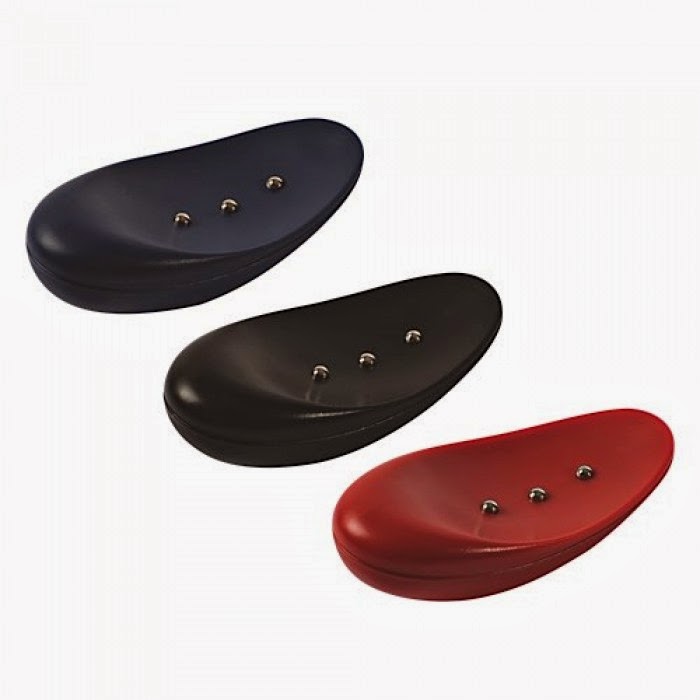
Tactalis.  This system uses switchable magnets that allow you to feel locations on the screen- the magnet in the fingertip stylus pulls and can be used to select buttons or spots on the screen, trigger audio, access web links etc.  You can create your own content- which means teachers can create lesson plans to push to the system, and in turn students can manipulate and send back information to the teacher.

If you are developer seeking to make your apps accessible on their Origin platform, contact them at info@tactalis.com


Braille Institute has several FREE apps for vision impairment, including a full screen, high contrast browser app to compensate for iPad's shortcomings in this area!  There is also an app to help you find more apps for blind or low vision users, an app that helps simulate different vision issues, and an app to help you access information on the Telephone Reader Program (TRP).  Check them all out here:

AlexandraVision. AlexandraVision has a really neat tactile vibrating watch for people with visual impairments. The device tells the time through a series of short or long vibrations to represent the hour, tens of minutes (ie. three short vibrations equal 30 minutes past the hour), or minutes.  There is a new lanyard feature for the pocket watches so you can wear the watch around your neck if desired or there are gorgeous  pendant style watches that look like a fashion forward necklace too.


.

Thursday, July 4, 2013

Bookshare & Compatible apps for Print Disabilities


Bookshare
   Share Via Twitter

Bookshare is an excellent resource for individuals with print disabilities or physical disabilities where a reader cannot hold a book.  Bookshare provides recorded books, including DAISY format, web readers and more. There are a variety of books, textbooks, newspapers and periodicals- including the latest and most popular selections for all ages- currently 197,988 titles in the collection. The great news is qualifying students and schools in the United States can access Bookshare for FREE! There are subscriptions available to qualifying individuals in many parts of the world as well. More information on Bookshare is available here.


Bookshare has its own app available, Read2Go (by Benetech, $19.99, iPhone/ iPad compatible); see video here. 

Some app developers have caught on to the importance of Bookshare and are Bookshare compatible.

Voice Dream Reader allows access to Bookshare for those that have an account. It also has many useful features for dyslexics as well as for those with vision impairment.  FULL REVIEW HERE

Read&Write Gold from Texthelp has an entire series of web apps to help struggling readers. Their web app, Ebook Reader, works with their Read&Write Gold program to read aloud Bookshare books with highlighting tools, a built-in dictionary and more. If you own their software, access is free.  More information on the software here. You will be happy to know they have an iPad app too, iReadWrite ( FULL REVIEW HERE; see video of app here).

Kurzweil 3000 supports Bookshare and has many other features such as brainstorming and outline tools, auditory spell check, text to speech etc.  More information here.  For subscribers, there is a free iPad app also, firefly K3000

For More Supports & Apps for Struggling or Reluctant Readers/Writers, see here.