Tuesday, November 13, 2012

REVIEW: TOBY Playpad by Autism West


TOBY Playpad by Autism West
($94.99 at time of review, iPad only)


What is TOBY Playpad?
FYI this is an Australian app and some vocabulary and pronunciations are different from American English- See Developer's Notes for plans to address this. 

TOBY Playpad, by Autism West, is a comprehensive program SPECIFICALLY developed for children with autism, after years of research.   It is an incredible resource for a parent (or perhaps a new educator) who needs to know how to teach a child with autism - as it literally walks you through what to do and say, step by step, as you and your child progress through the program.  TOBY stands for Therapy Outcomes By You, and this is definitely an accurate acronym- you will become both your child's guide and active partner when using TOBY Playpad. I'll let you read more about the TOBY Playpad program here


Features:
Research based
Created by autism specialists and specialists in related fields
Very comprehensive - covers a variety of learning tasks on and off the iPad in four learning domains: (imitation, language, sensory, social )
Helpful in teaching your child to attend
Likely useful for children with other speech and language delays
"Real World" activities in different settings to cement what your child has learned on the iPad
Engaging; fun; no negative reinforcement used
Consistent rewards- always the same length; rewards can be accessed separately in case you need access to them at another time.
Gives you a snapshot of your child's strengths and weaknesses
Allows you to upload progress to a server as a "back up" if your data gets lost
No expertise needed- the app will guide you through each step of learning
Help guide within the app & online help forum


What I love about TOBY Playpad


TOBY was developed specifically for children with autism.

All of the tasks were developed with the input of specialists who work with autistic children, and are based on years of research.  TOBY Playpad focuses on four main areas of learning - Imitation, Language, Sensory, and Social. The first three activities have tasks to be completed both on and off of the iPad; the Social tasks are solely off the iPad (NET- Natural Environment Tasks).  There are a variety of tasks such as copying drawings of shapes on the iPad screen, matching up like images on the iPad, matching up like objects in real life, receptive vocabulary tasks, expressive vocabulary tasks, matching colors, imitating actions such as put on hat, imitating CVC words, working on eye gaze while singing a song, making noises with homemade musical instruments,  and much more.  There are even tutorial activities for iPad skills such as dragging and pointing (the pointing tutorial does not distinguish between isolated or non isolated finger touches).


Fine Motor Imitation, Basic


working on gaining attention and sharing a gaze during a moment of fun


TOBY uses modeling, prompts and positive reinforcement to help your child learn.
Toby introduces new words and concepts through the use of modeling and/or prompts.  I really like how TOBY Playpad does not use negative reinforcement by labeling the incorrect item when chosen. When an error is made, the object chosen in error simply shows a red No symbol, and a verbal prompt is given, i.e. "No, Try Again."  Then if the next attempt is wrong, both a verbal and visual prompt will be used - a prompt such as "Try this one" is spoken, while the correct object flashes and an illustrated hand points to the correct answer.  The verbal and visual prompts will continue if the user keeps making an error, however you will notice a written guide for the facilitator in the upper right hand corner : "Prompt: Hand Over Hand".  The facilitator should prompt the child and guide him to the correct answer for positive reinforcement - the name of the item will be spoken and verbal praise/reward token given before moving on to the next item.

Being introduced to a new word; below he chooses incorrectly, and then is rewarded for a correct choice.


TOBY works on imitation skills.

 
Action with Objects: NET Activity (Getting Dressed: Hats)


Copying, Drawings Activity


Oral Imitation, Consonants task


TOBY teaches you how to teach!

The activities included in TOBY Playpad are outlined for you and also include tips on how to prompt and reinforce during each activity, so there is no level of guessing.  There are also lists of what common materials you should have available. In addition, there is a guide that you can access from within the app.  There are sections for troubleshooting as well.  If needed, there is an online forum too. There are some resources on the TOBY Playpad website also, including printable templates and materials lists: http://tobyplaypad.com/resources/
 
Each activity is laid out step by step, with tips on how to prompt and reinforce.


TOBY is fun!

My own kiddos are verbal and actually ask to play TOBY- The handful of  kiddos I've used it with seemed to enjoy the predictability and structure of the program; we have been using the program over the past month or so.  The fireworks reward, hands down has been the most popular, although all the reward games get chosen.  FYI, there are tips within the app on how to keep your child motivated when using TOBY Playpad too.


TOBY fosters learning across environments...

Learning Together....in the real world

As many of us may have experienced, a child can be a superstar at identifying items on a computer task, or in the speech therapy room, but then struggle with doing so in real life.  TOBY Playpad teaches skills both on the iPad and off, using simple materials and items from the real world.  The wonderful thing about this program is that it actually teaches you skills that can transfer to any environment.  Once you start to go through the program and experience different NET (Natural Environment Tasks) activities, you will see how you can create similar opportunities for learning through everyday activities using the techniques planned out in TOBY.  Many of the images I have included are our own activities using principles outlined in TOBY.  We are especially excited because these NET activities have fit right in with our Autism program funded here through our Regional Center, RDI (Relationship Development Intervention). You will see that TOBY Playpad actually takes the best components from a variety of methods (I see elements that line up with RDI, floor time, ABA for example), to give you a very well rounded, comprehensive home program that will likely compliment whatever program you are doing elsewhere.


How do I know this will work?

You don't know. This is not a miracle cure, nor will it be the right fit for everyone, but there are several steps you can take beforehand to give your child the best shot at succeeding with TOBY Playpad.  I can say that I have used this with my own two (verbal) children on the spectrum, and a handful of nonverbal preschoolers, and was excited to see them all interested and engaged in the program, with at least some successes for all.  However, I had in mind who might be a good fit before even introducing the program to them.   

Here is a questionnaire to help you determine whether TOBY Playpad might be a good fit for your child:  
http://tobyplaypad.com/suitability/
and here is a link to the light version to trial with your child: https://itunes.apple.com/us/app/toby-playpad-lite/id566484707?mt=8


Be committed. TOBY Playpad will require time and commitment on the part of the parent (or educator) implementing it.  Some of the tasks are more independent, but almost all will require your input or facilitation.  If you are prepared to put in the time for this program, and have taken the steps to ensure it was the right fit, my hope is you will be as pleased with the outcome as I have been.  That said, you can see fit to use the parts of the program that fit your child's needs as well as your lifestyle. 

You can also get in touch with TOBY Playpad.  TOBY Playpad welcomes feedback from you and is happy to answer questions/ troubleshoot.  Developer comment: we have support available for anyone experiencing any problems with the Lite or Full Version – thetobyproject@gmail.com

Wish List ( I always have one)
 I have probably scrutinized this app more than any before -  If someone asked me to pick just one "Autism App" - excluding essential AAC apps for communication for a moment - this would be the one I would recommend first.   So I am nitpicky not because there is anything wrong with this app - in fact I see this app as very valuable to the autism community.  I have a couple of ideas for options that I feel would benefit more children globally and that would better adapt the program for use in a therapy setting as well.

Voice recording
My first wish would be a way to address the differences in vocabulary and pronunciation, as some of the items are markedly different - a stroller is a "pram" for example.  This is especially true for many of the clothing items.  For example, a swimsuit, from what I can make out of the Australian accent, is called "bathers" .  A tshirt is called singlet. Flip flops are thongs, etc.  The pronunciation for leggings is really different, as well as for items in the Household Objects set, such as radio.  On the upside, my 5 year old now can identify and label foods such as a sultana! (I will let my fellow North Americans go look that one up).  Anyhow, if I were given the option to record over the vocabulary item with the American equivalent, that would be fabulous.  In fact so as to not to be selfish in wanting an American version, recording would allow access for anyone with the ability to read in Australian English.  This would be ideal for parents to work with their child in their home language, or for working with students who are second language learners. Developer Response: Record button – we’re working on how a record button can be incorporated as there have been several requests for language translations J  This might be a little way off due to resource limitations but it’s definitely on our wish list too J

Written labels
 A written prompt option would also be super for noisy classrooms when completing some of the iPad tasks. I know a quiet environment is ideal, but that is often not the reality in a school setting.  For loud classrooms,  instead of relying on the voice instructions/replay button when an instruction is missed*, the facilitator could announce what to find "Find _____ " etc.  (*Just to be clear, there is currently a "replay" button available to users when instructions are missed- I have found this very useful for occasional interruptions/ unexpected noises).  Having a written label option would also be a work-around for an English-speaking facilitator working with a student whose language is not English. The facilitator could read the label and voice the word for the child in his language.  Also thinking ahead - a written label option would allow a child to work on reading, using the vocabulary already familiar to the child through using TOBY Playpad! This could also be a way to expand use of TOBY to other children with other learning difficulties.   Developer response:       Written labels – we’ll take this to the team, the thing we’ll need to problem solve it that the written word is potentially a prompt for the child, so we would need to be very careful when and how this is used. We want to ensure that the child is able to pay attention to the auditory word before they pay attention to the written word.  But great food for thought in terms of how to make more advanced options available once skills were achieved J

Customizable Rewards
I would love to see the option to include a personal video or photo illustrating a favorite toy or activity - when a reward is reached a portion of the video would play or a timer would indicate how long to play with the child's preferred item.  The built in rewards are really fun and the kiddos I have used them with have enjoyed them.  However I have worked with children in the past who need something more personal to them in order to be motivated. My youngest took to the idea of playing with castle blocks after completing his TOBY time.  It would be wonderful to have an image of us playing the castle blocks to access when the reward has been reached. Developer Response: Customisable Rewards – this is also on our wishlist J

Customizable Lists of Vocabulary to Target
I would love to have access to a list of all vocabulary used and an option to turn words on/off to focus on the child's strengths and/or weaknesses.  This would be useful for a therapy setting - for example a speech provider could focus on vocabulary within TOBY Playpad to address a specific speech and language goal.
Developer Response: Customisable Vocab List – this is something we can add to our wish list.


Specific data scoring and emailing of work samples
I would LOVE specific data, such as scores showing exact items correct, correct with prompt, or incorrect. This addition would be incredibly useful for data tracking purposes.  Right now TOBY Playpad gives an excellent overview of your child's strengths and weaknesses, but including specific data could allow an I.E.P. member to use TOBY Playpad to show specific progress toward goals met.  Developer's Response: Specific data – yes, that has been the feedback and we’re working on adding this element to TOBY 2 (which targets later developing skills).  Once it’s tested in this setting we might be able to transfer it across to TOBY 1.  We didn’t want to burden families with inputting too often, but parents are asking for more rather than less data collection J

Option for more users
TOBY currently allows 3 users.  I created profiles for each of my children and used the third profile for my students. You could also use the second or third profile as a "test" profile to figure out how TOBY Playpad works. Obviously in my case the third profile's data is not accurate, as it is a conglomerate of several students' work.  I would love to see the option to purchase additional profiles as needed.
Developer Response: More user options – the team are working on this as well J


FYI : As the code for TOBY Playpad expires within 7 days, the winner must redeem his/her code within 24 hours of the Rafflecopter ending.  After 24 hours if the winner has not been in touch, the code will be given out again.  Sorry, it would just be such a shame to see this code go unused. 
a Rafflecopter giveaway  (ENDED)


Monday, November 5, 2012

GIVEAWAY: Tense Builder by Mobile Educational Tools


Tense Builder by Mobile Education Store ($19.99)


I have quite a few apps from Mobile Education Store, and I am glad to say Tense Builder meets all expectations built up by the rest of Mobile Education Store's collection of apps- these are apps that engage students while teaching important concepts for language development. This app tackles the tricky topic of tenses through the use of animated video clips (students can choose from Future, Present, Past or a combination of all three tenses). Another plus is the clips are playful and funny. The child can play the video clip, then assemble sentences to match what they saw.  I am particularly happy that Tense Builder includes a data feature- I can save my students' recordings to play back with them at a later time.  I can also choose to save data from a session and email it to myself.  This has been really useful. Another positive is customizable settings- there are different levels of difficulty and cues can be turned on or off as needed. You can also decide if you want to focus on just regular verbs, just irregular verbs, or a combination of both. My short wish list:  I would really love the ability to pick exactly which verbs to focus on.  I would like to see the price drop a bit as well, but the good news is the app will soon have even more content added (58 verbs covered by December 2012)


Description (from Developer)

TenseBuilder is designed to help students learn how to identify and use correct tense forms by playing movie quality animated videos to demonstrate past, present and future tense. 48 video lessons (will expand to 58) are in place to help give students a deeper understanding about the purpose of tense. Special attention is paid to the past tense of irregular verbs.

Students will learn how to sequence events and how to differentiate between events that will happen, events that are happening now and events that have already happened. Students will also identify correct written verb forms and drag them to complete sentences.

Students have the opportunity to record their sentences in their own voice to improve their receptive and expressive language skills and promote carryover of these target verb forms to their conversational speech.

Tense Builder offers a unique environment for improving a student's ability to understand tenses and use verb forms properly.

FEATURES
-48 target verbs with matching animated movies (will expand to 58 by Dec 2012)
-Movies employ humor to engage student
-Video modeling for each verb and tense form used
-Each verb has separate animated lesson to show past, present and future tense
-Option to focus on a particular tense
-Ability to address past tense developmentally, by first teaching regular past -ed forms and then moving to irregular past.
-Includes receptive task, where student taps the correct image to match a sentence, and an expressive task where student drags the correct verb form to complete the sentence
-Intuitive drag and drop to create sentences
-Words are spoken as they are being dragged for emerging readers
-Record feature allows students to record sentences in their own voice
-Save and email recorded sentences

LANGUAGES
- English

REQUIREMENTS
- Compatible with iPad
- Requires iPad 5.0 software update

Mobile Education Tools is a member of Moms with Apps, a collaborative group of family-friendly developers seeking to promote quality apps for kids and families.
Recommended Ages: 3-6, 6-10
Categories: Special Needs, Education


Mobile Education Store recently appeared on the Lifetime network show The Balancing Act.  Click here to see the segment!

Thanks to a wonderful community, MES has been able to help over 250,000 children improve their language around the world.


a Rafflecopter giveaway

Friday, November 2, 2012

REVIEW / GIVEAWAY: Talk About It Objects Pro HD by Hamaguchi Apps


Talk About It: Objects Pro HD by Hamaguchi Apps for Speech, Language and Auditory Development ($9.99 at time of review; Home version also available- $5.99 )


After a while on the app scene, you begin to recognize apps by the developer name.  Having used many Hamaguchi apps and knowing their quality, I knew Talk About It: Objects Pro HD would be a good addition to my app arsenal. Many of the Hamaguchi apps work on more basic language skills like combining words into phrases, or following basic directions. This app, however is more geared toward students who have already mastered basic communication skills, but have difficulty with tasks such as describing, categorizing, and recognizing the most important/most specific details of an object.  Students work on receptive, expressive or both receptive/expressive tasks. I am glad to have a Hamaguchi app that meets the needs of these students. 

There are several things I value about this app. For starters, it is developed by a speech and language pathologist.   It allows data tracking to easily keep track of students' progress, it has the "fun" factor with a spinner feature during describing practice, and a built in game/reward system. In addition there is a recording feature which has been very useful for students to refer back to their speech productions.  Another feature I love is the customization- I can go in to the settings and choose exactly which objects I want to cover from the list, or make it randomized.  There are 50 objects spread across the following categories: Animals, Clothing and Accessories, Foods, Household Items, Jewelry, Musical Instruments, Places, Vehicles, and Miscellaneous.  I can set how many facts per object I would like the student to work on, (three, five or seven statements) and whether or not there will be feedback given for incorrect selections (I personally have kept this to off).  I can also remove the recording feature and/or clues from the game screen, and choose whether the reward game is played after every object, after three objects, after five objects, or none.  I can even shut off progress and scores if they are a distraction to the students.

While I am reviewing the Pro edition, there is also a Home edition of this app available, if you do not need to track multiple students. The Pro edition tracks up to 30 students; the Home edition is for a single child.


To play, select the students from the students you have entered under the Users tab, and highlight them in red to include them in play.  The name of the player whose turn it is will display in the top right hand corner.  To play, the student presses the play button under the picture square on the left hand side to activate the spinner.  The spinner will land on an object to describe- possible guesses/information for that object is displayed in a "Guess Box" to the right.  The game show feel continues with a special "Talk About It" curtain below the picture window and guess box-

During game play the student is required to look for the best descriptive sentence for an object.  The choices include a mix of statements, from unlikely, to true but vague or irrelevant etc., and to most specific.  For example there is a picture of a doll and the user is asked "Which sentence below tells us the most specific and important information about a doll?

1. A doll looks like an animal or a unicorn
2. A doll is something that you look at on your shelf.
3. A doll is something that you sleep with.
4. A doll is something to play with and looks like a person.

If needed, there are audio buttons next to each sentence so the child can hear each detail read aloud before making a choice.  If an incorrect choice is made, a red x will show in the box next to it.  More than one correct answer can sometimes be chosen.  For each correct answer a chime will sound and the child's score will increase in the upper left hand corner if it was not preceded by an incorrect choice. When a correct choice is made, a green check mark will also be placed next to the sentence, and the sentence will "magically" be sent behind the curtains for storage.   The student can view these stored sentences by pressing the Show button below the curtain to reveal them.  Then the play will continue with more choices for the same object, along with the same request to find the most specific and important information:

1. It has a head, body, arms and legs.
2. My sister has a doll named Cathy that is really cute.
3. I saw a doll.
4. It has different parts.


After all the important details have been gathered, the curtain opens to reveal all the details, with bubbles to check off for each detail, and a recording feature displayed below.  If you want the child to recall the features without written support, there is a hide button. Press the start button to have the student list the details he/she remembers (The curtain will automatically close when the start button is pressed and open after the stop button is pressed)  If the student needs cues, touch the magnifying glasses along the bottom to hear different hints voiced such as "Tell me some important parts of it."  "Can you describe what it looks like?" "Think about what you would do with it." "What category is it?"  The details the student remembered can be ticked off on the list- a chime will sound and the correct responses will be scored when this is done. The student can also listen to his/her recording, pause it, or rewind it to the beginning. You can set a reward game to play after a certain number of objects are described.


 When the student is finished, choose a new student from the Player list, or end the session by pressing the red End Session button in the top right hand corner. If you choose to end the session, a pop up window will say "Save data and show session?  Here you can review data for each student, email, delete or print the data.  You can also create a PDF of the data.  You can also see data from previous sessions by returning to the main screen, selecting Users, then Previous Data.


Wish List:

There is not much to add, as Hamaguchi Apps has already thought of what we need most!  What I would love to see:  this is one I am always pining for in my speech and language apps- the ability to insert our own picture and details, of course!  I would also like to see the app automatically move from one player to another, instead of having to change it manually.  I would also like the reward game to be more interactive and perhaps timed- right now you can keep pressing Play again but sometimes a set time length is better, especially for some of my students who have a need to know what is coming next- these kiddos need a more defined time frame.


Learn More:

Developed by noted speech-language pathologist and author of Childhood Speech, Language & Listening Problems: What Every Parent Should Know, Patti Hamaguchi, M.A., CCC-SLP. To find out more about this app and our other upcoming projects, visit our website: www.hamaguchiapps.com or YouTube channel: HamaguchiApps


a Rafflecopter giveaway

Thursday, October 25, 2012

Special Apps, Special Kids' 1,000 Likes Party Continues-More Post-Party Giveaways to Enter:


Who would like a Post Party Giveaway? Several generous developers have joined in supporting Special Apps, Special Kids with more codes to share! Please enter through the Rafflecopters below:

ICOMMUNICATE GIVEAWAY 
https://itunes.apple.com/us/app/icommunicate/id320986580?mt=8

iCommunicate by Grembe

iCommunicate is an app I personally use often to make story boards or visuals to accompany articulation activities, for example.  It also has been useful at home for following step by step routines. In addition I have used it to support my second language learners by using iCommunicate as a sort of visual dictionary.  The latest update allows sharing of story boards and pictures through email and iTunes file sharing!

iCommunicate

Description (from Developer)

iCommunicate lets you design visual schedules, storyboards, communication boards, routines, flash cards, choice boards, speech cards, and more. It is customizable to your needs.

Features:
► Record your own audio for pictures and boards
► Share pictures and boards thru email and iTunes File Sharing
► Utilize Text-to-Speech with 20 voice options(Note: higher quality options available with a WiFi or 3G connection. When no connection OpenEars US Male voice used.)
► Internet Voices include: Australian(Female), Canadian French(Female/Male), Canadian English(Female), Dutch(Female/Male), French(Female/Male), German(Female/Male), Italian(Female/Male), Norwegian((Female), Swedish(Female), UK English(Female/Male), US English(Female/Male), US Spanish(Female/Male)
► Use your own pictures, take pictures on the fly with camera, or quick online image search
► Includes 10,000+ N2Y SymbolStix at no extra charge

Two type of boards possible:
► 4x10 - up to 4 pictures across by 10 down(2x2, 4x4, etc.)
► Task Completion - one picture at a time, swipe to move back and forth, add a checkmark(one finger) or do not symbol(two fingers) with touch. Touch hold time, move to next picture automatically on completion, and audio feedback options available

► Print with AirPrint or email boards
► Lock app from unwanted changes
► Universal app

Note: This app is identical in every way to our other iCommunicate app. We have made both apps Universal to work on all iOS devices, and needed to support our existing users. Anyone who has purchased this app in the past, now can install on any device.

Please visit http://grembe.com for more info and demos, and engage with us and users from around the world at our support site http//getsatisfaction.com/grembe

► Uses iSpeech, CMU Flite and Poilitepix OpenEars libraries for Text-to-Speech

Grembe is a member of Moms with Apps, a collaborative group of family-friendly developers seeking to promote quality apps for kids and families.
Recommended Ages: all,parents
Categories: Special Needs


WONKIDO GIVEAWAY

Playing with Friends with the Wonkidos by Brighter Futures Brighter Minds
Coming Soon!

https://itunes.apple.com/us/app/playing-friends-wonkidos-hd/id497924583?mt=8

Several friends rave about these apps from Brighter Futures Brighter Minds- there is a wide collection of apps from Wonkido to address social and daily living skills, see here for their full collection: http://itunes.apple.com/WebObjects/MZStore.woa/wa/viewArtistSeeAll?dkId=11&ids=491143846&softwareType=iPad

Description (from Developer)

Playing With Friends With the Wonkidos HD

BFBM now offers their exciting instructional animated videos as WonkiBooks: an E-book with interactive audio. Each WonkiBook contains the same fun and colorful visual learning tools to help teach your children valuable developmental skills. Your child will enjoy interacting with each page to hear the Wonkidos come to life as they read the story.

Evan is a young boy who loves playing with his favorite toys, the Wonkidos! Wobbles, Stacks, Apps and Sparkles spring to life in Evan's imagination, and together with Mr. Know-It-All, help Evan learn valuable social skills in a fun and entertaining way!

Asking a friend to play is difficult for some children. This video will teach step by step how to ask a friend to play with you. Special topics include eye contact, communication and smiling at friends. Children will learn proper ways to approach and greet another child, as well as ways to ask them to play and listen to their response.

PLAYTALES GOLD GIVEAWAY 


PlayTales is offering the Special Apps, Special Kids Community the chance to win a year's subscription to PlayTales Gold (a $39.99 value) Anyone can sign up for a free trial subscription good through the end of October!  FYI books can be read in 7 different languages! 


Playtales Description (from developer)

Have fun and learn with…
GREAT STORIES, MUSIC, NARRATION, SOUND EFFECTS, PLAYABLE FEATURES and more!

Make your life easier with PlayTales Gold.

Now, with PlayTales Gold you can finally have COMPLETE AND TOTAL ACCESS to an entire catalog of hundreds of fun, interactive, multilingual children’s e-books for one low monthly price of only $3.99! Make things easier and get access for the entire year worry free.

PlayTales Gold offers interactive books for BEGINNER AND INTERMEDIATE readers in English, Spanish, French, German, Italian, Chinese and Japanese for users all over the world. Access and browse our easy-to-use storefront and fill up your child’s bookshelf. DOWNLOAD AS MANY BOOKS AS YOU LIKE.

Kids can PERSONALIZE the bookshelf, rate books and chose from 3 different kinds of reading options ‘Read by Myself’, ‘Read to Me’, and ‘Autoplay’.

Kids will enjoy reading a wide range of super fun e-books. Find books about Word Learning, Friendly Animals, Royal Families, Outer Space, Fashion, Fun Vacations and so, so, So much more!

Gold Features:
* Low Monthly or Yearly Subscription and FREE for Libraries and Educational Institutions
* 100+ titles of beautifully illustrated books for children
* Wide range of book story themes from word/topic learning to friendly animals and royal families to space aliens and family vacations
* Browsing options with Book Summaries and Page Views for each story
* Book Filter Options for Titles & Reading Language
* 1-5 Star Book User Rating for each story
* Personalized Bookshelf for kids
* 3 kinds of book reading options ‘Read by Myself’, ‘Read to Me’, and ‘Autoplay’
* Fun music, narration, sound effects and interactive playable features in each book!

For more information about PlayTales Gold please visit our website at www.playtalesbooks.com. You can also follow us on Facebook, Twitter, YouTube and Pinterest!


Contact the PlayTales team at the following email: info@playtalesbooks.com. Or visit our web page if you prefer: www.playtalesbooks.com.


PLAYTALES PROMOTIONAL VIDEOS
PlayTales Gold Promo Video –  Coming Soon
PlayTales Gold How to Use Video – http://www.youtube.com/watch?v=THZc0Dm8geI


Where can I download Playtales?
iTunes
Universal for iPhone and iPad –

Android Market Place
Android –  Coming Soon

Blackberry AppWorld
PlayBook –  Coming Soon

Windows App Store
Windows Phone – Coming Soon


PLAYTALES WEBSITE


PLAYTALES SOCIAL COMMUNITIES


PLAYTALES NEWSLETTER
a Rafflecopter giveaway

123 kids fun Alphabet giveaway  


123 Kids Fun Alphabet by RosMedia

This is a cute ABC app- each letter name is spoken as the child advances through the app, along with a short sentence, i.e. "L is for lamp".  There are several animations and sound effects for each letter, and the illustrations are charming- the voice is pleasant as well.  Depending on which camp of reading strategies you belong to, you may or may not appreciate some of the word choices, such as knife for the letter k.  While trialing the app two small errors were found that should be corrected with the next update.  I really like the alphabet letter tracing- it helps keep children in the lines with cute car themed guides.  I don't know much from an OT perspective about the letter strokes, so it would be interesting to get feedback in that area about that as well. It captured my 5 year old's attention.  It also got him practicing his letters, and it jumpstarted a good discussion about silent letters, too! 

123 Kids Fun Alphabet Description (from developer)

123 Kids Fun Alphabet is designed for all children (ages 3 to 7) to start their adventure with the alphabet.

It is also recommended for teachers. Each letter has been illustrated with four words, one of which is animated and enriched with a sound characteristic for a specific object. Just tap the first picture of each letter.

The combination of letters with pictures and a readers’ recording is a very effective method to quickly and enjoyably learn the alphabet.

The Application also includes three interactive games:

💎 The goals of two are to memorize the knowledge acquired earlier. Your child points at letter or words read by the reader.

💎 The third game is to teach the child to write letters by joining points on a special template.

The Application is prepared in a way to allow your child to independently learn the alphabet without your assistance.

Features:

🎨 Very clear and easy-to-use application.
🎨 Colourful animations and drawings.
🎨 English lector.
🎨 Educational games: quizzes.
🎨 Interactive learning on how to write letters.
🎨 Background music off/on option.
🎨 NO ADVERTISING,
🎨 NO InApp PURCHASES.

-=-=-=-=-=-=-=-=-=-=-=-=-=-=-

Become a fan of 123 Kids Fun Apps on Facebook:
http://www.facebook.com/123KidsFun

Follow us on Twitter:
http://twitter.com/123KidsFunApps

Visit 123 Kids Fun Apps website:
http://www.123kidsfun.com


a Rafflecopter giveaway

123 Kids Fun MUSIC by RosMedia


Description (from developer)

123 Kids Fun Music is a music game for your toddlers and preschoolers (ages 2 - 4) to start their adventure with the sounds.

Enjoy 24 wonderful instrument sounds with an attractive interface. Xylophone, Drums, Guitars, Trumpets, Flute, Bells and many, many more…

123 Kids Fun Music - Fun and easy way to use virtual instruments. Just tap to hear the sounds!

As simple as can be. No over head fixtures, designed for kids of all ages.

Features:


🎸 Very clear and easy-to-use application,
🎸 Colourful animations and drawings,

🎸 Wonderful sounds,
🎸 No integration with social media.
🎸 NO ADVERTISING,
🎸 NO InApp PURCHASES.

Have fun!

-=-=-=-=- www.123kidsfun.com -=-=-=-=-


a Rafflecopter giveaway

Friday, October 19, 2012

Review: Fluency Finder by Lantz, Glass, and Gaskins, LLC ($6.99)


Fluency Finder by Lantz, Glass, and Gaskins, LLC ($6.99 at time of review, iPhone and iPad)

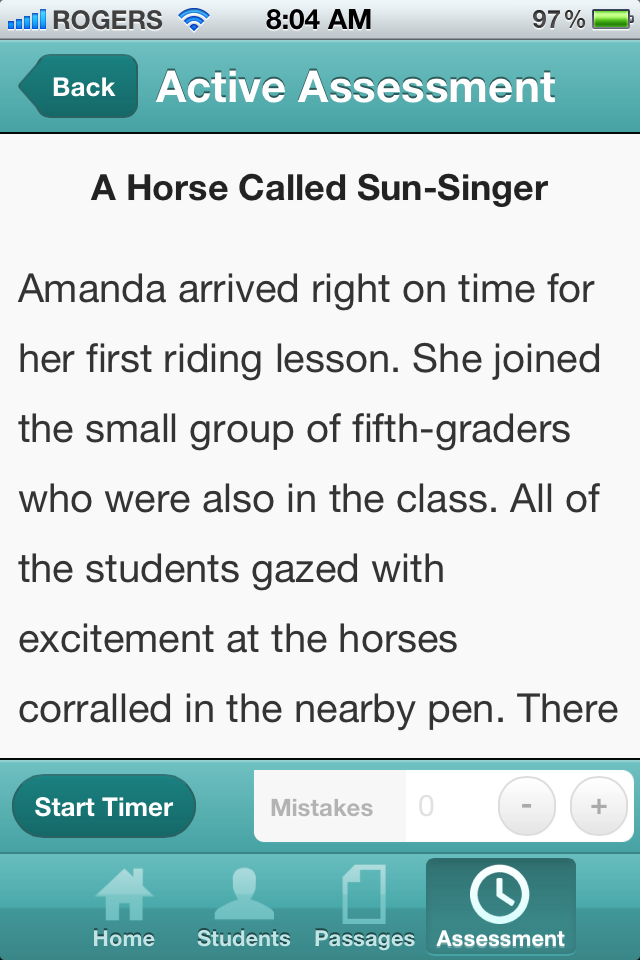
iPod/iPhone screenshot of Fluency Finder

I was excited to trial Fluency Finder- especially with my son (a 3rd grader) so I could get an idea of how he is doing with reading fluency.  There are few reading fluency apps out there, and while there are quite a few reading comprehension apps- many with data tracking- this is the only one that I've found geared toward children  that allows tracking of reading fluency.  Originally I was not impressed by the tiny font and lack of passages, but I am happy to report that the latest update has addressed these issues-  I would now recommend this app for use on the iPad.

The app interface is easy to maneuver- there are four main buttons on the main screen: Home, Students, Passages, and Assessment; there is also an information button in the top left hand corner, and a Contact Us/ FAQ button in the top right hand corner.   The FAQ button includes Target Rates (words per minute) for each grade level (1st- 5th).  Fluency Finder can be used in portrait or landscape mode.  I like that is available for the iPhone, although once you have been spoiled by the iPad screen, you won't want to rely on the smaller screen unless you have to.

Under the Passages tab you can view each passage, along with its type, grade level, word count and reading ease.  To actually score a reader's reading fluency, enter the "Assessment" tab, select a student, then choose a passage.  Start the timer in the bottom left corner to track time spent reading,  and count mistakes by tapping the plus or minus symbols in the bottom right hand corner.  When the child is done, press the "Finish Assessment" button, and a screen will come up with the student's information, the passage read, the date, number of mistakes, words per minute, and the total time (in seconds).  It would be really handy if there was an "email" feature of some sort from this screen.  When accessed from within the Student Profile tab, the data displayed is slightly different- it will include date, passage title, type, grade, reading ease and reading level, along with word count, words per minute and mistakes.

Back to the assessment screen-the font previously was an issue, but is now a much more comfortable size on the iPad.  If you click on the Passages tab, they will still be a fairly small font, but the same passages can be viewed with a larger font through the Assessment tab.  According to the Information button on the main screen, the student shouldn't be reading from the device itself anyway- they should be using the same (printed) passage as the examiner, available at www.fluencyfinder.com . The passages can be opened in Word or as PDFs.  (I was able to easily open a passage in Word and change it to a larger font.)  Now that the font is larger, I prefer the iPad- it eliminates the hassle of going online and printing the passages- it is a time saver to complete it directly from the iPad. You'll have to decide what works best as it may vary depending on the needs of the child- will he/she be distracted by your proximity/scoring during the reading for example?  (For home use, I found it a non-issue.)

 I would love to see the ability to adjust fonts from within the app itself, and also I wonder if this app could also allow for adjustment of spacing,- there has been some research showing certain spacing distances may be useful to dyslexics, for example.  So as to minimize the distraction, I think the scoring bar could be flipped to face the opposite direction from the student, with the student sitting across from the examiner.

Originally there were only a few passages for each grade level, but I am excited to say the latest update includes six passages for each grade level (1st through 5th grade), including two informational passages, two narrative passages, and two fables.  This means a choice between two different passages for each type, which is really appreciated.  The developer's website says there are more original passages to come as well- in fact, the next update should bring passages for grades 6, 7 and 8*   
If a few adjustments were made, I could see this app becoming even more versatile, but for now it does fill a niche. I may have my son use the app independently- to see if he can self-monitor his reading errors. It definitely removes the need for eyeing the clock continuously or making tally marks on scratch paper, and that is a very good thing.

*Note from Developer
 The next update will include 6-7-8 grade reading level passages. Next we will be adding a comprehension assessment to each passage for all grade levels. We will also be rolling out to the android market.